8
Chapter 2. Hardware SetupLynx User Manual
The Intel® Fabric Passive (IFP) Internal Cable Assembly enables high speed, low loss data
connections between the Intel® Xeon™ Phi™ processor (KNL-F) and chassis connections to
an external network interface via QSFP +28 style connectors. IFP internal cable assembly
enables a direct connection from an Intel processor to an Intel Fabric network.
Installation Instructions
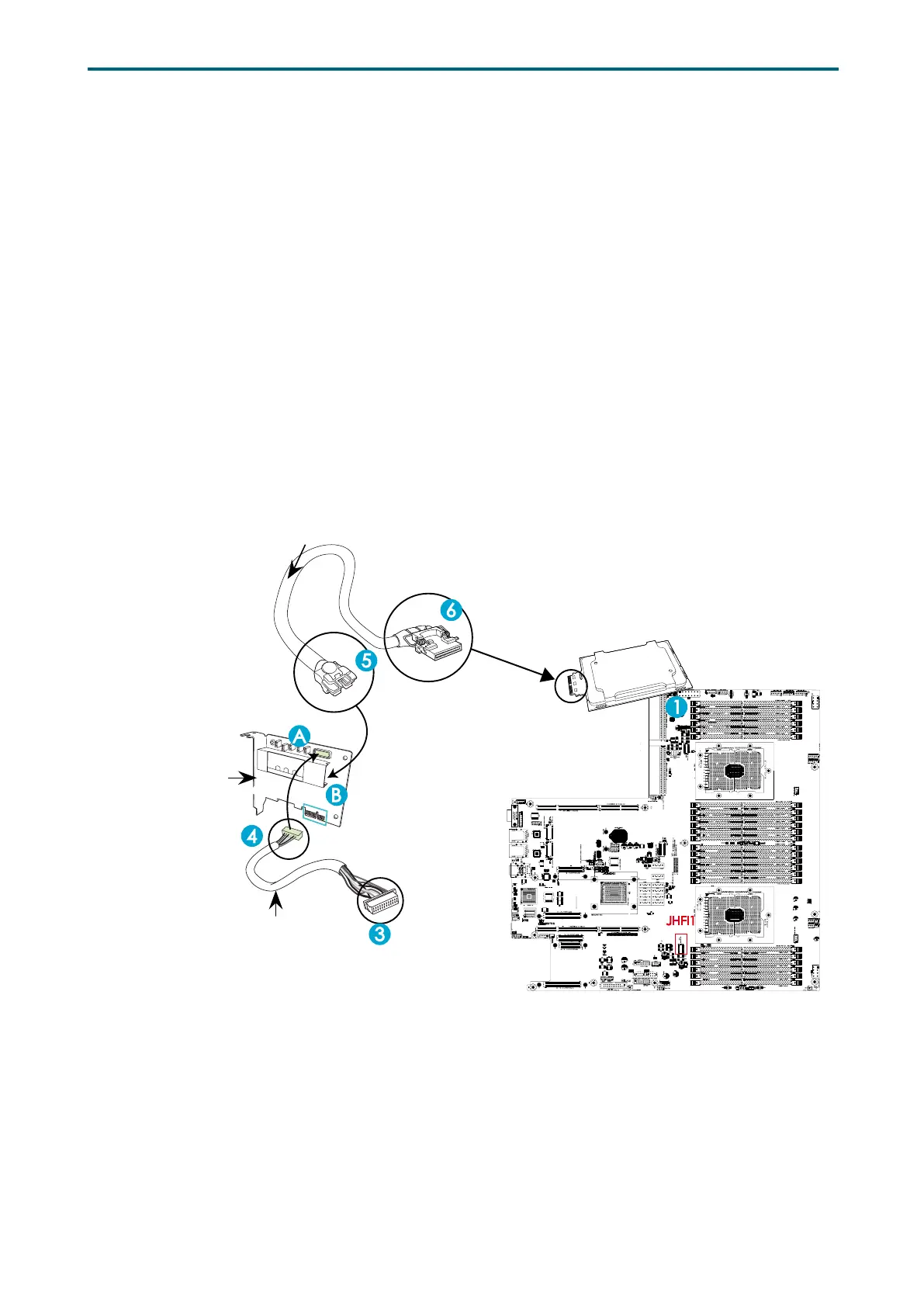
1. Locate the CPU Socket on the motherboard. Install an Fabric processor on this socket as
shown below (marked 1) if you have not done so.
2. Locate the PCI-E slots the motherboard. Install an Host Fabric Interface (HFI) card on an
appropriate PCI-E slot of your choice.
3. Connect the HFI connector on the HFI cable to the JHFI1 header as show below (marked
3).
4. Connect the other end of the HFI cable to the connector (marked A) on the HFI card as
shown below. (Marked 4 ).
5. Connect the plug (marked 5) on one end of the Internal_Faceplate_to_the_Processor (IFP)
cable to the connector (marked B ) on the HFI card as shown below.
6. Connect the other end of IFP cable (marked 6) to the Fabric processor installed in CPU
Socket as shown below.
• HFI Drawing example�
• Cards & Cables are not included in the range of supply�
Fabric Processor
HFI
(Host Fabric Interface)
Sideband Cable
H
FI Carrier Card
3. Connect the HFI connector
on the HFI cable to the onboard
JHFI1 header.
Install an Fabric Processo
2. Install an HFI card to a PCI-E slot
4. Connect another end of
the HFI cable to the
connector(A)
of the HFI card.
5. Connect one end of the
IFP cable to the connector(B)
of the HFI card.
6. Connect the other end of the
IFP cable to the Fabric Processor.
JHFI1
HFI Carrier Card
2�2 HFI Carrier Card for Host Fabric Interface (HFI) Supported


 To Next Page