Doc No. FM5600 issue E Page 27
19. TOUCHSAFE PRO PANEL SETUP
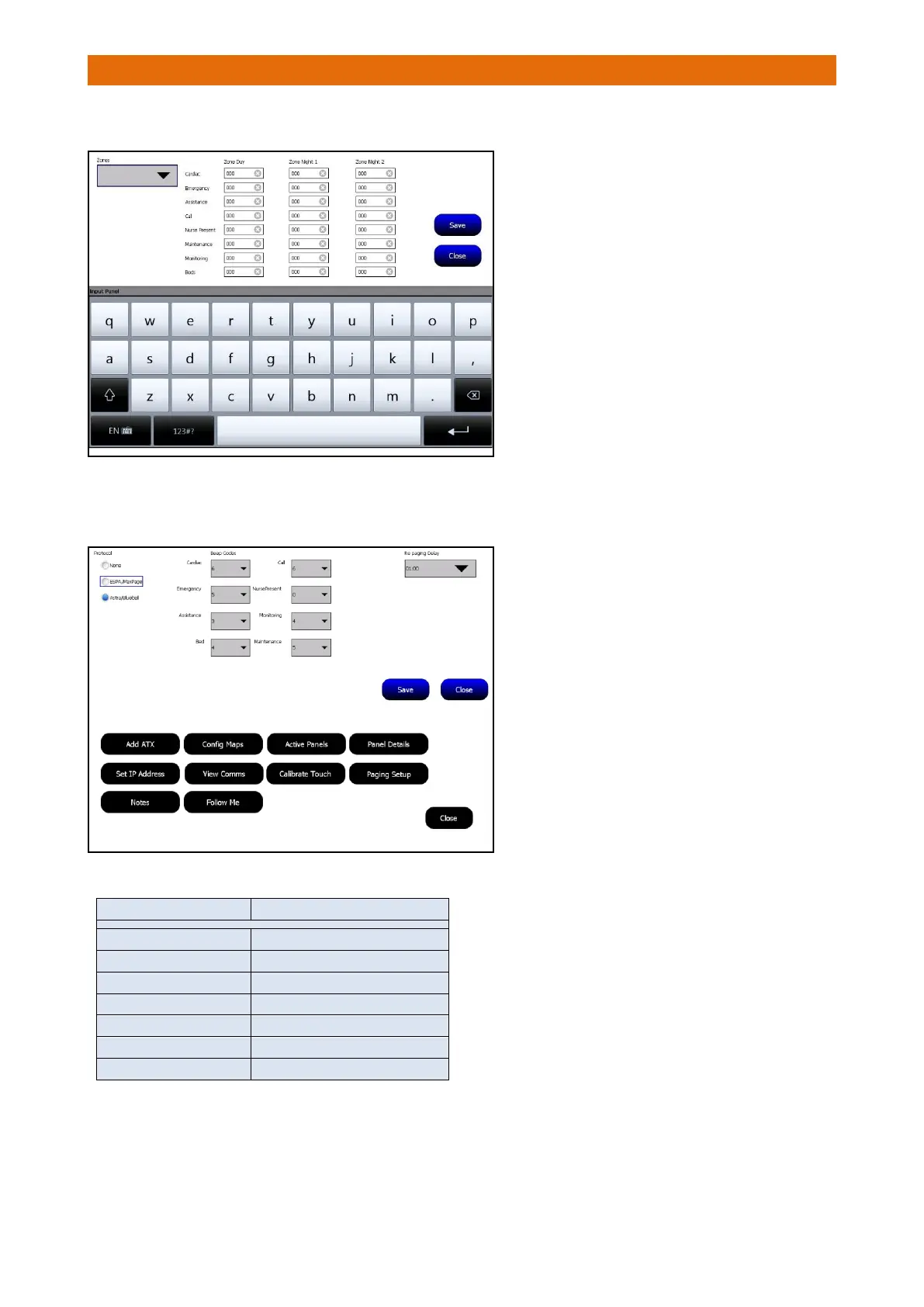
Still on Touchsafe Pro Master Panel (ID 1), select the Zoned Pagers option…
Go to the Touchsafe Pro Panel with the Interface connected, Logon as an Engineer and select the Paging
Setup option…
Set the Protocol option to ⚫Astra/Bluebell
Select the Beep Codes you want the Pager to
sound from the pull-down boxes alongside
each call type.
See the Beep Code table below.
Set the Re-Paging Delay from the
pull-down box; if an alarm call is not
accepted when this period expires the
Pagers will be notified again.
Press the Save button then Close to exit.
Select a Zone from the pull-down box then
enter the 3 digit Pager ID’s
you want to be
notified during the Day, Night 1 and Night 2
modes in the boxes alongside each call type
group (Cardiac, Emergency, etc.).
See “Notes on Pager ID’s” on page 21.
The keypad will be displayed when you click
on a box to enter a pager ID - you may need
to press the 123#? button to select the
numeric keypad.
Press the Save button then Close to exit.
Enter the Beep Code to choose the beep pattern the
Pager will sound for each call type.



 To Next Page