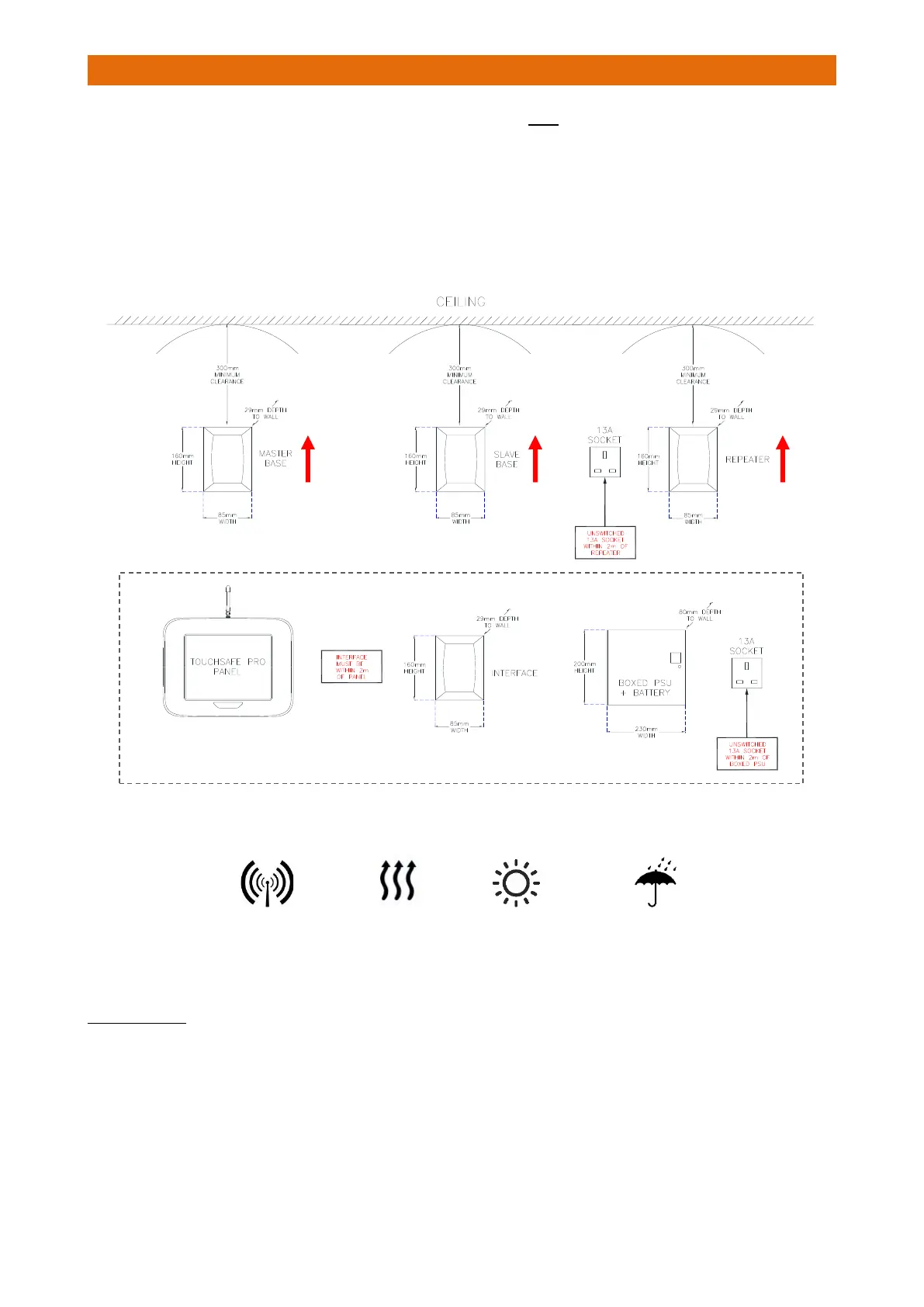
All paging products must be sited in a dry secure area; they are NOT suitable for outdoor locations.
The interface will normally be within 2 metres cable run of a Touchsafe Pro Display Panel.
All radio parts should be positioned as high as possible but a minimum of 300mm from the ceiling and at
least 2 metres away from any other electronic equipment.
All radio parts have internal vertically polarized antennas – to achieve maximum radio range it is important
that all radio parts are mounted vertically i.e. in portrait orientation. This means the cables can exit
upwards or downwards depending on location of the mains socket and for ease of fixing/hiding cables.
IMPORTANT: AVOID LOCATING PAGING PRODUCTS…
RADIO RANGE
Construction materials such as foil backed plasterboard, reinforced concrete or stone walls will reduce
range. Environmental conditions such as high levels of transmission at nearby frequencies or emissions
from other electrical equipment may further reduce range. Clear line-of-sight will give maximum radio
coverage of 200 metres radius from the Master, Slave Base, Wireless Slave or Repeater.



 To Next Page