EasyManua.ls Logo

Aidcall Touchsafe Pro - Please Test Alert; Please Test Display; Cancel Please Test Alert

Aidcall Touchsafe Pro
33 pages
Print Icon
To Next Page IconTo Next Page
To Previous Page IconTo Previous Page
Loading...
Doc No. FM5600 issue E Page 25
18. PAGER TESTING
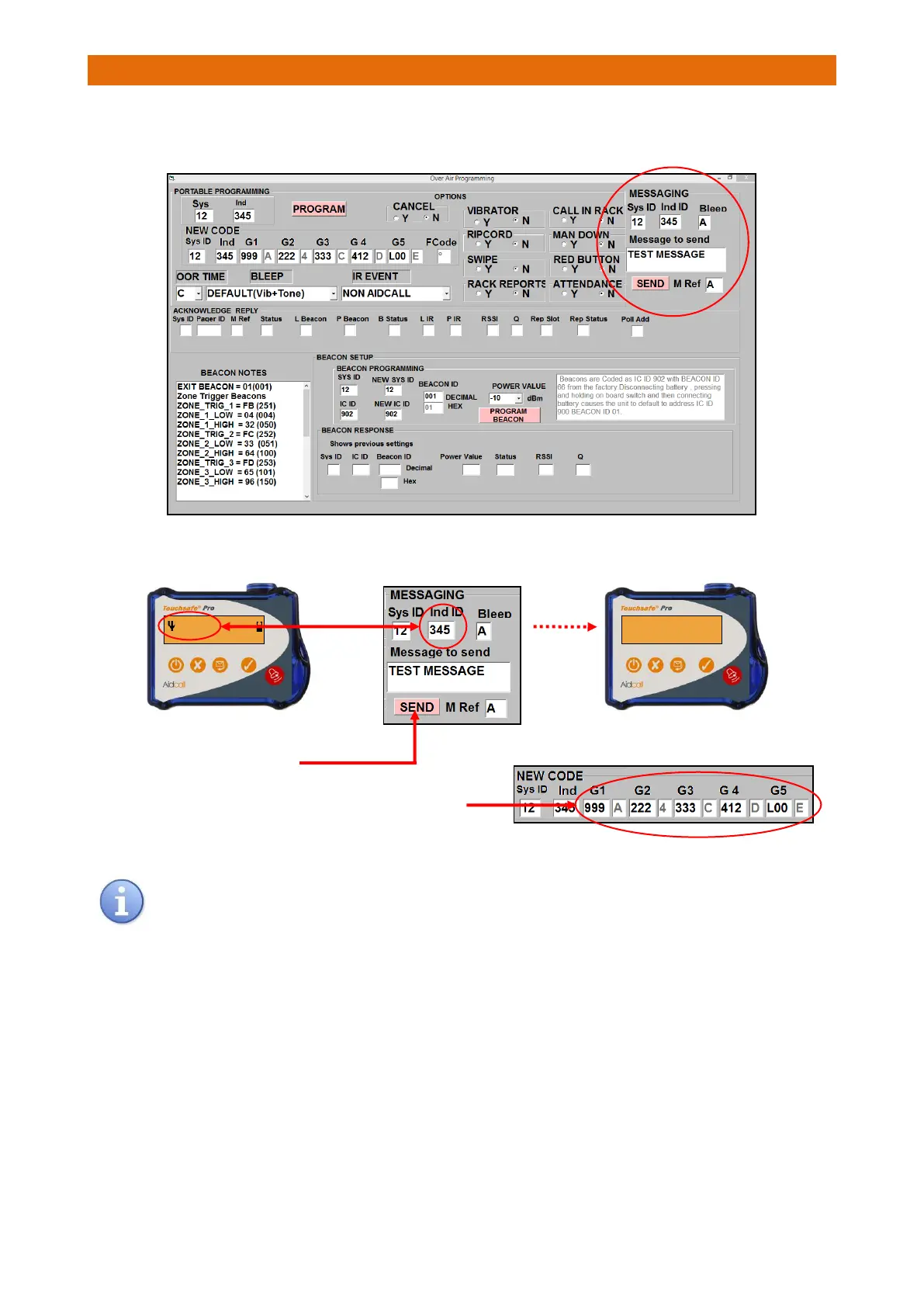
When the Paging system is fully installed and setup plug the Laptop running the Programmer software into
the Master Base and select the Over Air Programming tab…
1. Enter the Pager ID you want to test in the MESSAGING area of the screen
3. Repeat the test with other ID’s in the Groups 1 to 5
To avoid the likelihood of data collisions un-plug the Interface unit from the Nursecall system
when sending test calls from the programmer.
ID345 L00R
TEST MESSAGE
2. Click-on SEND and “TEST MESSAGE”
should appear on the Pager…

Other manuals for Aidcall Touchsafe Pro