Doc No. FM5600 issue E Page 24
REPEATERS/SLAVE BASES
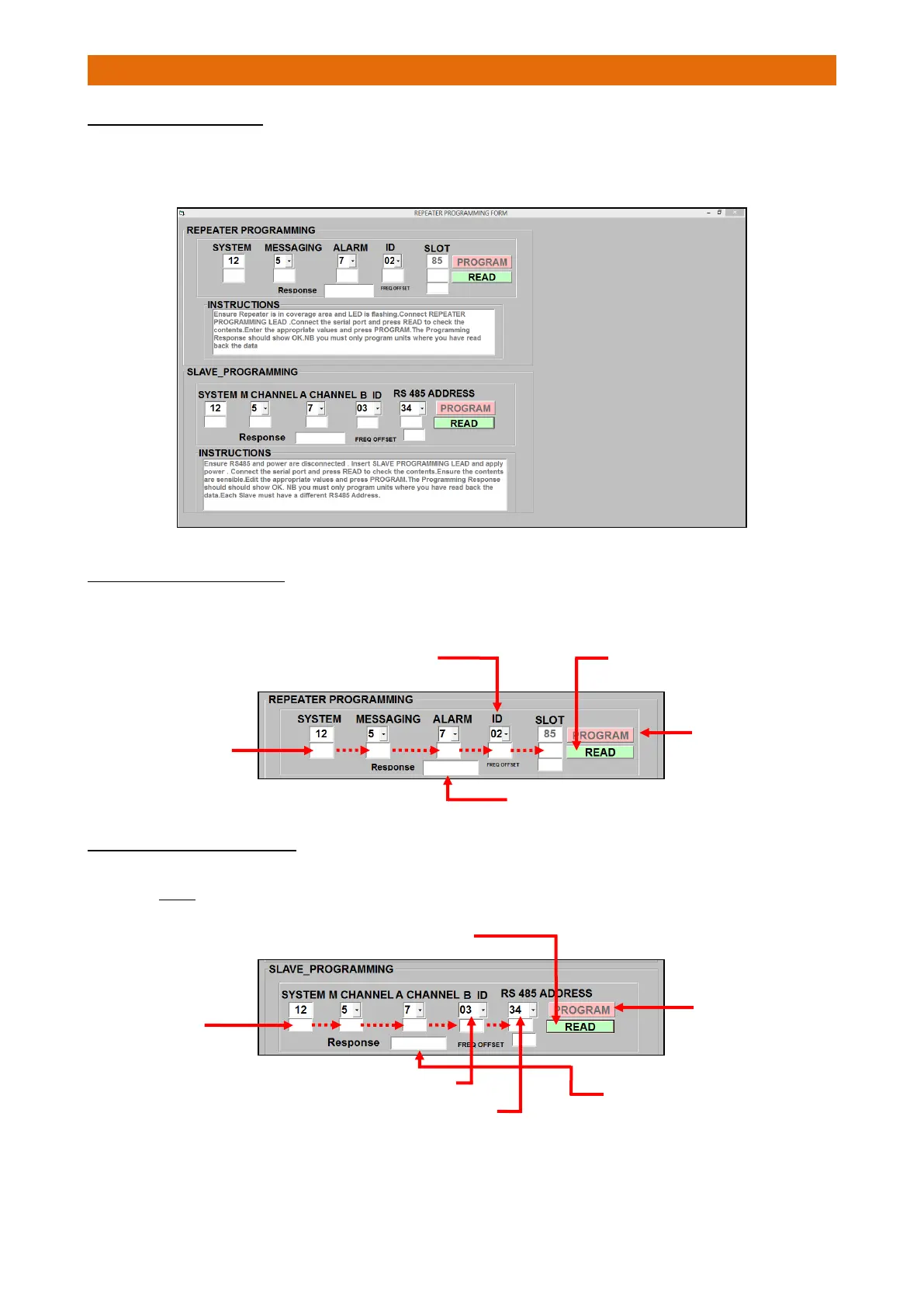
Click-on the “Repeater/Slave Programming” tab at the top of the main screen to open the Repeater
Programming Form…
PROGRAMMING REPEATERS
Ensure the Repeater is in the radio coverage area and the Green/Yellow 2 Second Sync LED is flashing.
Connect the same programming lead used for the Master Base to the Repeater.
PROGRAMMING SLAVE BASES
Ensure the power and RS485 data bus is disconnected.
Insert the Slave programming lead and apply power. Note: different lead to that used for Master/Repeater.
1. Select the required ID from the drop-down list
4. Enter new
settings and
click-on
PROGRAM
3. Check the
Response Data
is received in
these boxes
5. Check the Response box shows “OK”
4. Select the required RS485 Address from the drop-down list
(must be different on each Slave Base)
2. Check the
Response Data
is received in
these boxes
6. Check the Response
box shows “OK”
3. Select the required Slave ID from the drop-down list



 To Next Page