DocNo.FM5505issueDPage13
8.SYSTEMCONFIGURATION
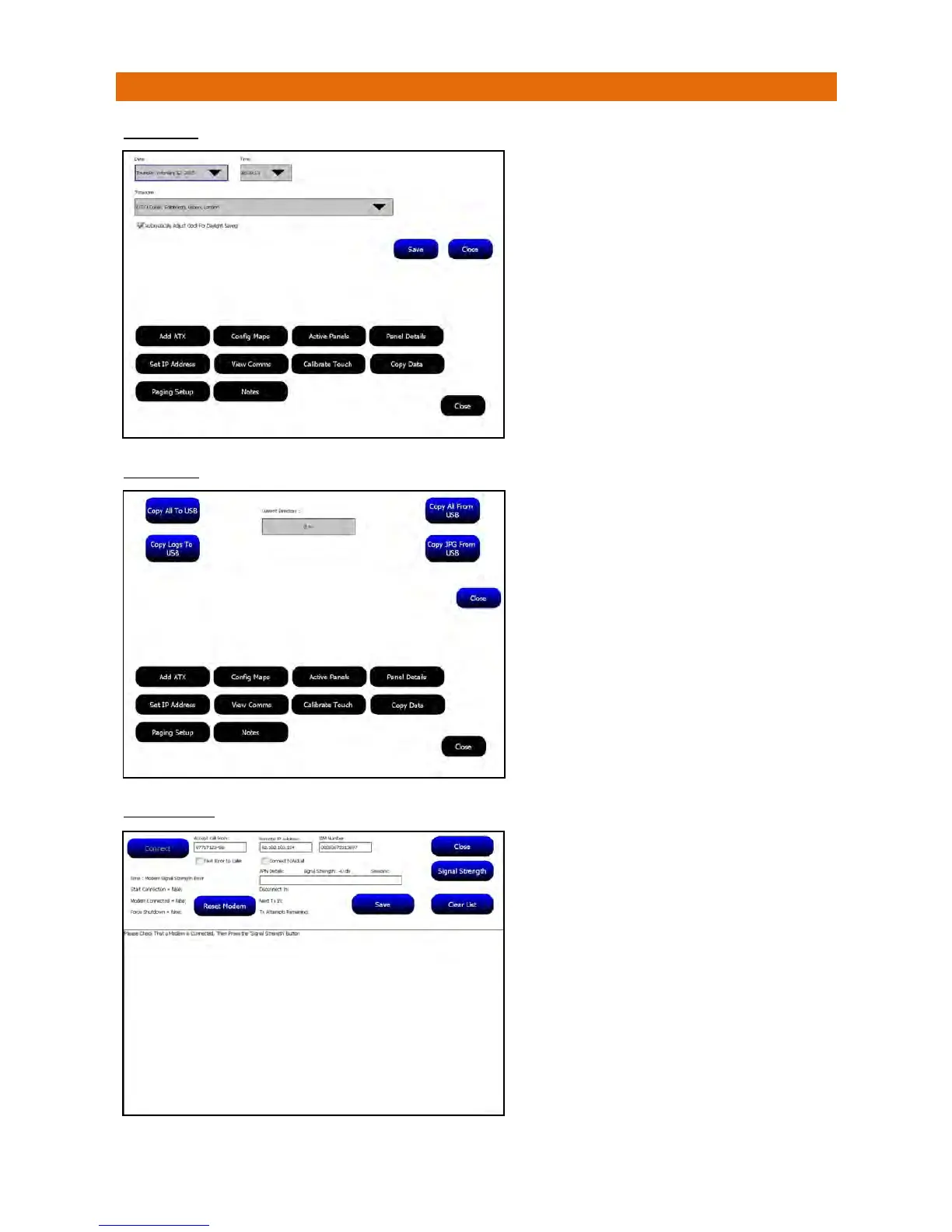
DATE/TIME
COPYDATA
GSMMODEM
ThedateandtimemustbesetontheMasterPanel(1).
Onceset,thedateandtimeissenttoallotherpanels
onthenetworkeveryminutetosynchronisethem.
SelecttheDateandTimefromthepull‐downboxes
thenselectthelocalTimezone.Tickthecheckboxto
enableAutomaticDaylightSavingadjustmentsevery
MarchandOctober
PressSaveandthetime&dateissynchronisedfrom
theMastertoallotherpanelseveryminute.
PresstheClosebuttontoexit.
WhenMasterPanel(1)hasbeensetup,plugaUSB
memorystickintooneoftheUSBPortsonthelower
faceofthePanel.PressCopyAllToUSBandwaituntil
theCurrentDirectoryboxshows100%.PressCloseand
removethememorystick.
InsertthememorystickintoanotherPanelonthe
Network,openthe“CopyData”optionandselectCopy
AllFromUSB.WaituntiltheCurrentDirectorybox
shows100%thenpressCloseandremovethememory
stick.Checkpaneldataandeditasrequired.
UsetheCopyLogsToUSBtoexportallthesystemlog
recordsfromthePanel.
UsetheCopyJPGFromUSBtoimportscreensavers.
ThesemustbestoredontheroutedirectoryoftheUSB
memorystick,theyshouldbe1024x768pixelsandthe
filesizeshouldbeassmallaspossible(~100ktypi cal).
PresstheClosebuttontoexit.
TheschememusthaveaGSMModeminstalledforthe
remotediagnosticsfeaturetofunction.
ShouldyourequireTechnicalSupportfromanEngineer
overthetelephonetheymayrequesttoaccessthe
PaneldataviatheGSMModem.
ToallowtheGSMModemconnectionyoumustpress
theConnectbuttonwhenasked.
OncetheEngineerissatisfiedaconnectionis
establishedpresstheClosebuttontoexit.



 To Next Page