17
Recording TV program or DVD
The advanced MPEG-4 digital video recording technology
allowes you to record TV program via AV-IN cable.
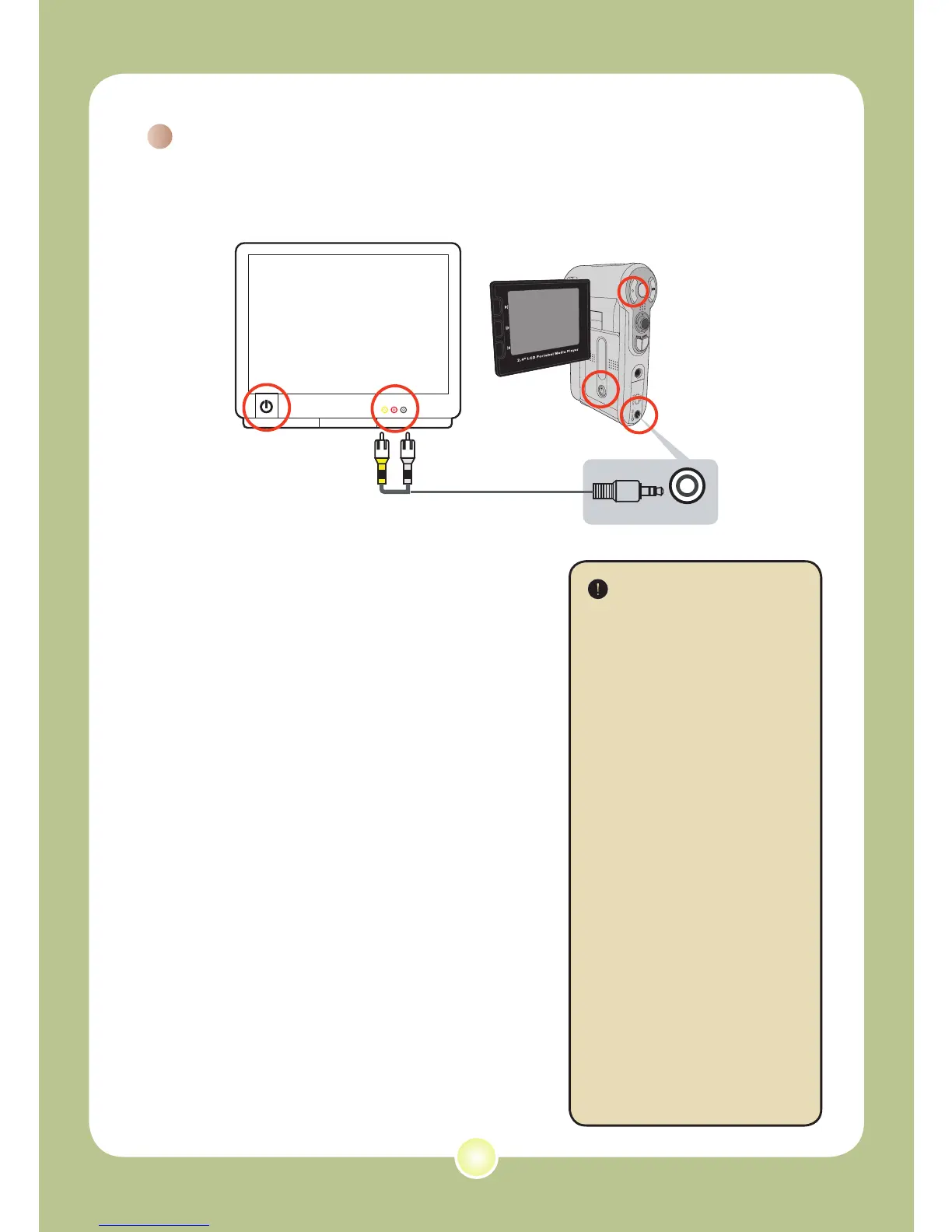
1 Turn on your TV or DVD player.
2 Connect the AV cable to the AV-Out
terminal on the TV or DVD player.
(Normally, it’s not necessary to
switch the mode, please refer to
the User’s Manual of the TV or DVD
player.)
3 Turn on the camera.
4 Connect the other end of the AV
cable to the camera’s AV-IN terminal.
Make sure that the images displayed
on the TV or DVD player is also
displayed on the camera’s LCD
monitor.
5 Press the Record button to start
recording.
6 Press the Record button again to
stop recording.
There are two resolution
settings available for
recording videos: VGA
(640x480) and QVGA
(320x240).
VGA mode is suitable
for displaying on the TV,
but memory-consuming.
The recording time for
the 1GB memory card
can last approximately
1 hour.
QVGA mode is suitable
for displaying on the
small screen (such as
the LCD monitor). The
recording time for the
1GB memory card can
last approximately 2
hours.
For more information
on VGA and QVGA’s
settings, please refer to
page 25.
1
2
3
4
5











 To Next Page