30
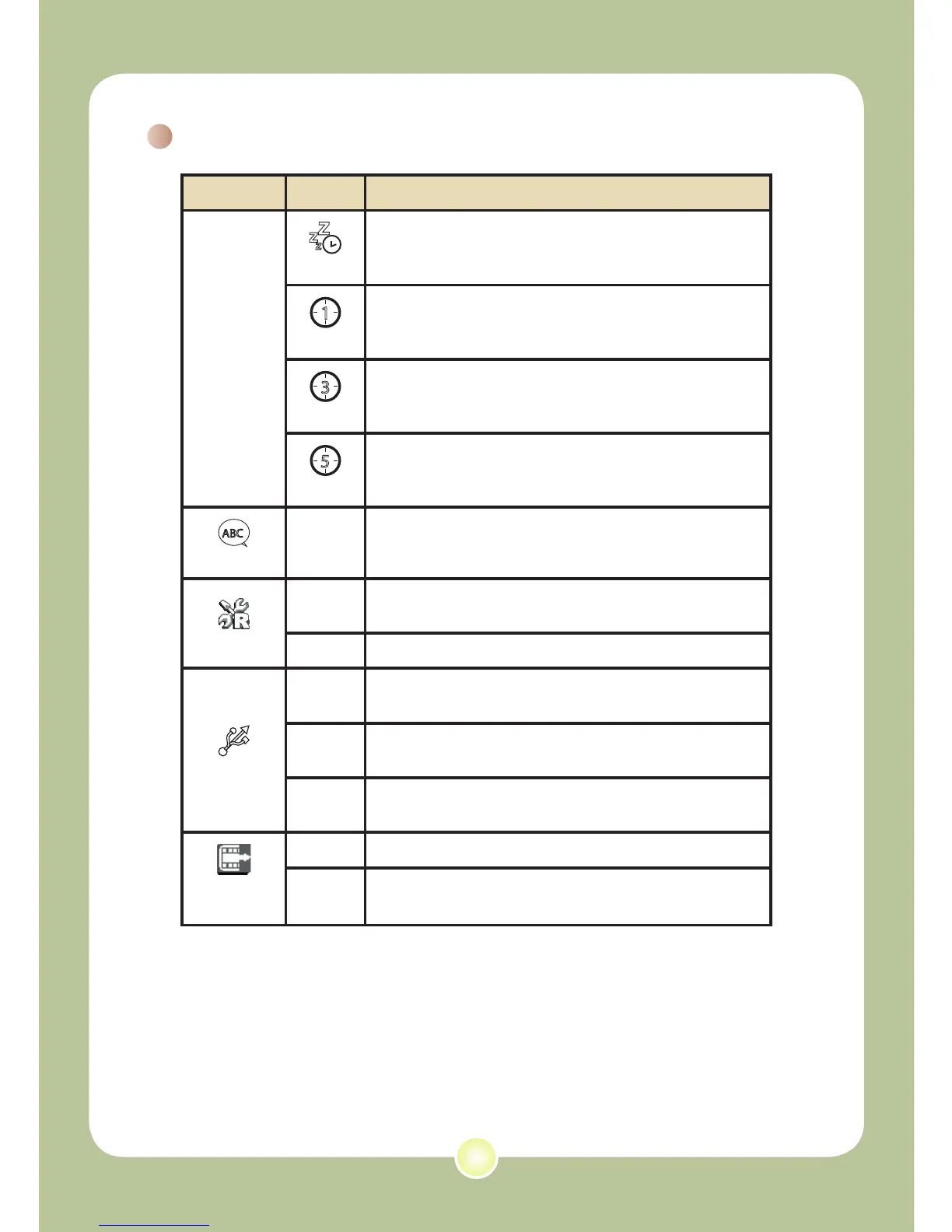
Menu items in Setting mode (continued)
Item Option Description
Auto Off
Z
Z
Z
Off
Disable Auto-off function.
1 min
The camera automatically shuts down when staying
inactive for over 1 minute.
3 min
The camera automatically shuts down when staying
inactive for over 3 minutes.
5 min
The camera automatically shuts down when staying
inactive for over 5 minutes.
Language
-
Lets you select the language used for OSD.
Default
Yes
Restore factory defaults. Note that your current
settings will be overridden.
No
Cancel action.
USB Mode
Menu
When connected to a PC, the camera displays a
menu for you to choose a desired connection mode.
Disk
When connected to a PC, the camera automatically
enters Disk (removable disk) mode.
Printer
When connected to a PC, the camera automatically
enters Printer mode.
Start
Movie
On
Enable Start Movie function.
Off
Disable Start Movie function.











 To Next Page