AirSpeed 2900 gNB 5G OD Installation Guide
© Copyright Airspan Networks Ltd., 2021 P/N DUG01085 Rev. A, Nov 2021
3.5 Tilt Adjustment
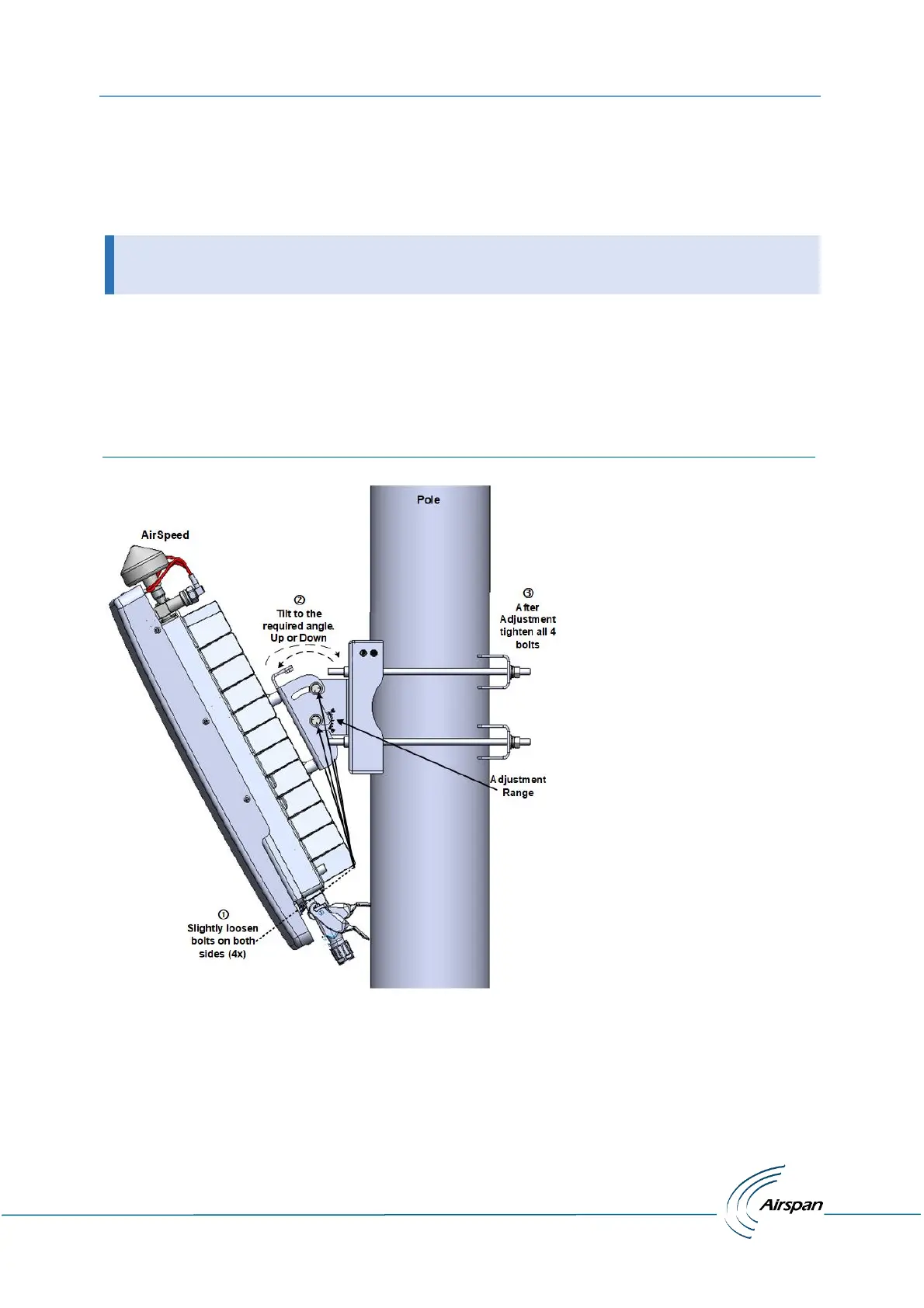
On the AirSpeed 2900 it is possible, after assembly to adjust the unit’s tilt, either up or down. This
allows for maximum system optimization and reduce interference while increasing coverage. There
are adjustment slots located on the sides of unit body where it is attached to the Mounting bracket.
The AirSpeed 2900 unit body has a yield of a maximum tilt of +20° (up) and -30° (down).
Once the AirSpeed unit is mounted in place and a tilt adjustment is needed:
1. Slightly () loosen the four (4) bolts on both sides of the mounting bracket.
2. Adjust () the unit to the required tilt.
3. After adjustment to the required tilt () tighten all four (4) bolts on both sides. Fastening
torque of 75 [Lib*in] = [85 kgf*cm]
Figure 11: Tilt Adjustment


 To Next Page