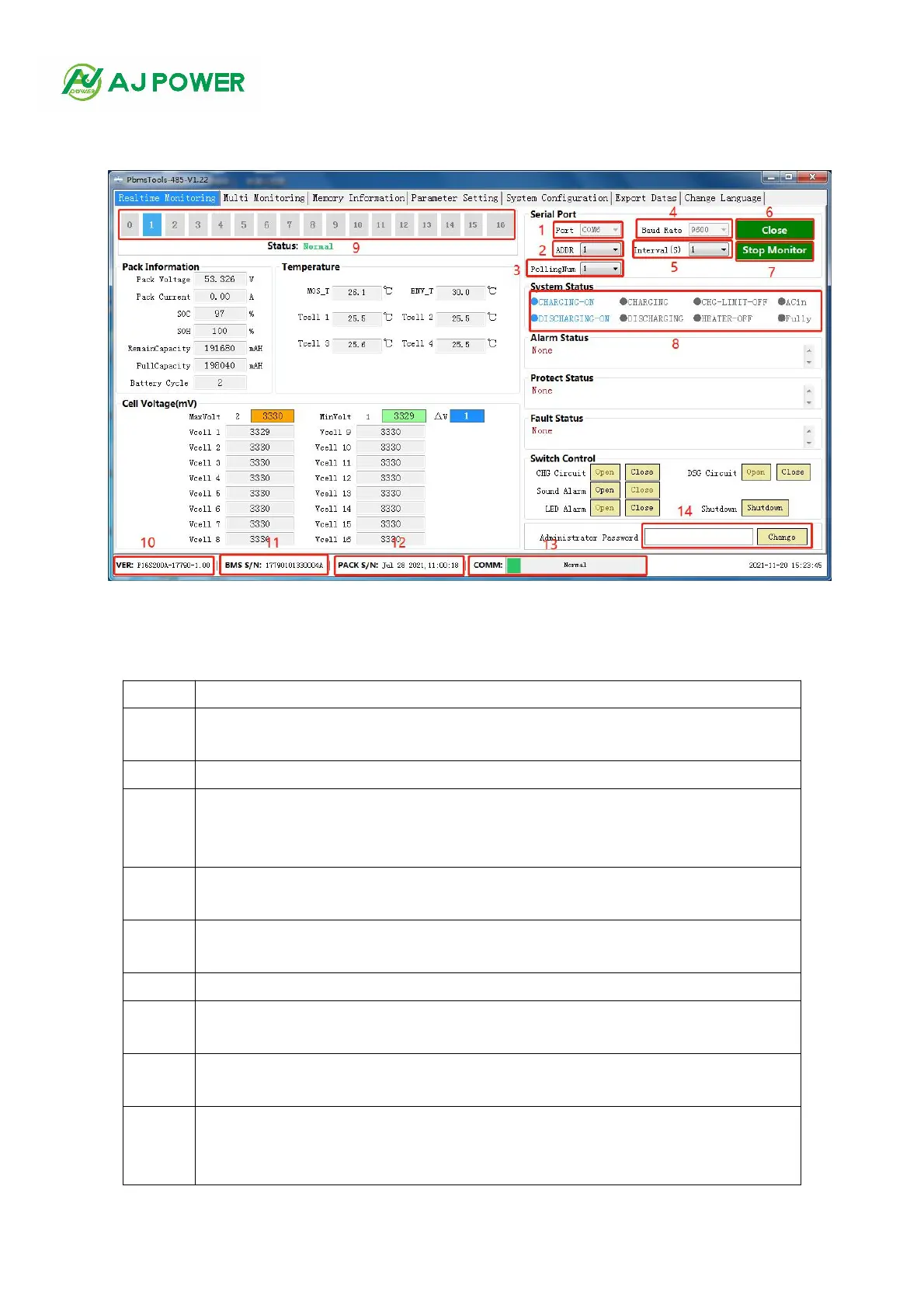
3.4 Interface introduction
Figure 1-3(Software main interface)
Description of main controls ( Figure 1-3)
Serial port: you can select the drop-down item to select the serial port to communicate.
(Note: available when the serial port is not opened)
Address: read-only value, the currently read BMS address value
Read only value, the total number of batteries read by the host computer from the BMS
board (when applied to multiple computers in parallel, battery data is obtained from the
main battery)
Baud rate: you can select the drop-down item to select the baud rate of communication.
(Note: available when the serial port is not opened)
Interval (seconds): optional. The interval between the upper computer reading data from
the BMS board
Open serial port: alternate function buttons to open or close the serial port
Start monitoring: alternate function buttons to start or stop monitoring. The time
frequency of reading data during monitoring is the time interval set in 5
System status: when a system status occurs, the text of the item is blue. Gray indicates
no occurrence
Battery pack serial number: data key, which is the serial number of the battery pack. The
battery pack being read and presented on the current interface is displayed in white
words on a blue background



 To Next Page