39English
CONNECTING THE ANTENNA
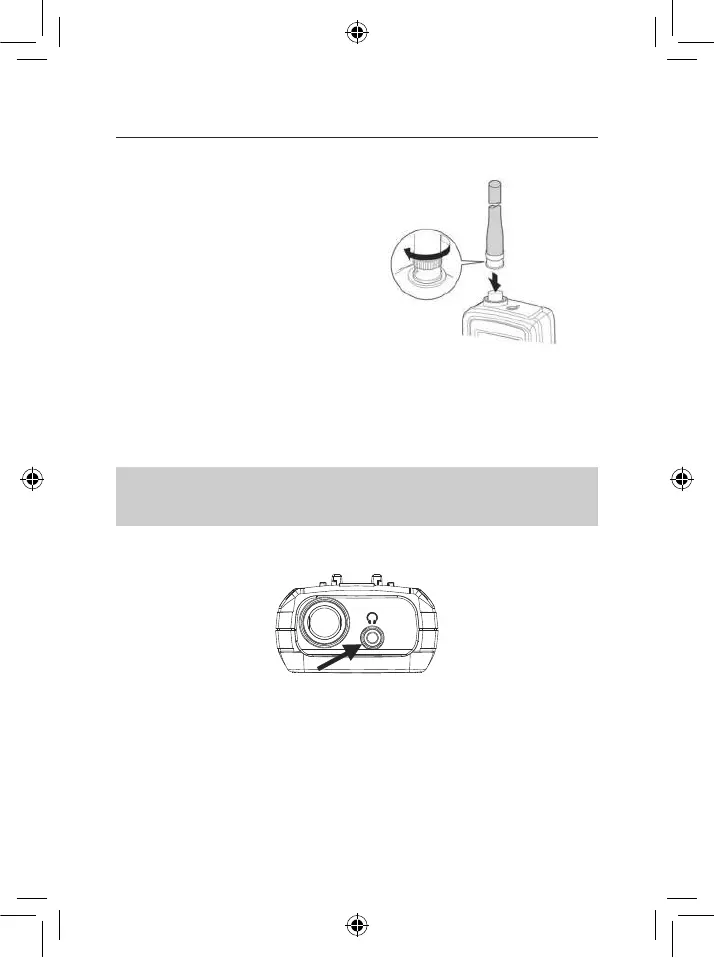
2#'.((.0)'(),'/$55<-,&'P,S-7<,'.%(,%%.'
to the connector on the top of your
scanner, align the slots around the
antenna’s connector with the tabs on the
scanner’s BNC connector. Then slide
the antenna’s connector down over the
scanner’s connector and rotate the antenna
connector’s outer ring clockwise until it locks
into place.
CONNECTING AN OPTIONAL ANTENNA
The scanner’s BNC connector makes it easy to connect a variety of optional antennas,
including an external mobile antenna or outdoor base station antenna.
NOTE: @)-+30#B0,#EFG"9HIGEJ#"/#HIG=K>;#8"+('+)#8+.),#%"#8"$$,8%#+$#"B%*""/#
+$%,$$+<#L5#%9,#+$%,$$+#8+.),#'0#"M,/#KE#&,%,/0#)"$:1#4),+0,#B0,#)"-#)"00#8"+('+)#8+.),#
6)'7,#HIG=K>#"/#0'&')+/;#<#N"B#8+$#:,%#+#OPQ#+*+4%,/#+%#3"B/#)"8+)#,),8%/"$'80#0%"/,<
CONNECTING THE EARPHONE
For private listening, you can plug the supplied earphones (or other headsets with at least
2 x 32 Ohms) into the 3.5 mm headphone jack on top of your scanner. This automatically
disconnects the internal speaker.
SETTING UP YOUR SCANNER


 To Next Page