42 English
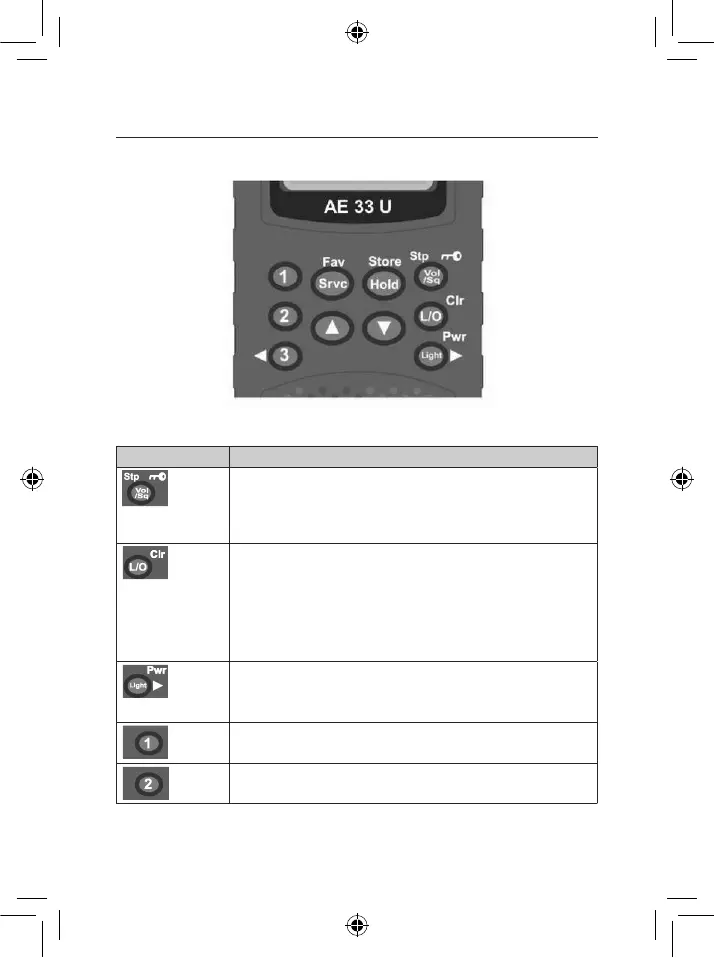
A LOOK AT THE KEYPAD
Your scanner’s keys have various functions labeled on the key tops and below the keys.
Key Name Description
• Press to go to volume control mode.
• Press to go to squelch control mode.
• Press to go to step mode for VHF-Low, FM, AIR, VHF-High
and UHF bank.
• Press & hold this key to disable the keypad.
• T*,//'(#'<#0B'#$('.'/,<,0(,&'".L#$*-(,'0).%%,<'#*'/5,0-6,&'
preprogram frequency.
• Press & hold to clear all lockout frequencies in Service Scan
Mode (include hold mode).
• Press & hold to clear all lockout channels in Favourite scan
mode (include hold mode).
• Press & hold to clear channel memory in Editing Favourite or
Instant channel.
• T*,//'(#'($*%'#%K#>'(),'HIJ'7.0B'<-+)(1
• T*,//'U')#<&'(#'($*%'(),'5#4,*'#%K#>1
• Press to move the digit to right in Edit Favourite / Instant
Channel Mode.
• Press to select Instant channel 1.
• Press & hold to store Instant channel 1.
• Press to select Instant channel 2.
• Press & hold to store Instant channel 2.
AE33U CONTROLS AND DISPLAY


 To Next Page