49English
To unlock all channels in the bank
! Press (Hold) to stop scanning in favourite scan hold mode, then press & hold (L/O).
M'0#%6*3.(-#%'(#%,'/#$%&/1
STORING FREQUENCIES
To store a Service bank frequency to the Favourites bank
1. Go to service scan mode. When a desired frequency is
found, press (Hold) to pause scan.
2. Press & hold (Store) to enter the STORE mode.
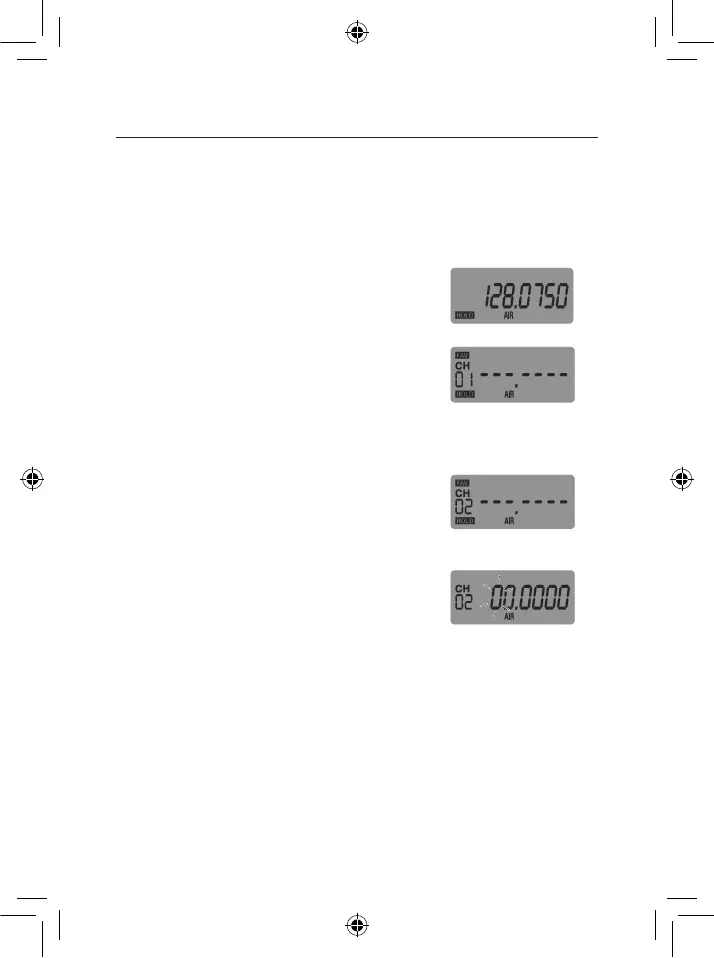
The display toggles between frequency and the next
available channel in the Favourites bank.
3. 9/,'(),'XKY'B,?/'(#'/,<,0('(),'&,/-*,&'".L#$*-(,/'
channel to store the frequency to.
4. Press & hold (Store) to store the frequency. The radio
stays in the favourites mode.
Ex: Service scan Hold
Ex: Store Favourites, CH
01 (AIR)
To manually store a frequency to the Favourites bank
1. Go to favourites mode and select desired bank.
2. Press (Hold) to pause scan.
3. 9/,'XKY'(#'/,<,0('&,/-*,&'0).%%,<1
4. Press & hold (Store) to enter the STORE mode. The
,&-(.7<,'&-+-('P./),/1
5. 9/,'(),'ZKXKYK['B,?/'(#'/,<,0('(),'&,/-*,&'
frequency.
6. Press & hold (Store) to store the frequency.
Ex: Store Favourites,
CH 02 (AIR)
Ex: Store Favourites,
Select Desired
Frequency (AIR)
To store a frequency to an Instant Channel
See Instant Channels on page 18.
OPERATION


 To Next Page