47English
FAVOURITES SCAN
Each SERVICE bank has a FAVOURITES bank which remains empty until you store your
favourite frequencies to it.
SCANNING SERVICE & FAVOURITES
To go to scan mode or scan the next bank
! Press (Srvc/Fav) until the bank you want to scan
displays.
! When HOLD icon appears, press (Hold) to resume
scan. Scan starts automatically. When there are no
frequencies stored in the Favourites bank then the
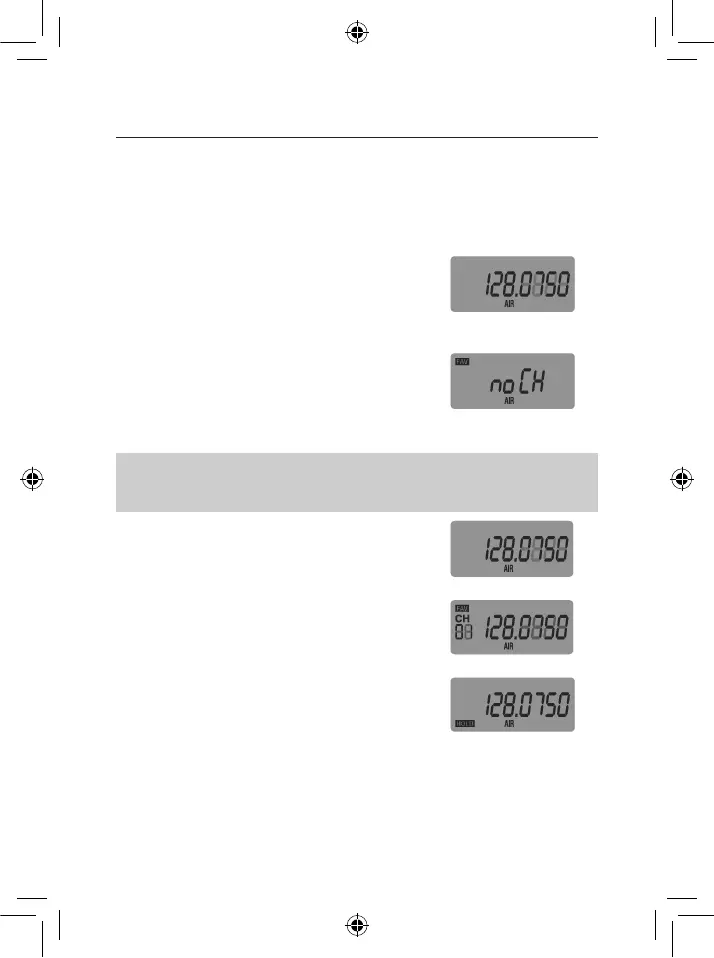
&-/5<.?'P./),/'\noCH”.
Ex: Service scan, AIR
bank
Ex: Favourites scan, no
channels
NOTE: Only one bank can be scanned at a time.
The banks can be changed in the following order:
RSI#T#UHP#T#VSH#T#SHP#T#WGX?#T#US#T#@LH#T#WGYL#T#ZYU
To switch scan modes between Service scan and
Favourite scan
! Press & hold (Srvc/Fav). In Service mode the FAV icon
does not show on the display. In Favourites mode the
FAV icon shows on the display.
To pause scan:
1. Press (Hold) at any time to pause scan on the current
frequency. HOLD icon appears.
2. 9/,'(),'XKY'B,?/'(#'+#'(#'(),'5*,L-#$/K%,S('"*,8$,%0?'
in the service bank or the previous/next channel in the
favourites bank.
3. Press (Hold) again to resume scan.
Ex: Service scan
Ex: Favourites scan
Ex: Service scan Hold
OPERATION


 To Next Page