5
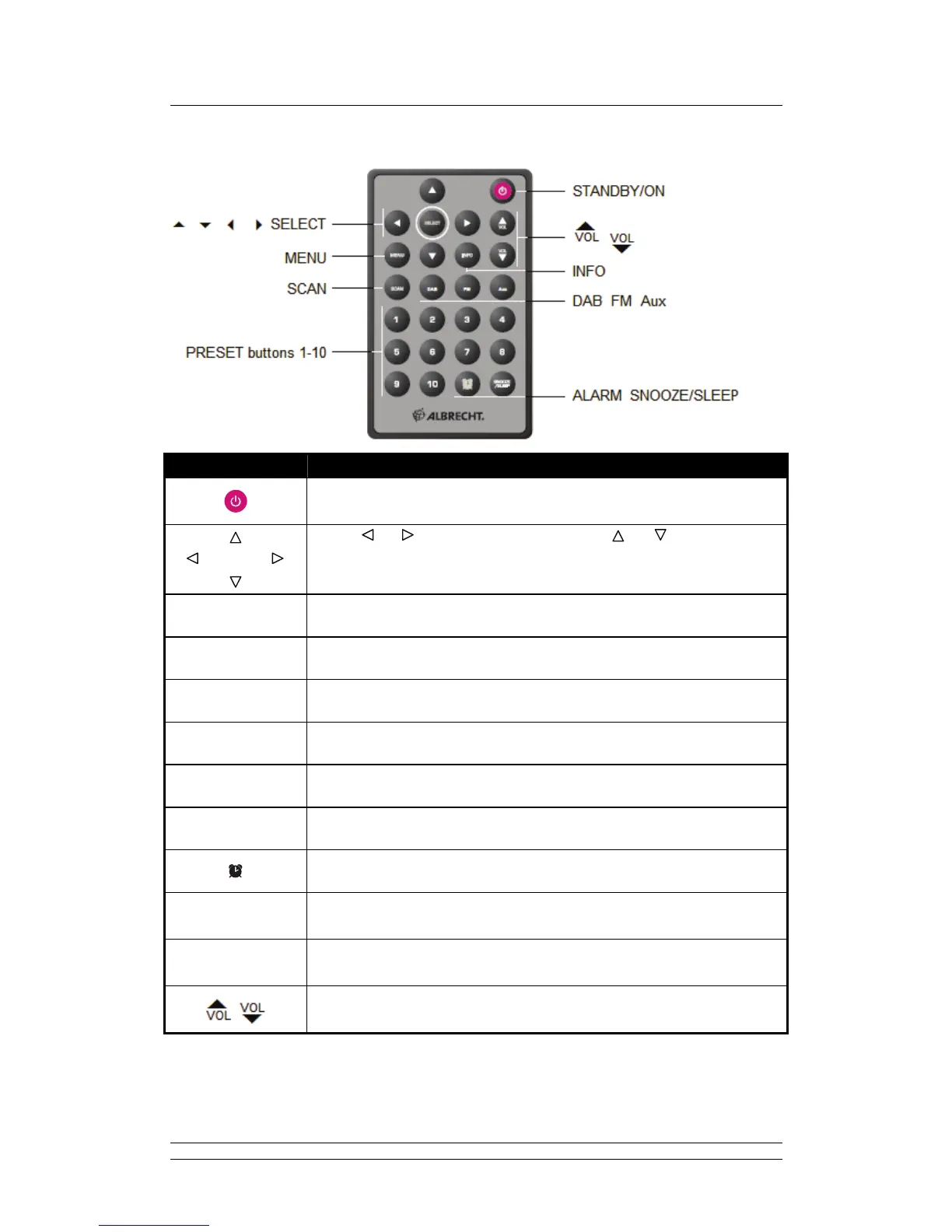
Remote Control Overview
Control All mode
Press to turn on/off radio.
SELECT
Press or to scroll right and left. Press or to scroll up and
down.
Press SELECT to confirm.
MENU
Press to enter main menu and other options.
DAB
Press to enter “DAB” mode.
FM
Press to enter “FM” mode.
Aux
Press to enter “Aux in” mode.
SCAN In DAB, FM mode: Press to autoscan for active stations.
INFO In DAB, FM mode: Press to browse station info.
Press to enter alarm setting.
SNOOZE/SLEEP
Press to enter Sleep setting.
When alarm sounds, press to postpone alarm.
1 - 10
In DAB, FM mode: Press and hold to store current playing station.
Press to recall relevant preset station.
Press to adjust volume level.



 To Next Page