9
Chapter 2: Getting Started/Setup
1. Place your radio on a suitable shelf or a stable and flat table.
2. Connect the power adaptor between your radio and the mains supply.
3. To better receive broadcast radio (DAB, DAB+ and FM) extend the telescopic antenna.
2.1 Setup Wizard
Step 1 - Power up
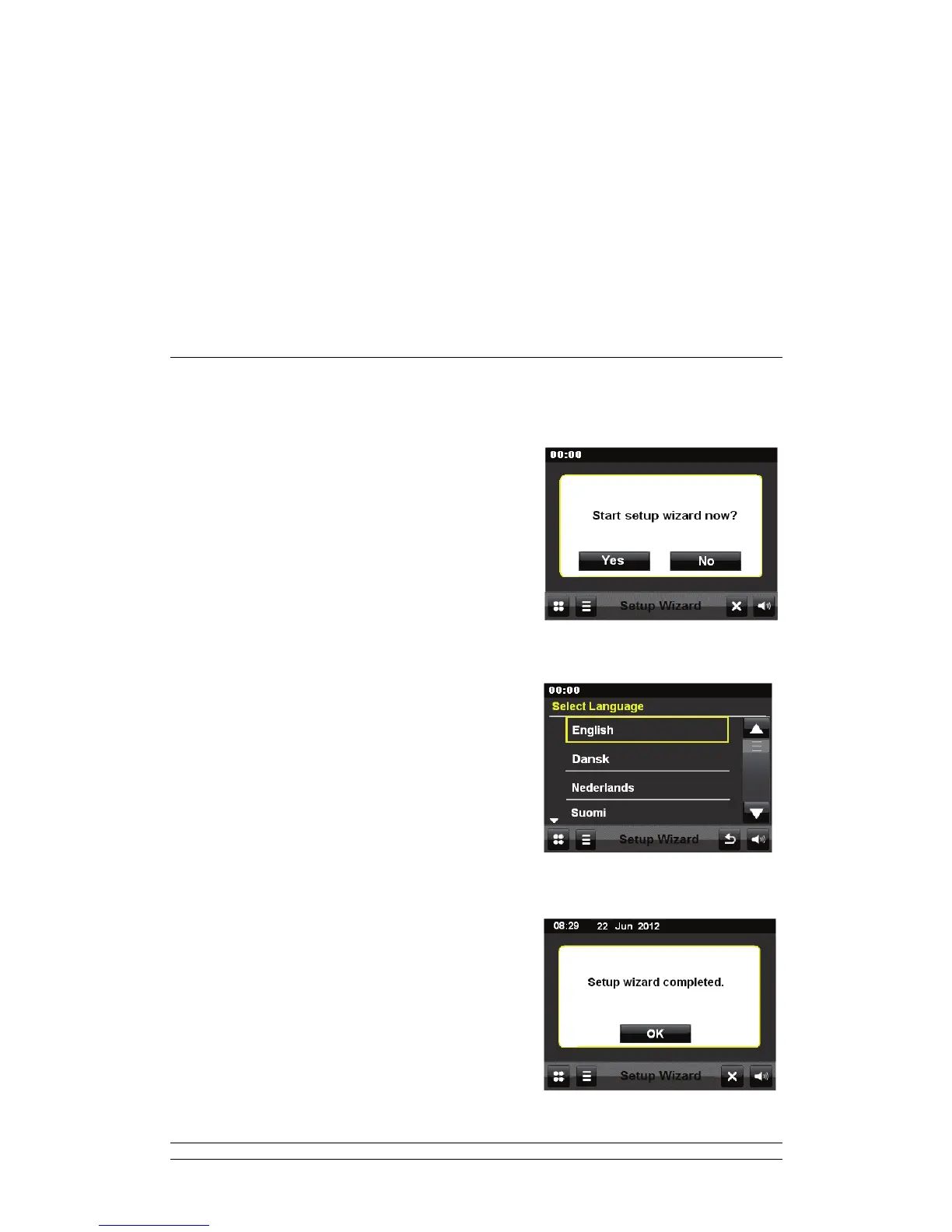
1. For initial use, it will ask you ‘Start setup wizard
now?’ Continue by touching the YES button.
Step 2 – Setup wizard
1. The menu will ask you to select Language format:
English, Dansk, Nederlands, Suomi, German etc.
Touch your preferred option, here, let’s select
English for example.
2. Now it asks you to set Time format: 24h or 12h,
touch your preferred format.
3. It asks you to Select Time Sync Source: None
/DAB/FM. Selecting ‘none’ means that you need to
manually set the time.
Now, your radio will indicate you ‘Setup wizard
completed’.



 To Next Page