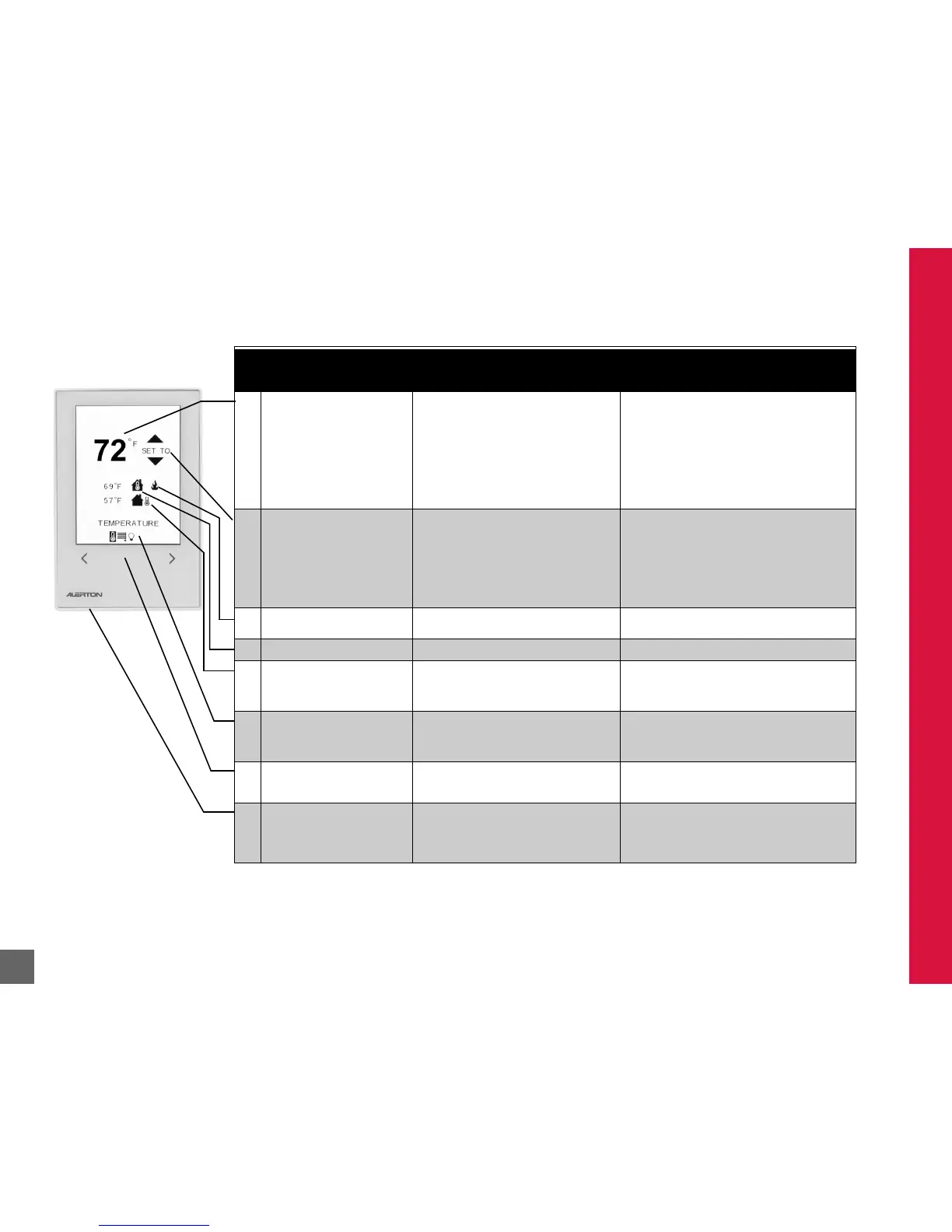
Table 1
ID
DISPLAY/CONTROL
FUNCTION
DESCRIPTION SOFTWARE REMARKS
1 Setpoint (°F or °C as
appropriate)
Room temperature
Override time remaining
ON/OFF status
Humidity
Air Quality (MS4-THC only)
Windows and Lights status (if
configured)
Value associated with data code
(field service mode)
Displays unit setpoint, room temperature,
after-hours/housekeeping timer, or ON/OFF
status, depending on mode of operation. Also
displays humidity value, CO2 concentration
(MS4-THC model), and the Windows and/or
Light status (if configured).
Displays time of day in Across the Room
Views only. Will alternate with setpoint or
room temperature if BV-82 is turned on.
Setpoint = AV-90.
Room temperature = AV-101.
Housekeeping timer or after-hours timer = AV-98.
Timer upper limit = AV-97.
Show ON/OFF mode = BV-65.
Occupied/Unoccupied Status = BV-67.
Show Space Humidity = BV-84.
Humidity = AV-102
CO2 = AV108.
Windows status = BV-87.
Lights status = BV-86.
2 UP/DOWN buttons
Adjust setpoint
Fan speed control (M4, M5, M8)
After-hours time (M2, M5)
ON/OFF control (M3, M6)
Window blind control
Lights ON/OFF
Adjust value (field service
mode)
UP button visible unless value is at maximum
value or ON;
DOWN button visible unless
value is at minimum value or OFF. Holding UP
or DOWN button causes numeric values to
count up or down.
Button press for setpoint may affect BV-67
according to mode (see Table 6 on page 21). In fan
modes, button press also affects BVs 72–74
(Table 9 on page 49).
3 Heating/cooling status Displays whether the heating or cooling is
active.
Heating icon = BV-77
Cooling icon = BV-78
4 Inside air temperature Displays inside air temperature. Inside air temperature = AV-101
5 Outside air temperature (OAT)
(optional)
Outside humidity (optional)
Displays OAT. Optionally, an outside humidity
reading in %RH can display.
OAT = AV-103. Set to -100 to disable OAT at the
display.
Outside %RH = AV-107. If AV-107 is 0, it will not
display.
6 Navigation tray Icons correspond to the detail screens
available for display; reverse-color highlight
shows the currently active screen. Only
features that are enabled will be shown.
7 LEFT/RIGHT buttons
Scroll through Detail screens or
codes (field service mode)
Navigates through other detail screens.
Press both buttons to access Service Mode.
8 LED Status Lights Default settings - gives visual indication to
occupants of the status of the zone where
Blue = Cooling, Amber= Heating,
Green = Unoccupied/Energy Savings,
Red = No communication
LED status Lights can be configured through DDC
controlling AV-110.



 To Next Page