33ALI-DVR3000H Series 960H DVR User Manual
Icon Type Reason
Record and Alarm Both alarm and record status
4.1 Quick Setting Toolbar
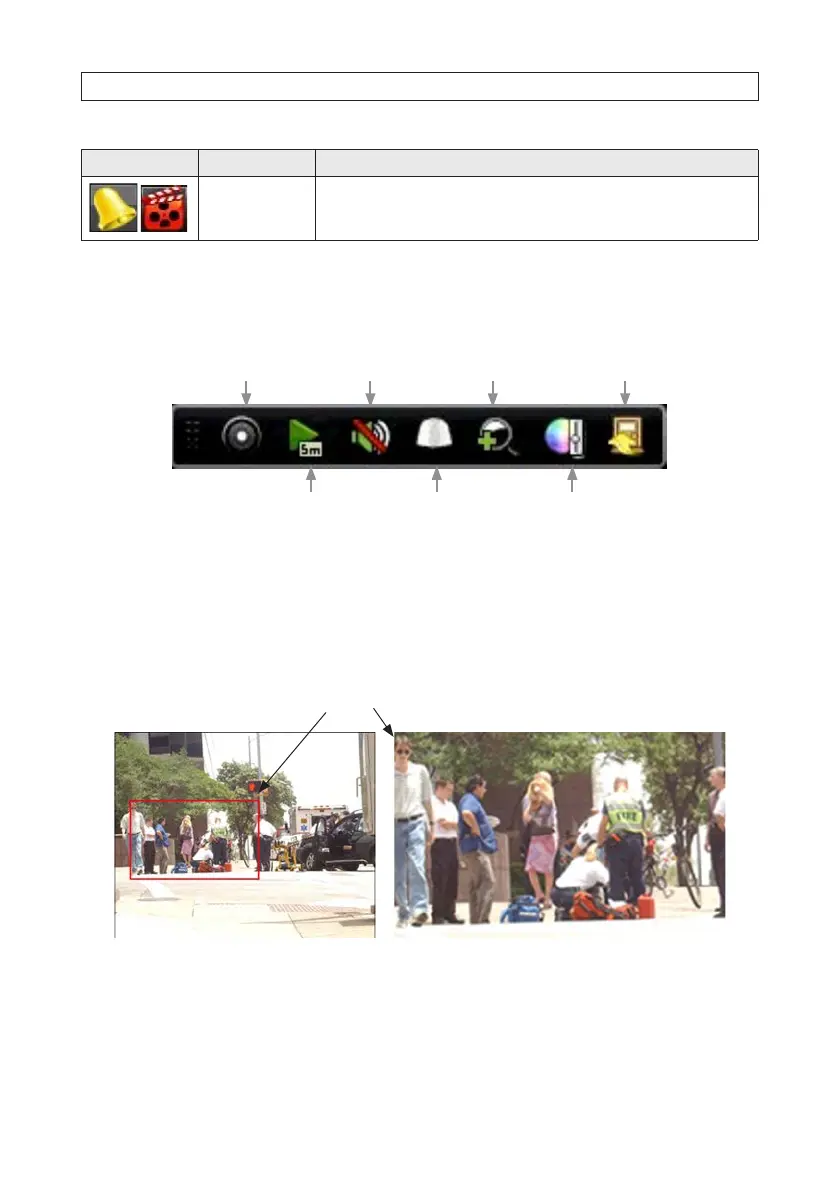
Left-clicking the mouse on a viewing frame opens a Quick Setting Toolbar at the top or bottom of the frame.
Instant playback
Digital zoom
PTZ control
Enable/disable
manual record Close
Image setting
Mute/audio on
Instant Playback: Plays what was recorded in the previous ve minutes. Nothing is played if a recording was not made at that
time.
PTZ Control: PTZ control is not supported.
Digital Zoom: Shows the selected portion of the camera image in full-screen mode. To select an area, left-click and drag to form a
rectangle across the area to expand. See the gure below.
Zoom selection area
Image Settings: Click this icon to open menus for creating customized setting for the brightness, contrast, saturation, hue,
sharpness and noise reduction of the camera image. You can congure dierent settings for each of two periods, use preset
settings, and/or congure settings manually. After making an adjustment on in this menu, the DVR will respond within a few
seconds. Click OK when your adjustments are complete.
SECTION 4: LIVE VIEW INTERFACE











 To Next Page