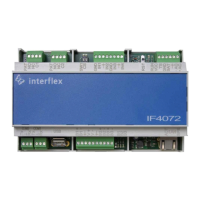
Need help?
Do you have a question about the Allegion Interflex IF-4070 and is the answer not in the manual?
Provides a brief overview of the IF-4070 controller's function.
Lists all items included in the IF-4070 controller package.
Defines the controller's intended use and the document's target audience.
Covers warnings for electric shock, overvoltages, and electrostatic discharge (ESD).
Lists common abbreviations and their definitions used throughout the manual.
Details recommended cable types and maximum lengths for various connections.
Illustrates the controller's connections and identifies key system components.
Explains the controller's operational modes, including offline and control functions.
Identifies and describes the main electronic components on the controller's circuit board.
Details all connections and ports available on the controller's PCB.
Explains the status indicated by LEDs and the function of the controller's switches.
Provides instructions for mounting the controller in a 19" cabinet or on a wall.
Step-by-step guide on how to safely open the controller's housing.
Instructions for connecting the controller to an Ethernet network.
Details methods for connecting readers via RJ45 or screw terminals.
Explains how to connect external contacts and devices via relays.
Illustrates the terminal assignments for contacts and relays.
Provides critical instructions and warnings for connecting the power supply.
Describes available power sources: integrated, external, and PoE.
Explains how to configure a redundant power supply for increased reliability.
Guide to connecting via IF-ServiceApp or serial service interface.
Details on setting up the PuTTY application for serial communication.
Steps for establishing a network connection and logging into the controller.
Using the 'netpar' command to manage IP addresses and network settings.
Shows example network configurations and subnet mask notations.
Procedure for restoring the default IP address using a factory reset.
Using the 'oc -h' command for interface settings and memory configuration.
Using the 'cfg' command to retrieve reader configuration information.
Procedures for performing warm boots and reboots via console or switches.
Steps for performing a cold boot to reset all settings to default.
Procedure for resetting only the network configurations to factory defaults.
Steps to perform a factory reset before or after software updates.
Describes updating via IF-6040 system or using PuTTY batch files.
Instructions for applying license upgrades to extend controller functionality.
Details on nominal voltage, fuse, power consumption, and supply units.
Information on host, reader, and service interface types and protocols.
Details the controller's input capabilities and contact debounce times.
Specifies output relay capacity and front panel status indicators.
Guidelines for the environmentally sound disposal of the device.
States compliance with EU directives and provides links to the full declaration.
 General
| Operating Voltage | 12-24 VDC |
|---|---|
| Operating Temperature | -40°C to 70°C |
| Dimensions | 200 x 150 x 50 mm |
| Certifications | CE, FCC |
| Communication Interface | RS-485 |
| Reader Interface | Wiegand |
| Inputs | 4 |
| Outputs | 4 |
| Transaction Storage | 100, 000 |
| Housing Material | ABS plastic |

 To Next Page