Publication 1769-UM009B-EN-P - May 2002
7-2 Using the 1769-SDN Scanner Module with MicroLogix Controllers
RSLogix 500 I/O
Configuration
One of the advanced features of RSLogix 500 is the ability to have the
programming software establish a communications connection with
the controller and read which I/O modules are attached to the
controller. This capability significantly reduces the effort involved in
configuring a system.
This section will illustrate how to read which I/O modules are
attached to the controller, and manually configure them. We will
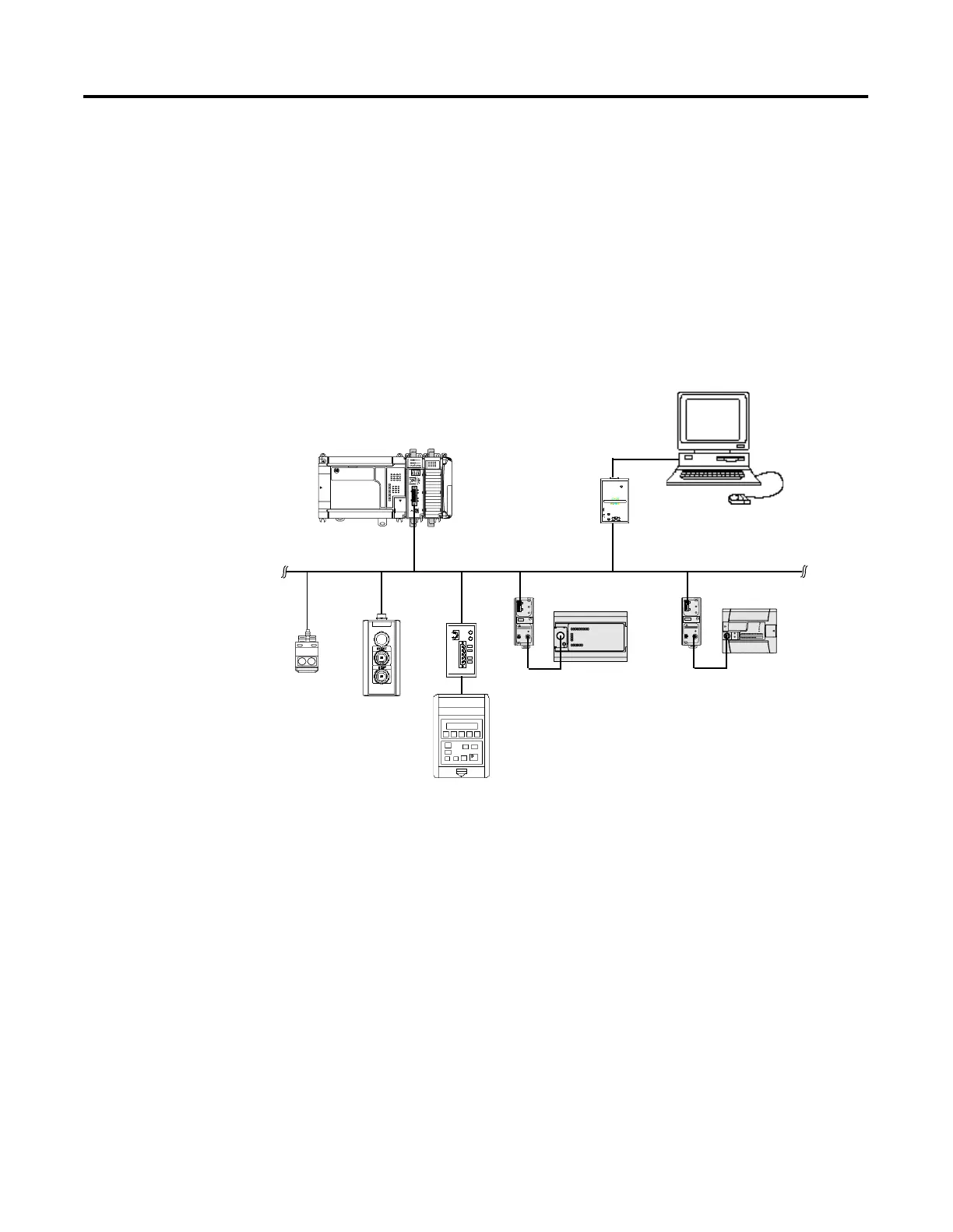
then configure the scanner. An example network is shown below:
DANGER
DANGER
PC with RSNetWorx
for DeviceNet software
Series 9000
Photoeye
RediSTATION
DeviceNet Network
1770-KFD PC
Communication
Module
MicroLogix 1500 Controller I/O
Bank with 1769-SDN Module
MicroLogix 1000 Controller
Connected via 1761-NET-DNI
MicroLogix 1200 Controller
Connected via 1761-NET-DNI
1305 Drive Connected via 1203-GU6
Enhanced DeviceNet Communications Module


 To Next Page
 Loading...