EasyManua.ls Logo

Allen-Bradley 1747-ASB - User Manual

Allen-Bradley 1747-ASB
158 pages
Print Icon
To Next Page IconTo Next Page
Loading...
Artisan Technology Group is your source for quality
new and certied-used/pre-owned equipment
FAST SHIPPING AND
DELIVERY
TENS OF THOUSANDS OF
IN-STOCK ITEMS
EQUIPMENT DEMOS
HUNDREDS OF
MANUFACTURERS
SUPPORTED
LEASING/MONTHLY
RENTALS
ITAR CERTIFIED
SECURE ASSET SOLUTIONS
SERVICE CENTER REPAIRS
Experienced engineers and technicians on staff
at our full-service, in-house repair center
WE BUY USED EQUIPMENT
Sell your excess, underutilized, and idle used equipment
We also offer credit for buy-backs and trade-ins
www.artisantg.com/WeBuyEquipment
REMOTE INSPECTION
Remotely inspect equipment before purchasing with
our interactive website at www.instraview.com
LOOKING FOR MORE INFORMATION?
Visit us on the web at www.artisantg.com for more
information on price quotations, drivers, technical
specications, manuals, and documentation
Contact us: (888) 88-SOURCE | sales@artisantg.com | www.artisantg.com
SM
View
Instra

Table of Contents

Other manuals for Allen-Bradley 1747-ASB

Questions and Answers

  • J
    Jose WareSep 23, 2025
    How to resolve module image assignment error on Allen-Bradley Control Unit?
    • W
      Willie ParkerSep 23, 2025
      If your Allen-Bradley Control Unit indicates that a module in a slot has only part of its image assigned to the 1747-ASB image (1/2-slot addressing and discrete mode only), change the 1747-ASB module image size (SW2-5,6,7,8) or specialty mode (SW3-9).
  • F
    fnunezAug 25, 2025
    What to do if Allen-Bradley 1747-ASB Control Unit shows configuration store fault?
    • C
      Charles WoodAug 25, 2025
      If your Allen-Bradley Control Unit shows a 'Configuration Store Fault (EEPROM failed write verification)' error, cycle the power to reset the 1747-ASB module. If the issue continues, replace the 1747-ASB module.
  • R
    Ryan JonesAug 25, 2025
    What to do if Allen-Bradley 1747-ASB displays I/O runtime fault?
    • N
      Natalie PalmerAug 26, 2025
      If your Allen-Bradley Control Unit displays 'I/O Runtime Fault (Error, Location)', check the I/O module in the specified slot. Cycle the power to both the 1747-ASB module and the I/O module. If the problem persists, replace the I/O module.
  • M
    Monique NguyenAug 27, 2025
    What to do if Allen-Bradley Control Unit shows Powerup Self Test Error?
    • J
      Jennifer WhitneyAug 27, 2025
      If your Allen-Bradley Control Unit displays 'Powerup Self Test Error (normal operating mode)', cycle the power to reset the 1747-ASB module. If the problem continues, replace the 1747-ASB module.
  • J
    johnjonesAug 27, 2025
    What to do if Allen-Bradley Control Unit has Runtime RAM Fault?
    • C
      carl84Aug 27, 2025
      If your Allen-Bradley Control Unit shows a 'Runtime RAM Fault', cycle the power to reset the 1747-ASB module. If the problem continues, replace the 1747-ASB module.
  • T
    Todd JohnsonSep 15, 2025
    What to do if Allen-Bradley Control Unit shows module is in test mode?
    • A
      Ana GarciaSep 15, 2025
      If your Allen-Bradley Control Unit shows 'Module is in test mode', check jumper pins on the bottom of the 1747-ASB module to ensure they are not connected to anything.
  • A
    Angela WestSep 12, 2025
    How to resolve undefined addressing mode on Allen-Bradley 1747-ASB Control Unit?
    • K
      Kelly HuffSep 13, 2025
      To resolve 'Undefined Addressing Mode' error on your Allen-Bradley Control Unit, check addressing mode selection (SW3-5,6).
  • T
    Tara FowlerSep 14, 2025
    How to resolve invalid baud rate on Allen-Bradley 1747-ASB?
    • J
      John ChaneySep 14, 2025
      To resolve 'Invalid Baud Rate' on your Allen-Bradley Control Unit, check baud rate selection (SW2-1,2).
  • T
    Terry HernandezSep 5, 2025
    How to fix last address exceeded error on Allen-Bradley Control Unit?
    • R
      Robert McintoshSep 5, 2025
      To address the 'Last Address Exceeded' error on your Allen-Bradley Control Unit, check the starting logical rack number (SW1-1,2,3,4,5,6), starting logical group number (SW1-7,8), and image size selection (SW2-5,6,7,8).
  • F
    fbookerSep 3, 2025
    How to resolve I/O configuration mismatch on Allen-Bradley 1747-ASB?
    • R
      Randall PatelSep 3, 2025
      If your Allen-Bradley Control Unit displays 'I/O Configuration Mismatch and Location' due to a problem with a specific slot, correct the I/O module configuration problem or change to Save Mode.

Summary

Preface

Who Should Use this Manual

Identifies the intended audience for the manual based on their responsibilities.

Purpose of this Manual

Explains the manual's objective and content for the remote I/O adapter module.

Terms and Abbreviations

Defines key technical terms and abbreviations used throughout the manual.

Chapter 1: Overview

1747-ASB Module Overview

Provides a general description of the 1747-ASB module and its role in RIO communication.

Remote I;O Overview

Explains the concept and operation of Remote I/O systems and communication.

Hardware Features

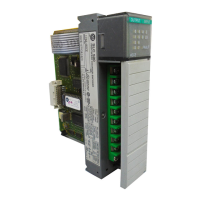
Highlights the physical components, LEDs, and DIP switches of the 1747-ASB module.

Chapter 3: Addressing

Chassis Overview

Describes the different types of chassis available for remote I/O systems.

Slot Numbering

Details the slot numbering scheme within chassis for module placement and addressing.

2-Slot Addressing

Explains the configuration where two chassis slots are addressed as one logical group.

Chapter 4: Configuration

DIP Switch Information

Details the function and settings of the module's three DIP switches for configuration.

Baud Rate (SW2-1,2)

Configures the communication speed for the module on the RIO link.

ASB Module Image Size (SW2-5, 6, 7, 8)

Determines the size of the module's image reserved in the scanner.

Chapter 5: Installation and Wiring

Installing the 1747-ASB Module

Provides step-by-step instructions for physically installing the module into the chassis.

Link Wiring

Guides on connecting network devices in a daisy chain configuration using Belden 9463 cable.

Link Termination

Explains the correct use of terminating resistors for RIO link integrity and baud rates.

Chapter 6: Start-Up and Operation

System Start-Up

Outlines the procedure for initial system startup and module verification.

Normal Operation

Describes the module's behavior and indicators during normal system operation.

Communication Exception

Explains conditions that may prevent normal RIO link communications.

Chapter 7: Troubleshooting

Troubleshooting Introduction

Introduces troubleshooting concepts, module indicators, and error types.

Error Codes for Error Conditions

Lists error codes, their meanings, and corrective actions for module faults.

DIP Switch Configuration Mismatch Fault Codes - Codes 1 and 2

Details fault codes related to incorrect DIP switch settings and their meanings.

Chapter 8: Application Examples

Basic SLC 500 Example Using and RIO Scanner

Illustrates a practical application using an SLC 500 processor and RIO scanner.

SLC Processor Image

Shows the input and output image structure for an SLC processor in the example.

RIO Address Label Examples

Provides examples of how to fill out RIO address labels for module identification.

Appendix A: Specifications

Adapter Operating Specifications

Lists the operational parameters and environmental limits for the adapter module.

Network Specifications

Details baud rate, cable length, and resistor specifications for network setup.

Calculating Throughput

Explains the process and formulas for calculating system throughput.

Appendix B: Differences Between the 1747-ASB Module and the 1771-ASB Series C Module

Hold Last State Operation

Compares the hold last state functionality between the two module series.

Specialty I;O Module Image Mapping and Control

Explains differences in mapping and controlling specialty I/O modules.

Physical Slot Numbering

Highlights differences in physical slot numbering conventions between the modules.

Appendix C: DIP Switch and Address Configuration Worksheets

DIP Switch Configuration

Provides a template for recording DIP switch settings for module configuration.

Address Configuration

Offers a worksheet to document the I/O module addressing within the chassis.

Allen-Bradley 1747-ASB Specifications

General IconGeneral
Model1747-ASB
CategoryControl Unit
ManufacturerAllen-Bradley
SeriesSLC 500
Communication ProtocolRemote I/O
Power Supply24V DC
CompatibilitySLC 500
Current Draw0.5 A
Operating Temperature0 to 60 °C
Storage Temperature-40°C to 85°C
Relative Humidity5 to 95% (non-condensing)
Product TypeRemote I/O Adapter Module

Related product manuals