Manual Programming
Refer to Menu Navigation for an overview of menus.
System Menu
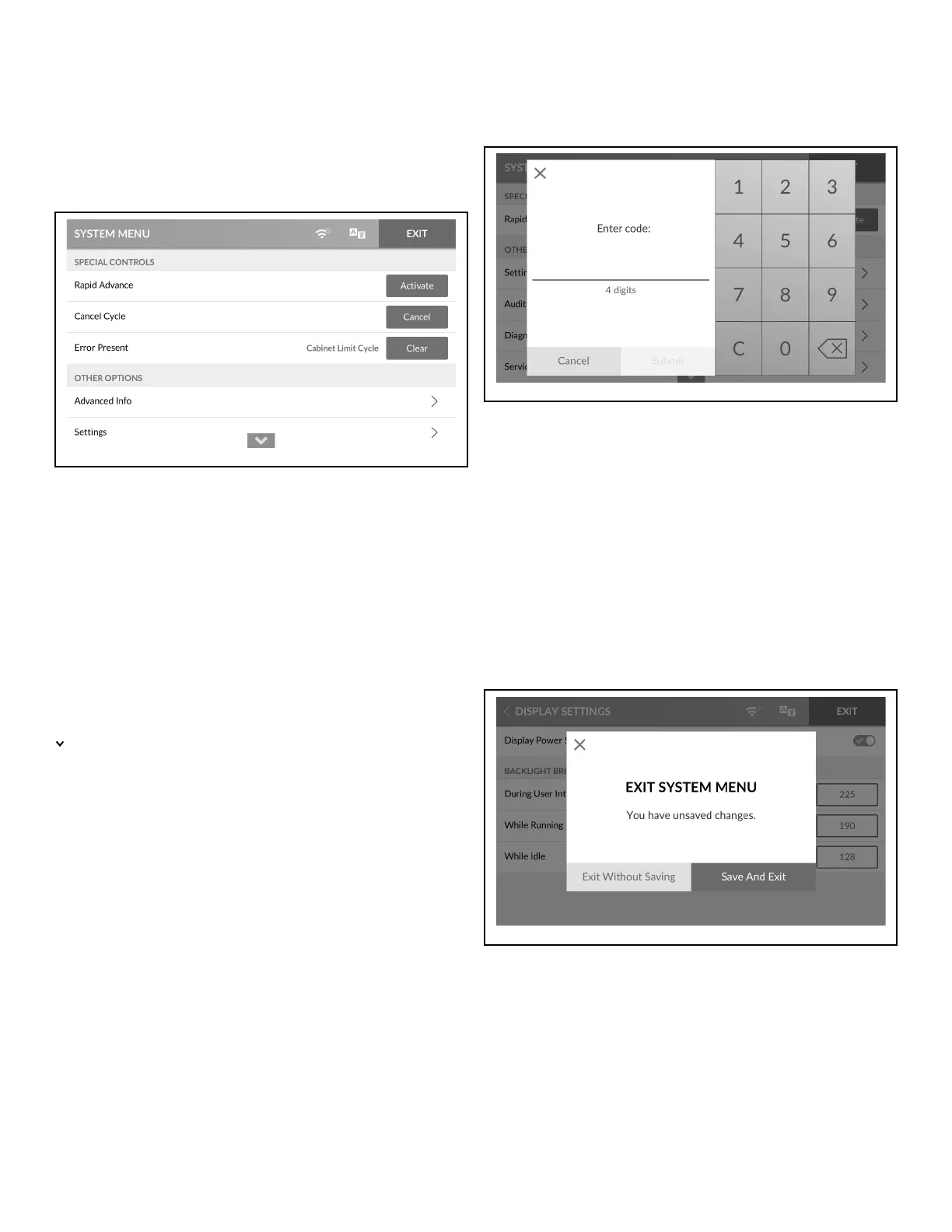
Figure 31
The System Menu allows the user to access RAPID ADVANCE
( Rapid Advance Activation), CANCEL CYCLE ( Cancel Cycle),
ERROR PRESENT ( Clear Active Error ), PARTIAL VEND
PRESENT ( Clear Partial Vend ), ADVANCED INFO ( Ad-
vanced Info Menu), SETTINGS ( Settings Menu), AUDIT DATA
( Audit Data Menu), DIAGNOSTICS ( Diagnostics Menu),
SERVICE SCHEDULE ( Service Schedule Menu) and RESET
( Reset Menu).
To access the System Menu, press and hold for 3 seconds on the
center of the menu header from the display with the service door
open and, for coin models, the coin vault closed .
indicates there is more content than fits on the screen. Swipe up
or down to see all content.
Touch EXIT to return to the previous screen.
NOTE: When selecting RAPID ADVANCE, DIAGNOS-
TICS, RESET or SETTINGS, the Passcode Menu will ap-
pear first, if programmed to be passcode protected.
Passcode Menu
Figure 32
The owner can program the control to require users to enter a
passcode to access sections of the System Menu. The control dis-
plays the Passcode Menu when entering RAPID ADVANCE
( Rapid Advance Activation), SETTINGS (Settings Menu), DI-
AGNOSTICS (Diagnostics Menu) or RESET (Reset Menu) sub-
menus from the System Menu.
1. Enter the four (4) digit passcode by touching the numbers on
the display.
2. Touch SUBMIT on the touchscreen to access the selected Sys-
tem Menu sub-menu.
Save Changes Menu
Figure 33
After modifications are complete, touch EXIT to access the Save
Changes Menu.
• Touch SAVE AND EXIT to save changes and exit the current
menu.
• Touch EXIT WITHOUT SAVING to discard changes and exit
the current menu.
Manual Programming
©
Copyright, Alliance Laundry Systems LLC -
DO NOT COPY or TRANSMIT
32 Part No. 70600001ENR6






 To Next Page