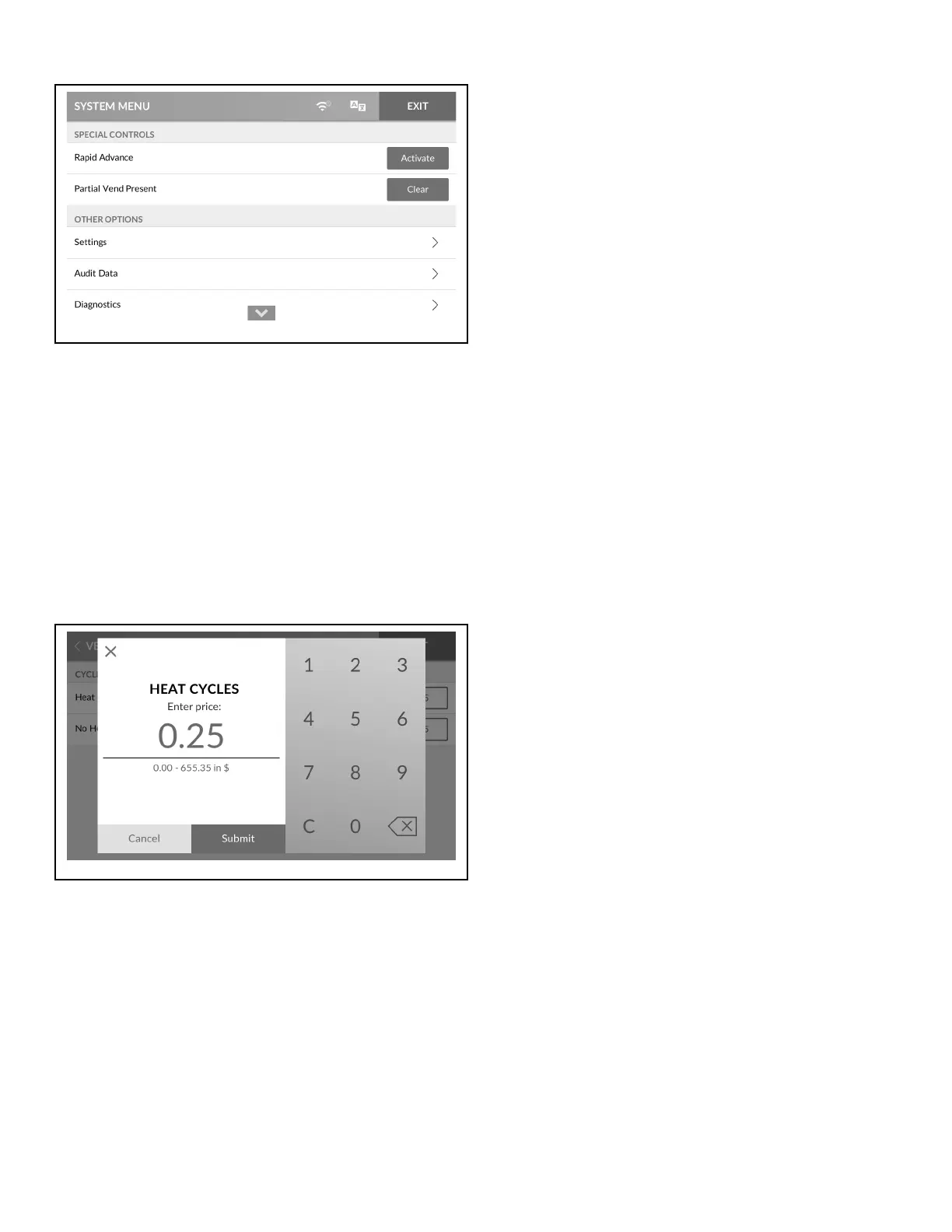
Figure 38
1. To access, touch and hold the center of the menu header on
the display with the service door open and, for coin models,
the coin vault closed. The control enters the System Menu.
2. Touch Clear next to PARTIAL VEND PRESENT to clear the
entered vend and hide the option.
NOTE: Any cleared vend will be added to the Audit
Data Menu.
3. When finished clearing the vend, touch EXIT to exit the Sys-
tem Menu.
Change Vend Price
Figure 39
1. To access, touch and hold the center of the menu header on
the display with the service door open and, for coin models,
the coin vault closed. The control enters the System Menu.
2. Touch SETTINGS, then VEND SETTINGS and navigate to
Vend Prices.
3. Touch the vend price next to the desired cycle to change.
4. Touch "C" to clear the current vend price.
5. Enter the new vend price using the keypad. Touch SUBMIT.
6. When finished changing the cycle price, touch EXIT to exit
the System Menu.
7. Touch SAVE AND EXIT.
Manual Programming
©
Copyright, Alliance Laundry Systems LLC -
DO NOT COPY or TRANSMIT
34 Part No. 70600001ENR6






 To Next Page