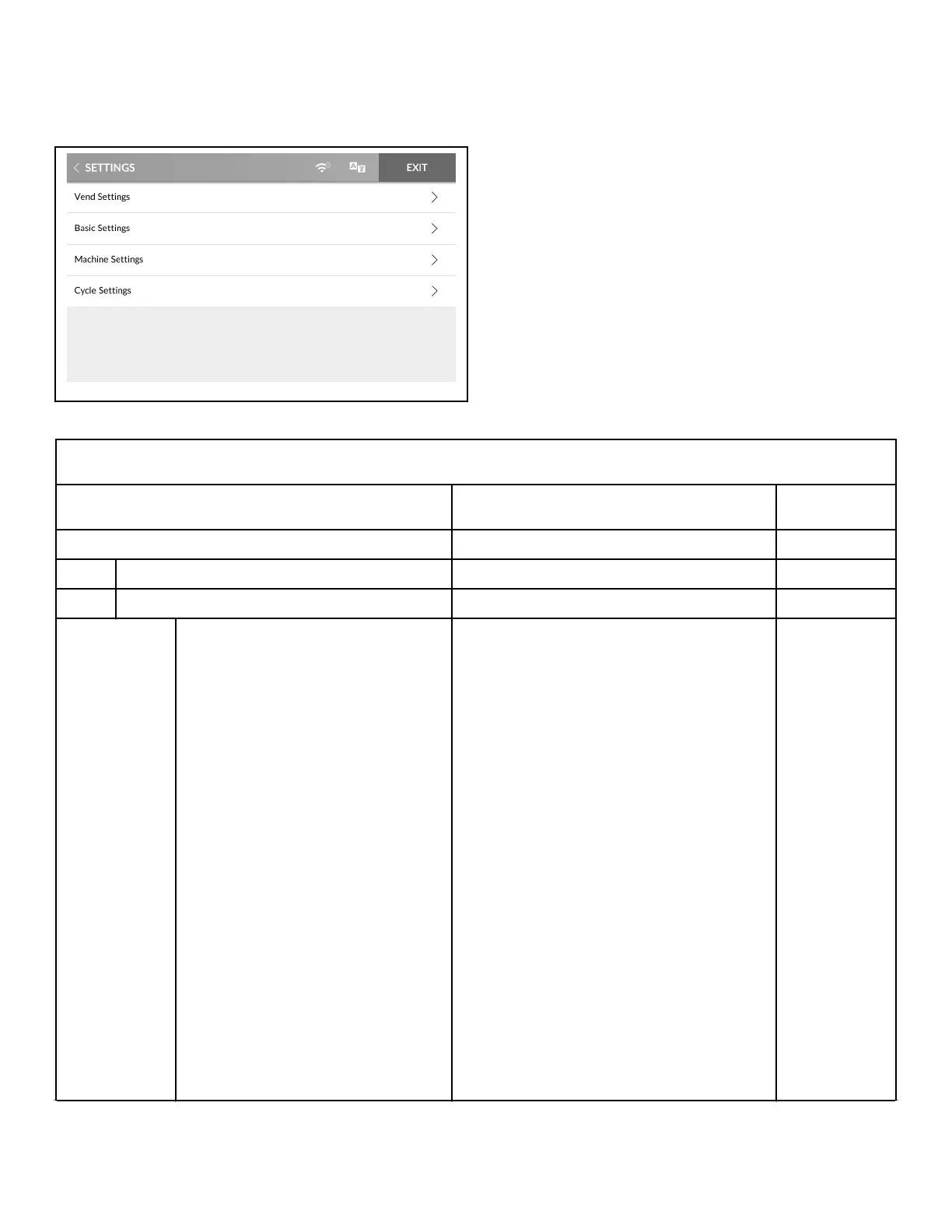
Settings Menu
Figure 41
The Settings Menu allows the owner to adjust the global settings
of the control. Refer to Table 2 , Table 3 , Table 4 and Table 5 for
setting options in each sub-menu.
1. To access, touch and hold the center of the menu header on
the display with the service door open and, for coin models,
the coin vault closed. The control enters the System Menu.
2. Touch SETTINGS from the display to enter the Settings
Menu.
3. When finished making changes, touch SETTINGS to return to
the System Menu or EXIT to exit the System Menu.
Vend Settings
Default values marked as * are customized at the factory accord-
ing to the machine's specific market and model.
VEND SETTINGS
Display Description Default
Currency Set the monetary symbol on the display.
MONETARY UNIT 1
Symbol
SELECT ONE No Symbol
$ Dollar
£ Pound
¥ Yen
₩ Won
€ Euro
₹ Rupee
₤ Turkish Lira
Ruble
Ft Forint
Kč Koruna
Kr Krona
Kn Kuna
R Rand
R$ Real
Tk Token
Zł Złoty
*
Table 2 continues...
Settings Menu
©
Copyright, Alliance Laundry Systems LLC -
DO NOT COPY or TRANSMIT
36 Part No. 70600001ENR6






 To Next Page