UM
150
User’s Manual
28
UM
150
User’s Manual
5.3.4 Using the Device
The usage mode is set by sliding the window up or down before
connecting to your PC.
• To use the UM
150
as both a modem and mass storage device, slide the window
up and insert the UM
150
into a PC USB port. To use it as a mass storage device
only, slide the window down and insert the UM
150
into a PC USB port.
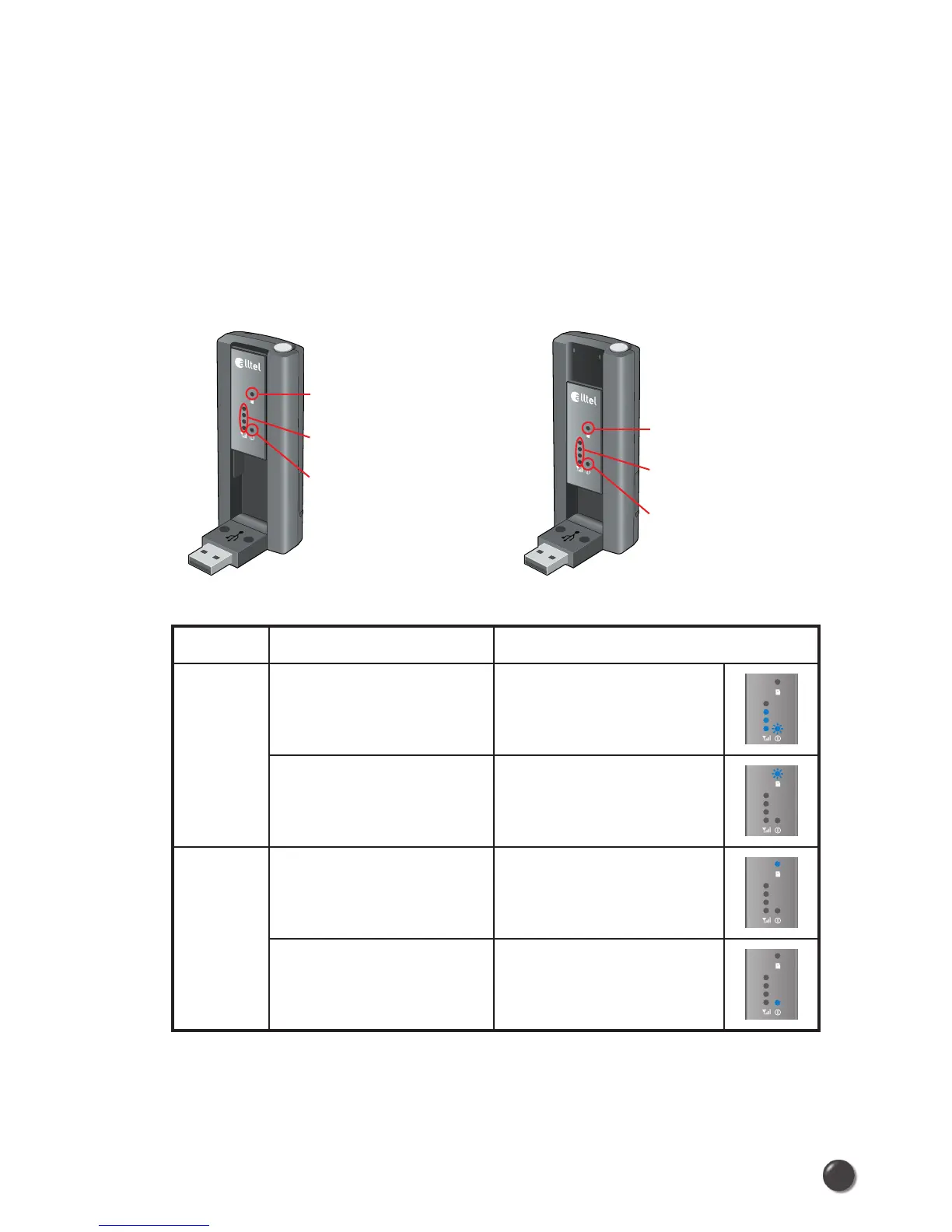
Function Operation LED Status
Modem
and
Mass
storage
Slide the window up
➡ Insert to PC USB port
➊ OFF
➋ ON (Blue light level
shows signal strength)
➌ ON (Blue light blinks)
Slide the window up
➡ Insert to PC USB port
➡ Slide the window down
➊ ON (Blue light blinks)
➋ OFF
➌ OFF
Mass
storage
only
Slide the window down
➡ Insert to PC USB port
➊ ON (Blue light stays on)
➋ OFF
➌ OFF
Slide the window down
➡ Insert to PC USB port
➡ Slide the window up
➊ OFF
➋ OFF
➌ ON (Blue light stays on)
* To use the UM
150
only as a mass storage on a computer that does not have
Quick Link Mobile installed, slide the window down and insert it into a PC USB
port.
Window slide
up condition
➊
Mass storage ONLY
indicator (disabled)
➋
Signal strength indicator
(enabled)
➌
Power status LED
(enabled)
Window slide
down condition
➊
Mass storage ONLY
indicator (enabled)
➋
Signal strength indicator
(disabled)
➌
Power status LED
(disabled)



 To Next Page