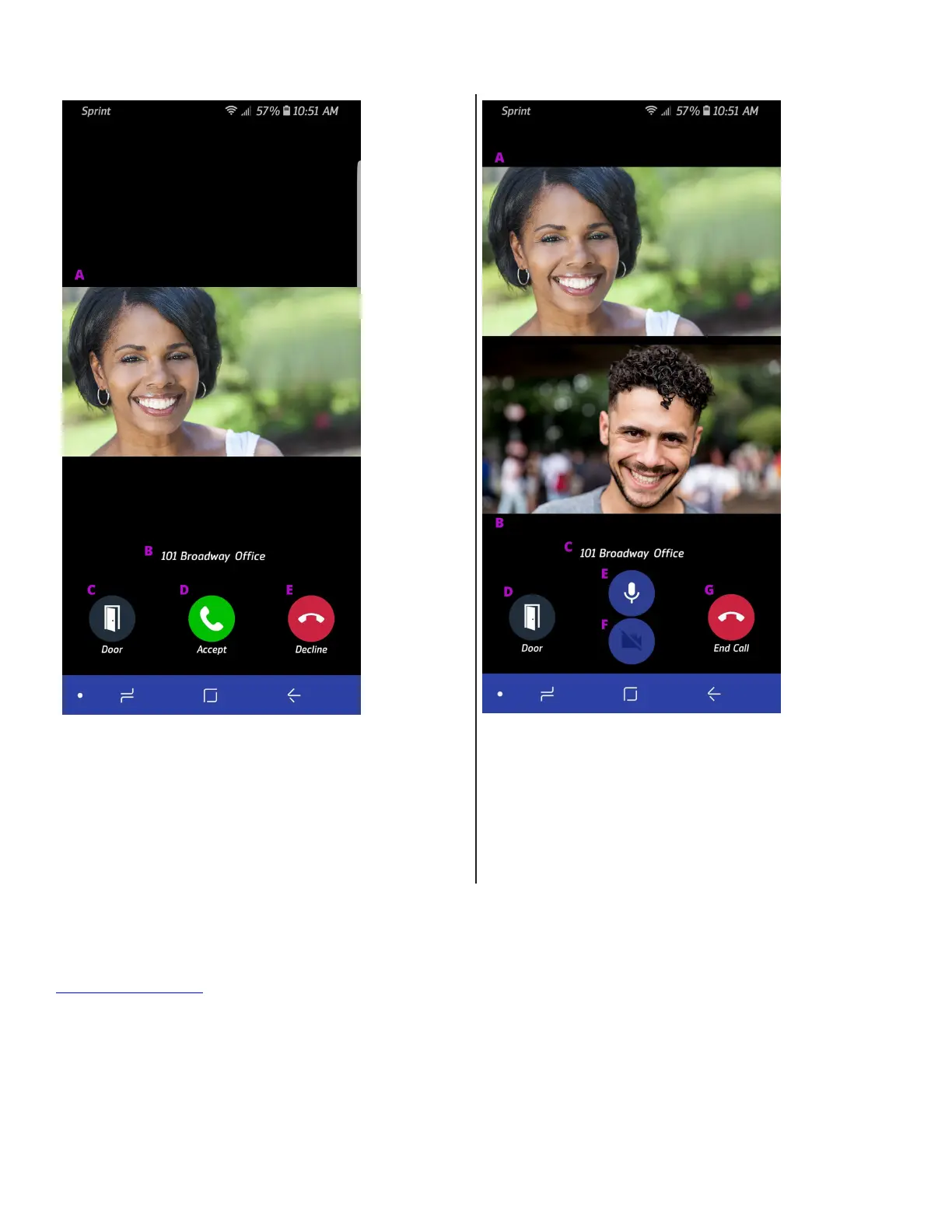
click the icon to turn your outgoing video stream on in order to allow your visitor to see you too. Once you’ve anwered a call, you can
click on the door release buon to acvate a door release acon.
A. Live Visitor Video Stream
B. Call Source Location
C. Door Release Button
D. Accept the call and activates you outbound audio
E. Dismiss the call without answering it
A. Live Visitor Video Stream
B. Live Outboud Video Screen
C. Call Source Location
D. Door Release Button
E. Toggle your outbound audio on or o
F. Toggle your outbound video on or o
G. End the Call
» iOS App Help
Download iOS App
» AlphaTouch Website
For now, logging into the AlphaTouch™ website is the easiest way to access your more advanced funcons. We hope to incorporate
most of these funcons into the mobile platofrms as well in the near future. Such funconalies include:
• Detailed event logs with image capture.
• Updang your resident lisng, phone number, email address and building access code.
• Send your visitors QR Codes that they can use to gain entrance to your building.
11


 To Next Page