24-EN
Setting the Range of MP3 File
Selection
You can set the range of MP3 file selection to
“entire disc contents” or “folder contents only.”
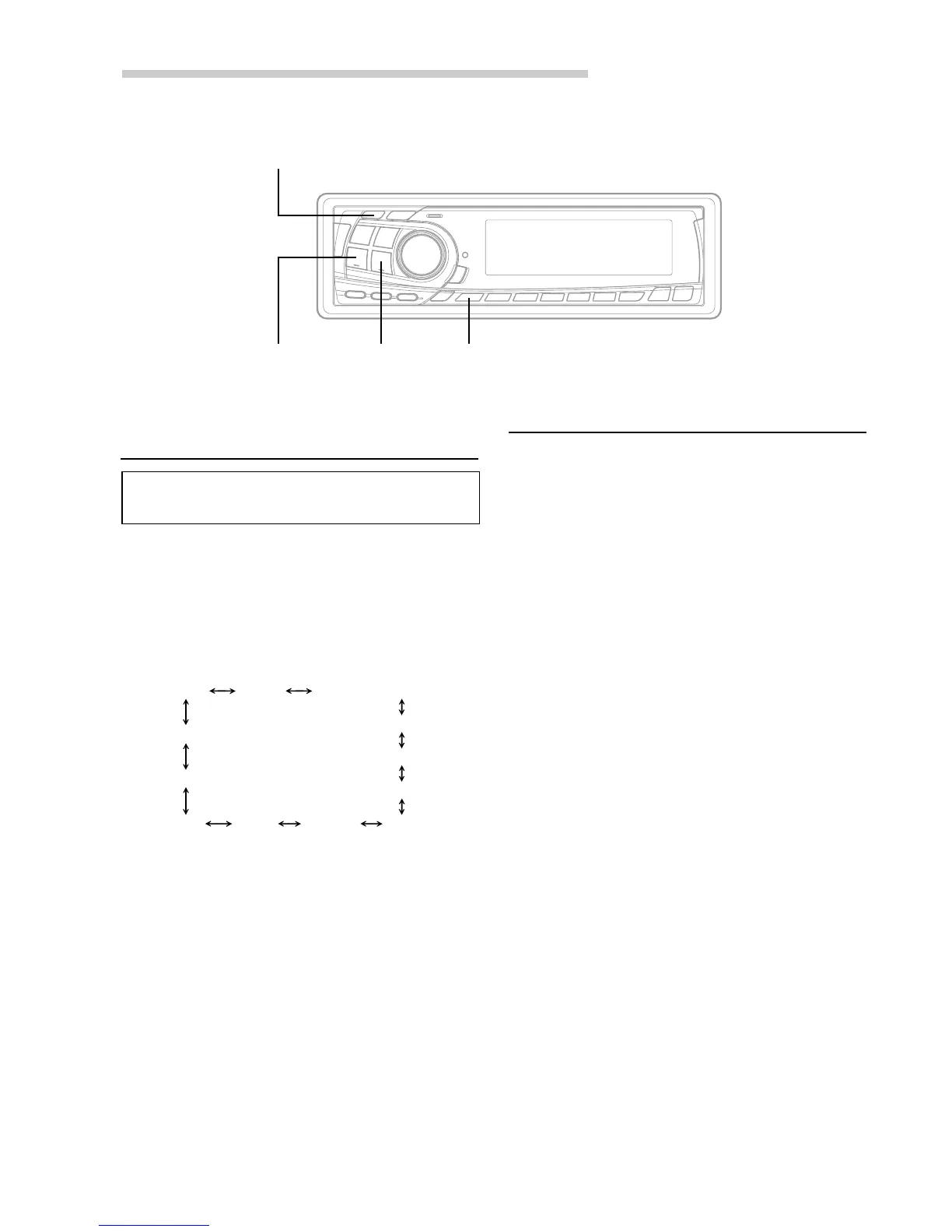
1 Press and hold the SETUP button for at least 2
seconds.
2 Press the f UP button repeatedly to select
DISC/FOLDER (track selection range).
Each press of the f UP button changes the
modes as shown.
∗ Displayed when you set SUB-W to ON.
NOTE
If you press the g DN button, the display scrolls in
reverse sequence.
3 Press the TUNE button to toggle the mode
between DISC ALL and FOLDER ONLY.
• DISC ALL : plays all the files on one disc
• FOLDER ONLY : plays files in the selected
folder only.
NOTE
The initial setting at the factory is DISC ALL.
4 Press the SETUP button to set the selected
mode.
MP3 Operation
TUNER SUB-W SUB-W switching phase
∗
SUB-W switching monaural/stereo
∗
AUX MUTE SCROLL BEEP
CONTRAST
DISC/FOLDER
DEMO
SRC DHE
TUNE
f UP g DN
SETUP
About MP3
CAUTION
Except for personal enjoyment, duplicating audio
data (including MP3 data) or distributing,
transferring, or copying it, whether for free or for a
fee, without the permission of the copyright holder
is strictly prohibited by the Copyright Act and by
international treaty.
• What is MP3?
MP3, whose official name is “MPEG Audio Layer 3”,
is a compression standard prescribed by the ISO,
the International Standardization Organization and
MPEG which is a joint activity institution of the IEC.
MP3 files contain compressed audio data. MP3
encoding is capable of compressing the audio data
at extremely high ratios shrinking music files by as
much as one-tenth their original size. This is
achieved while still maintaining near CD quality.
The MP3 format realizes such high compression
ratios by eliminating the sounds that are either
inaudible to the human ear or masked by other
sounds.
• Method for creating MP3 files
The software used to create MP3 files is widely
sold or free from various sources. For details on
creating MP3 files, refer to the user's manual for
that software.
The MP3 files that can be played back by this
device have the file extension “mp3”. Files with no
extension can not be played back.


 To Next Page