38-EN
Remote Control Operation
Steps
Selecting DHE
mode
Equalizer
Presets
Recalling the
Stored
Equalizer
Curve
Choosing the
Listening
Position
Select
Recalling the
Stored
Crossover/Time
Collection
1 Press the
A.PROC
button to
select the
mode.
2 Press the 8
or 9 button
to select the
mode.
Adjusting/Storing the EQ curve
Adjusting
1 Perform the procedure above to select the
desired equalizer characteristics.
2 Press the ENTER button to activate the
Adjusting Mode.
3 Press the g DN or f UP button to select
the frequency to be adjusted.
4 Press the 8 or 9 button to adjust to your desired
level.
To adjust other frequencies, repeat steps 3 to 4.
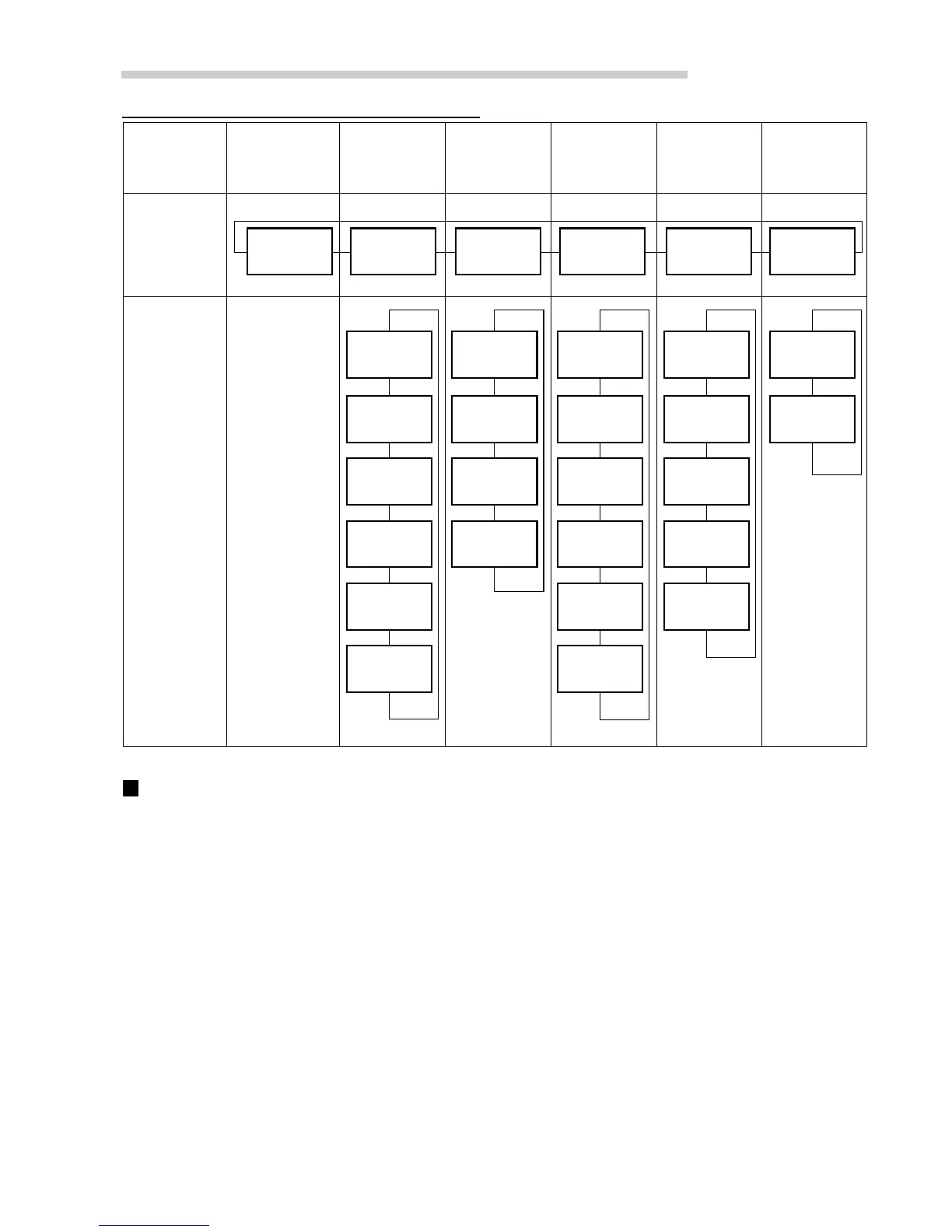
DHE mode
→
EQ mode
→
Private
mode
→
LPS mode
→
Crossover
mode
→
BASS
MODE1
↑
↓
BASS
MODE2
↑
↓
BASS
MODE3
↑
↓
VOCAL
MODE
↑
↓
ALL MODE
↑
↓
NON
EFFECT
↑
↓
POPS
↑
↓
ROCK
↑
↓
NEWS
↑
↓
FLAT
↑
↓
MEMORY2
↑
↓
MEMORY3
↑
↓
MEMORY4
↑
↓
MEMORY5
↑
↓
MEMORY6
↑
↓
MEMORY1
↑
↓
ALL
↑
↓
FRONT
↑
↓
FRONT-L
↑
↓
FRONT-R
↑
↓
OFF
↑
↓
MEMORY2
↑
↓
MEMORY1
↑
↓
Storing
5 Press and hold the ENTER button for at least 2
seconds to flash the display.
6 Press the 8 or 9 button to select the preset
number (1 through 6) that you want to store.
7 Press the ENTER button to store the setting. To
store settings, repeat the procedure above.
8 Press the A.PROC button to return to normal
mode.
Operating the Audio Processor
Normal
mode
→


 To Next Page