6-EN
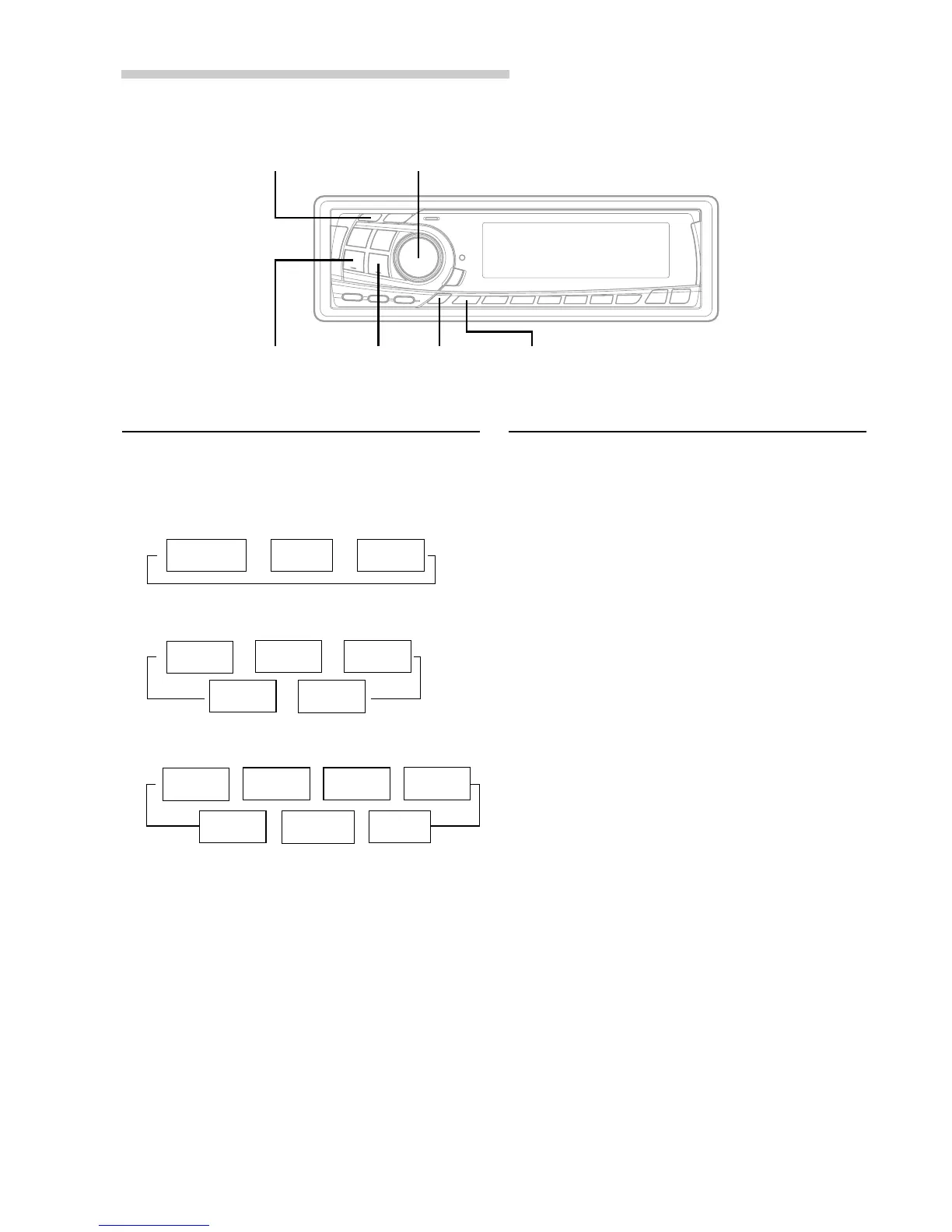
SETUPCLK
TUNE
g DN f UP
MODE/Audio Control
Setting Time
1 In the Clock priority mode, press and hold the
CLK (clock) button for at least 2 seconds while
the time is displayed. The time indication will
blink.
2 Rotate the Audio Control knob to adjust the
hours while the time indication is blinking.
3 When the hours has been adjusted, press the
MODE button.
4 Rotate the Audio Control knob to adjust the
minutes while the time indication is blinking. The
time is automatically set 5 seconds after the
minute adjustment. The time can also be
manually set by pressing the MODE button.
Displaying Time
1 Press the CLK (clock) button repeatedly until the
time is displayed.
Each press changes the modes as follows:
Radio mode
CD Player/Changer modes
MP3 modes
NOTE
Selecting any tuner or CD function while in the clock
priority mode will interrupt the time display
momentarily. The function selected will be displayed for
about 5 seconds before the time returns to the display.
→
Radio frequency
→ →
TITLE mode
Clock priority
mode
Playing time
mode
→
DISC TEXT
mode
→→
Clock priority
mode
TRACK
TEXT mode
←
TITLE mode
←
→→→
←
←
Folder name
mode
Clock priority
mode
Playing time
mode
→
File name
mode
Frame
display mode
TITLE mode
ID3 tag
mode
Basic Operation


 To Next Page