36-EN
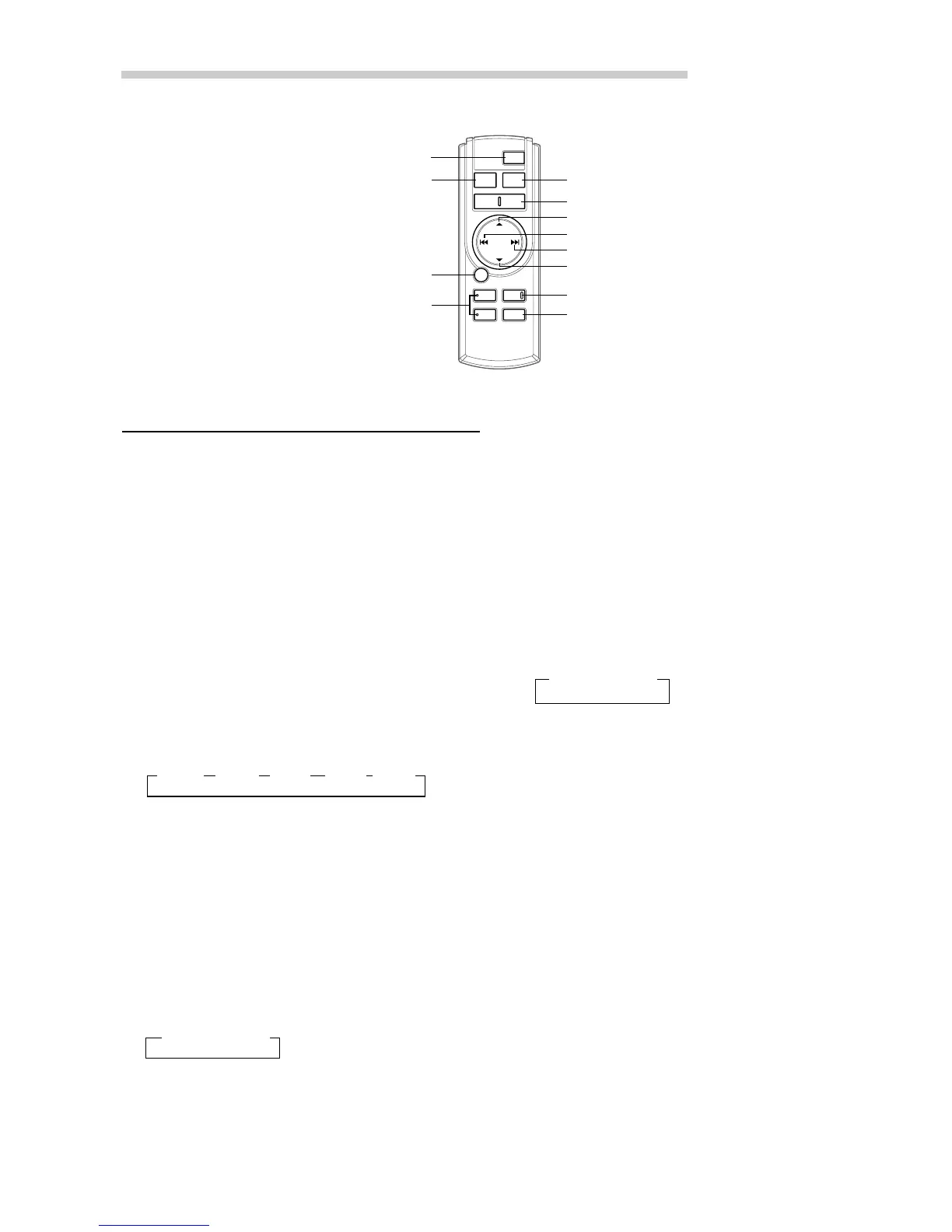
Remote Control Operation
8 g DN Button
Radio mode: SEEK (DN) Button
CD mode: Press the button to go back to the
beginning of the current track.
9 f UP Button
Radio mode: SEEK (UP) Button
CD mode: Press the button to advance to the
beginning of the next track.
! 9 Button
Radio mode: Pressing the button will select, in
descending order, stations programmed into the
radio's presets as shown below.
→ 6 → 5 ... 1
CD (MP3) mode: Press the Folder Select (DN)
Button to select the folder.
CD Changer mode: DISC Select (DN) Button
Press the button to select a disc in descending
order.
" Mute Button
Press the button to lower the volume by 20 dB
instantly. Press the button again to cancel.
# Audio Processor Button
Each press the button to switch the audio
processor mode.
For details, refer to page 38.
1
2
3
4
#
!
9
"
6
5
7
8
Controls on Remote Control
1 Power Button
Press the button to turn the power on/off.
2 Source Button
Press to select the audio source.
3 -/J Button
Press the button to switch between the Play and
Pause modes for CD.
4 ANGLE 89 Buttons
Press the button to adjust the angle of the
movable display.
5 Band/Program Button
Radio mode: BAND Button
Press the button and the band will change as
shown below.
→ FM1 → FM2 → XM1 → XM2 → AM
CD/Changer mode: To switch the disc mode.
6 Volume Adjustment Buttons
To increase the volume level:
Press the L button
To decrease the volume level:
Press the K button
7 8 Button
Radio mode: Pressing the button will select, in
ascending order, stations programmed into the
radio's presets as shown below.
→ 1 → 2 ... 6
CD (MP3) mode: Press the Folder Select (UP)
Button to select the folder.
CD Changer mode: DISC Select (UP) Button
Press the button to select a disc in ascending order.


 To Next Page