Preparation
6 Remove the ignition key and disconnect the
battery's minus terminal.
1 Park the vehicle in a flat, safe place. Apply the
parking brake, then remove the ignition key.
• Press the Reset button when using
for
the first time, etc.,
or
change
the carbattery.
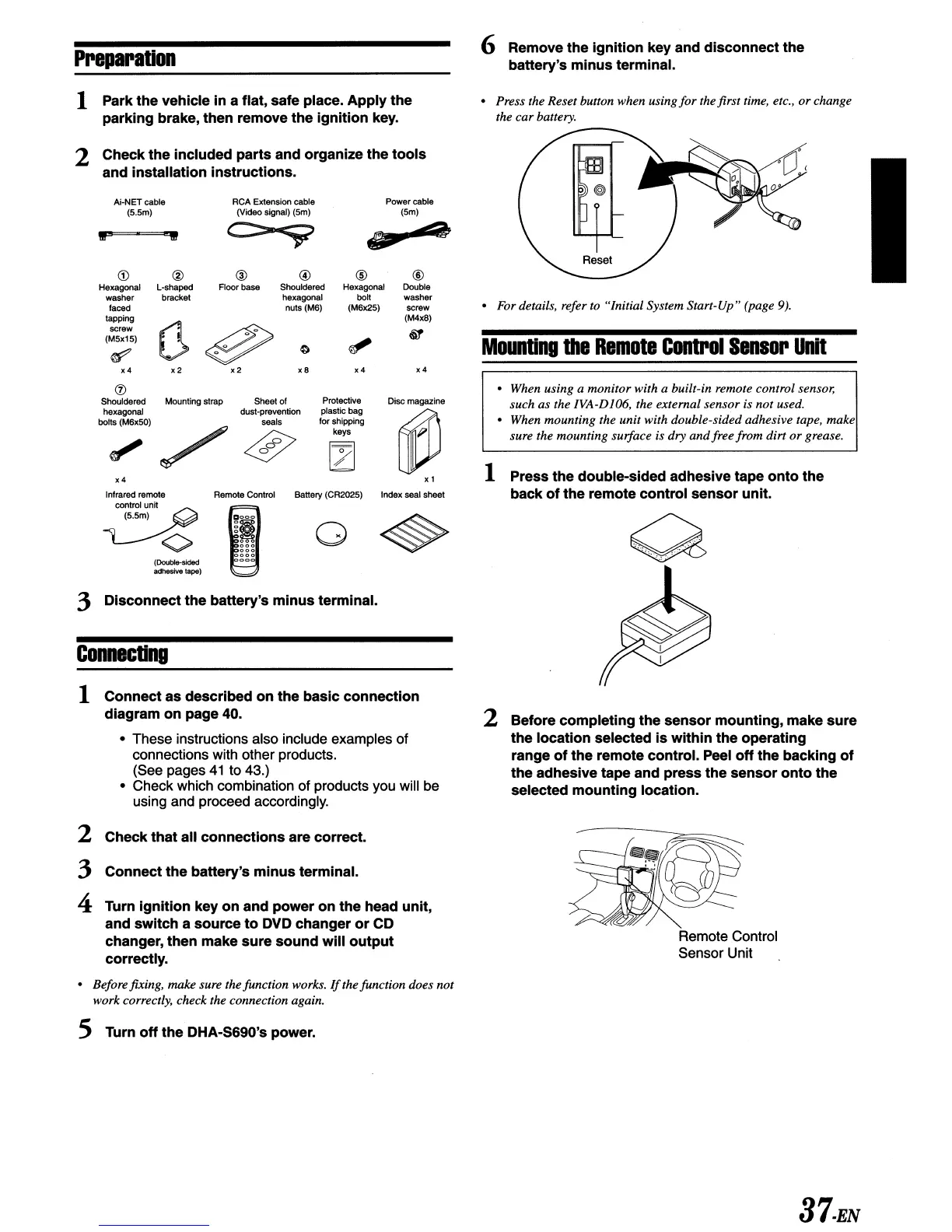
2 Check the included parts and organize the tools
and installation instructions.
Ai·NET cable
(S.Sm)
•
For
details, refer to "Initial System Start-Up" (page
9).
Mounting
the
Remote
Control
Sensor
Unit
x4
®
Double
washer
screw
(M4xS)
&1
Power
cable
(Sm)
.,4
x4
®
Hexagonal
boij
(M6x2S)
xS
@
Shouldered
hexagonal
nuts (MB)
RCA
Extension cable
(Video signal) (Sm)
@
Floor base
r1~
0w
x 2
x2
®
L·shaped
bracket
x4
<D
Hexagonal
washer
faced
tapping
screw
(MSx1S)
~
IF'
..
• When using a monitor with a built-in remote control sensor,
such as the IVA-DI06, the external sensor is not used.
• When mounting the unit with double-sided adhesive tape, make
sure the mounting surface is dry
and
free from dirt
or
grease.
Remote Control
Sensor Unit
2 Before completing the sensor mounting, make sure
the location selected
is
within the operating
range
of
the remote control.
Peel
off
the backing
of
the adhesive tape and press the sensor onto the
selected mounting location.
1 Press the double-sided adhesive tape onto the
back
of
the remote control sensor unit.
Disc
magazine
~
x 1
Index seal
sheet
Protective
plastic bag
for shipping
keys
o
Battery (CR202S)
Sheet
of
dust·prevention
seals
x4
Infrared remote Remote Control
~
contrOlunit
(S.Sm)
<>
(Double-sided
adhesive tape)
®
Shouldered Mounting strap
hexagonal
boijs
(MBxSO)
1 Connect as described on the basic connection
diagram on page
40.
• These instructions also include examples of
connections with other products.
(See pages
41
to 43.)
• Check which combination of products you will be
using and proceed accordingly.
2 Check that all connections are correct.
3 Connect the battery's minus terminal.
4 Turn ignition key on and power on the head unit,
and switch a source
to
DVD
changer
or
CD
changer, then make sure sound will
output
correctly.
3 Disconnect the battery's minus terminal.
Connecting
• Beforefixing,
rrulke
sure the function works.
If
the function does not
work correctly, check the connection again.
5 Turn
off
the DHA-S690's power.
37.EN



 To Next Page