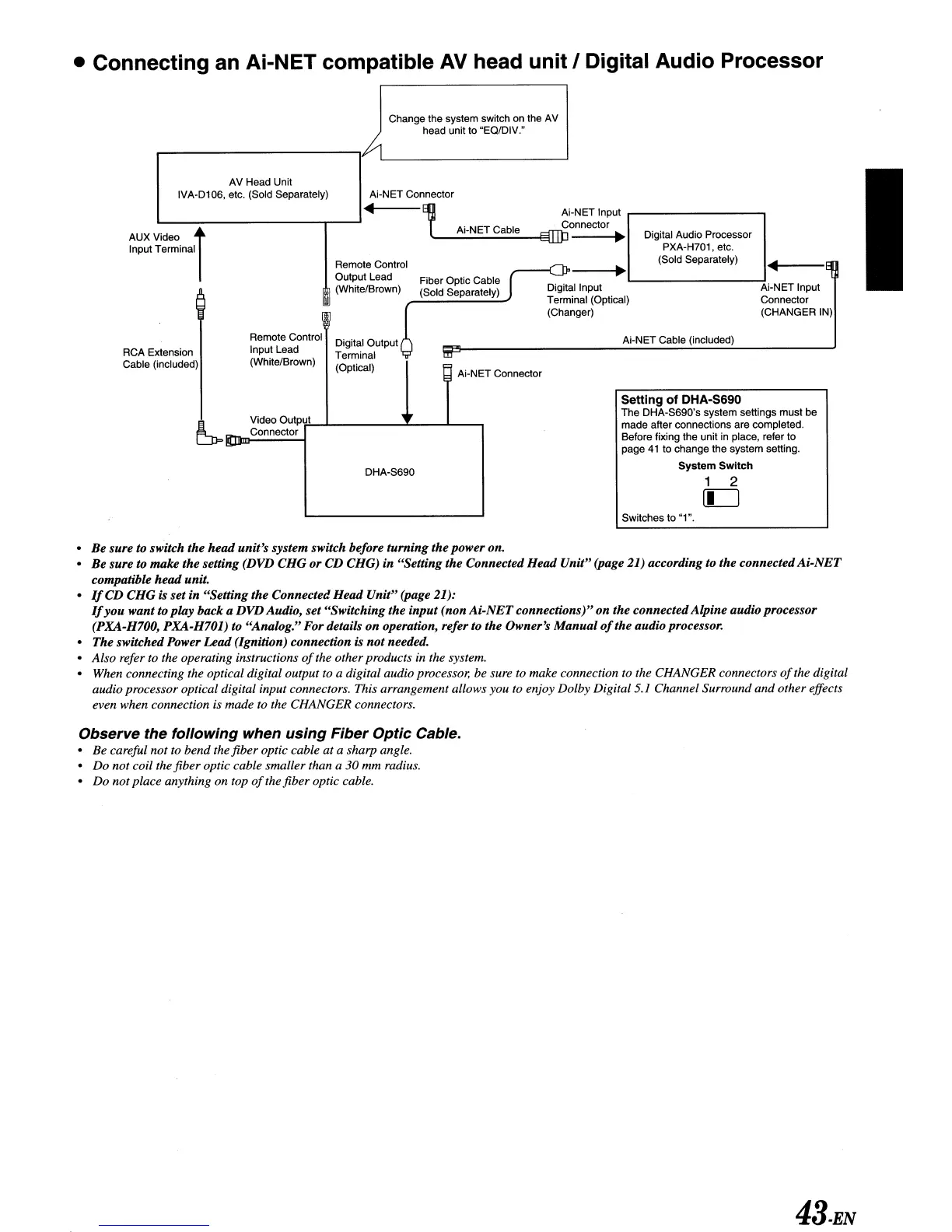
• Connecting an Ai-NET compatible
AV
head unit I Digital Audio Processor
Change the system switch
on
the
AV
head unit to "EQ/DIV."
~
Ai-NET Input
Ai-NET Cable Connector
'--':"::"':":::":""::':::"::""_Effi}:l
~
Ai-NET Cable (included)
Digital Audio Processor
PXA-H701 , etc.
(Sold Separately)
lP----I
...
~
I I
<l
...
I----EII
p
1--
--1
Ai-NET Input
Connector
(CHANGER
IN)
Digital Input
Terminal (Optical)
(Changer)
m
I Ai-NET Connector
Fiber Optic Cable
(Sold Separately)
Ai-NET Connector
...
Remote Control
Output Lead
~
(White/Brown)
R,_
""""""
0
....
""""'f
Input Lead Terminal
.)
(WhIle/Brown) (Optical)
AV Head Unit
IVA-D106, etc. (Sold Separately)
AUXVideo
~
Input Terminal I
RCA EXlension
Cable (included)
i Video Output
CJJ=.
- Connector
.....
DHA-S690
Setting of DHA·S690
The DHA-S690's system settings must be
made after connections are completed.
Before fixing the unit
in
place, refer to
page
41
to change the system setting.
System
Switch
1 2
[C]
Switches to "1".
•
Be
sure to switch the head unit's system switch before turning the power on.
•
Be
sure to make the setting (DVD CHG
or
CD CHG) in "Setting the Connected Head Unit" (page 21) according to the connected
Ai-NET
compatible
head
unit.
•
If
CD CHG is set in "Setting the Connected Head Unit" (page 21):
If
you
want to ploy backa DVDAudio, set "Switching the input (non
Ai-NET
connections)"
on
the connectedAlpine audio processor
(PXA-H700, PXA-H701) to "Analog." For details
on
operation, refer to the Owner's
Manual
of
the audio processor.
• The switched Power Lead (Ignition) connection
is
not
needed.
• Also refer to the operating instructions
of
the other products in the system.
• When connecting the optical digital output to a digital audio processor, be sure
to make connection to the CHANGER connectors
of
the digital
audio processor optical digital input connectors. This arrangement allows you to enjoy Dolby Digital 5.1 Channel Surround and other effects
even when connection is made
to
the CHANGER connectors.
Observe the following when using Fiber Optic Cable.
• Be careful not
to
bend the fiber optic cable at a sharp angle.
• Do not coil the fiber optic cable smaller than a 30 mm radius.
• Do not place anything on top
of
the fiber optic cable.
43.EN



 To Next Page