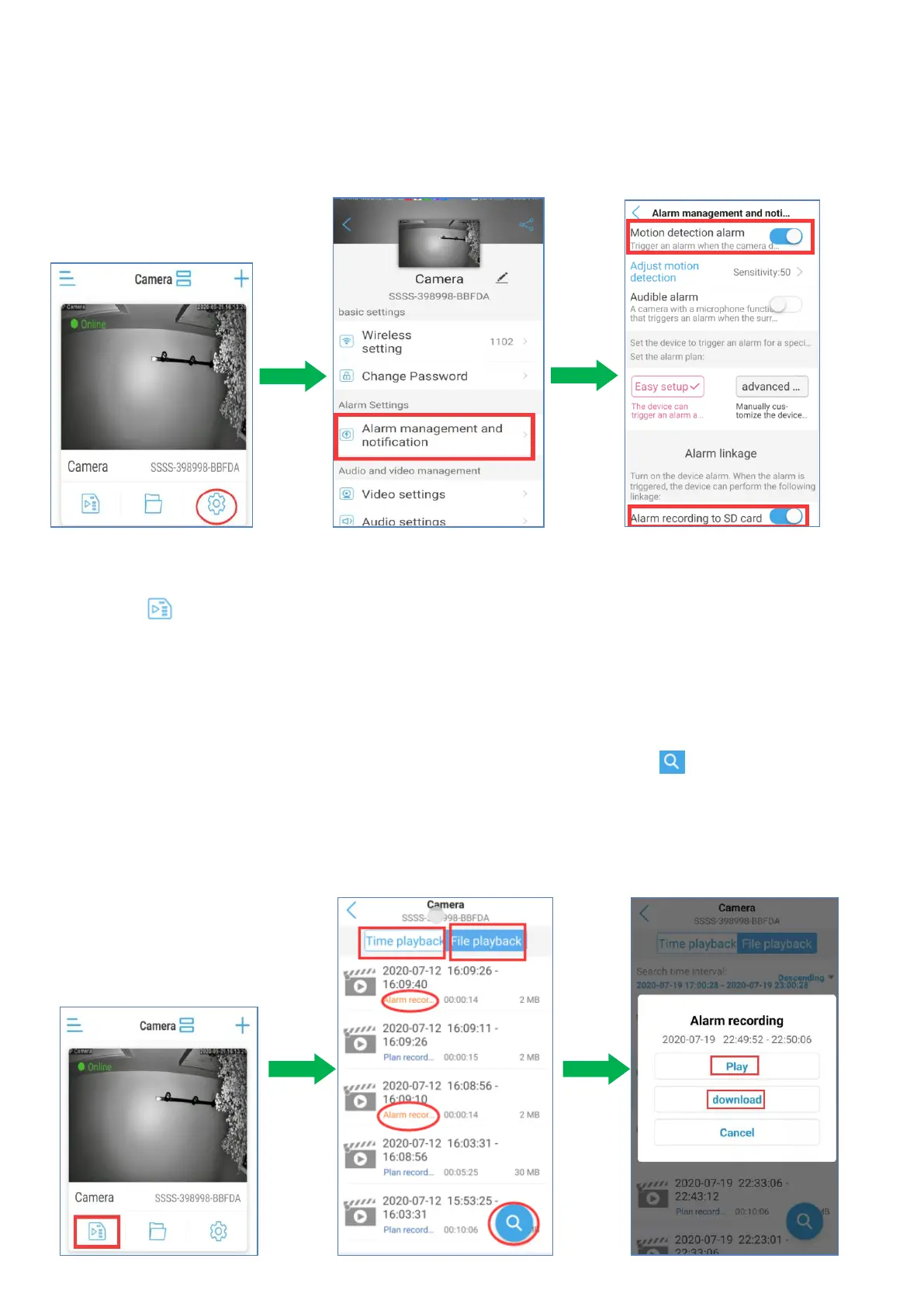
5.4.5 Record to SD Card Setting
5.4.5.1 Alarm Recording to SD Card Set-up
Go to setting - ‘Alarm management and notification’ page, enable ‘Motion
detection alarm’ and ‘Alarm recording to SD card’.
Note: Please activate the audio icon if you need records with audio.
Playback and Download Alarm Recordings saved on the micro SD card
a. Click icon,Go to ‘Recordings’ page.
b. There have two ways to view recordings.Time playback and File playback.
Note: There is currently no distinction between scheduled
recording and alarm recording in time playback.
c. Here you will be able to see the latest alarm recording, please check the red font, a video
file named “Alarm recording”. To view more recordings, please click ‘ ’ on the buttom
right side to get other recordings.
Note:Each alarm recording time is fixed, about 15 seconds
d. Select a Alarm recording, tap ‘play’ to playback it. Tap ‘download’ to download it.


 To Next Page