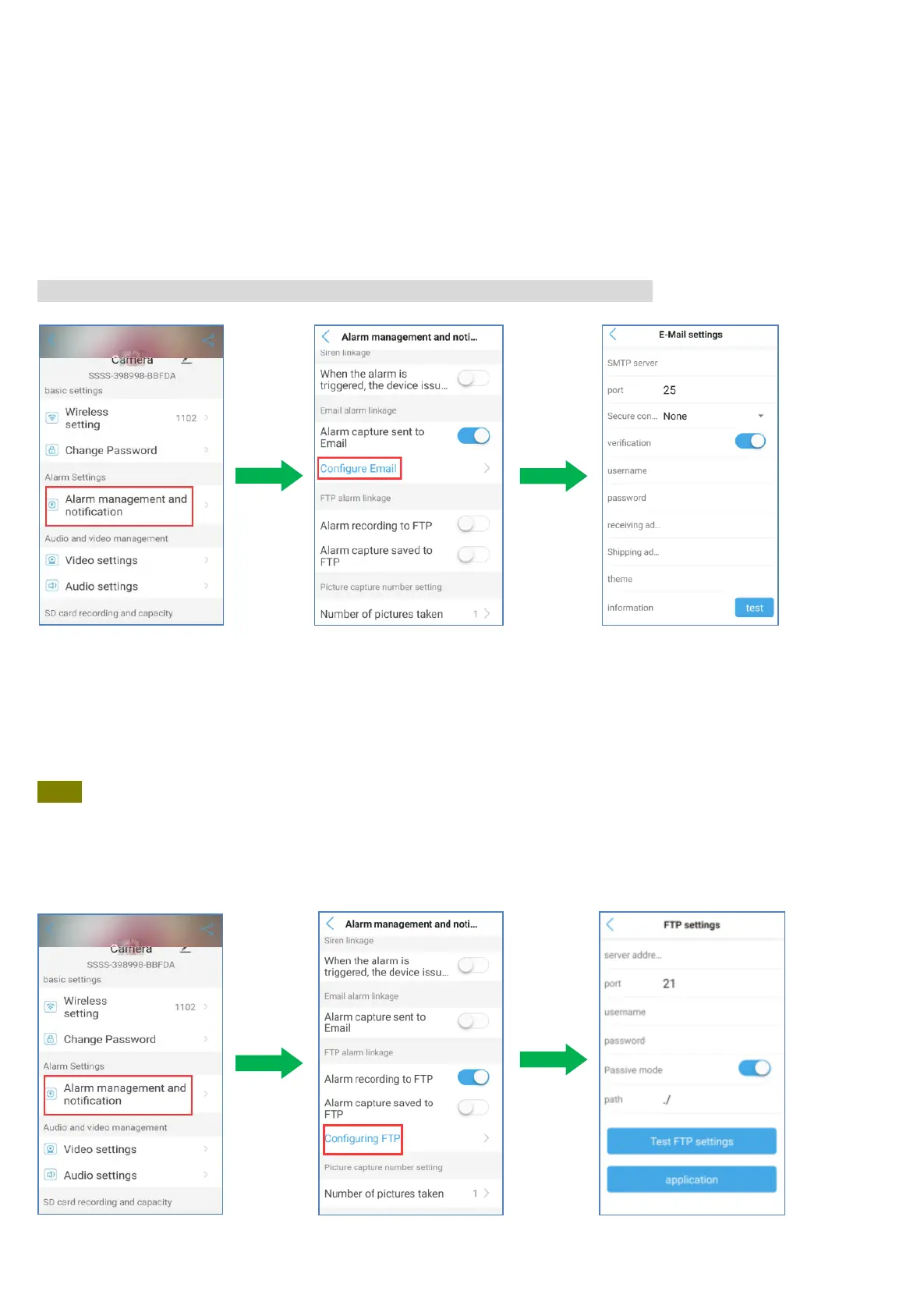
5.4.10 E-mail setting
Take gmail as an example, SMTP server: smtp.gmail.com
OR PING this domain address smtp.gmail.com,Then enter the IP address of PING in SMTP server.
Server Port: 465, Safe link: SSL
Authentication: default(on)
User name: Your sender email address
Password: Gmail login password
Send To: Mail address for receiving notification (Can be the same as Sender’s also).
Sender: The same as your sender email address (Must be an email address).
Please sign in to Gmail and allowing 3 party apps to access Gmail, less security.
If not successful, please set a app password of gmail instead of password.
5.4.11 FTP setting
Operation: Please click ‘Configuration FTP’ on the Alarm management interface. And insert the relevant
information on the pop-out page. And then click ‘Test FTP Settings’ to check whether the snapshots/
videos are sent to the FTP successfully. If yes, please click ‘application’ and the setting is successful.
Note:
a) Please keep the user name and password within 8 letters and avoid using special characters
such as #, &.
b) If you confirm that all the information is correct, but the testing result keeps indicating ‘Test failed’,
please log in your FTP server to check whether snapshots/videos are received successfully. If yes, go
directly click on ‘application’.


 To Next Page