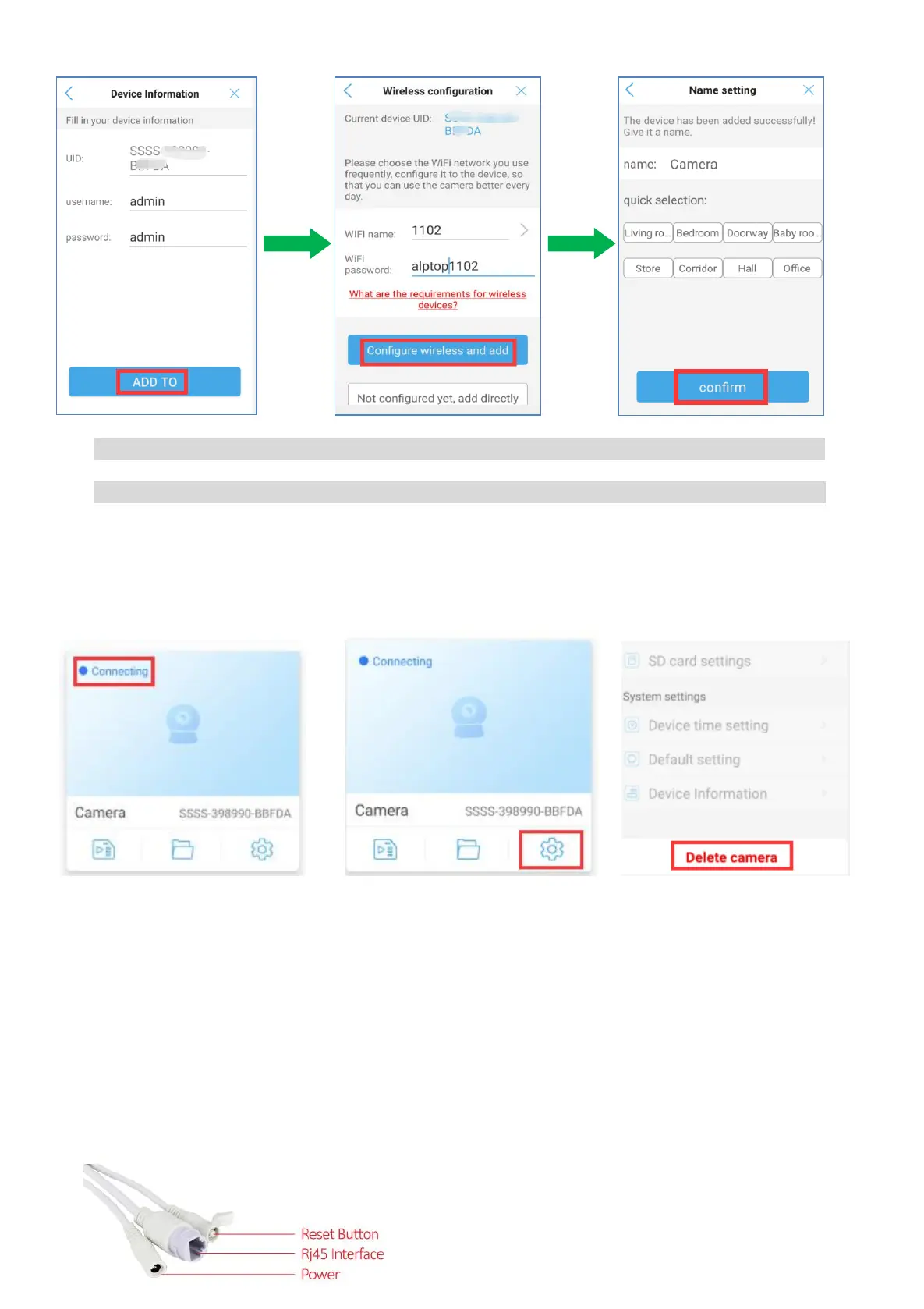
7) Tap 'Add to'.
Note: The default user name and password are both set as admin
8) Choose WiFi name and input your WiFi password, and tap "Configure wireless and add'.
Note:only 2.4ghz WiFi is supported.
9) Select or set a name for your camera, then tap 'confirm'.
10) Then you can remove the ethernet cable and choose a location within your local WiFi range to
install the camera.
Note: If you are unsuccessful, It will still display “connecting”. Then you have to go to "settings"
to delete the camera and start all over.
5.2 AP Mode Configuration (Connect Hot-Spot) For IOS device
When there is no visible router with network cable port for configuration, please apply the AP mode
to configure the camera with your local Wi-Fi network.
1) Enable the Phone's GPS function.
2) Have camera powered, don’t connect the network cable.
3) Please reset the camera by pressing the camera reset button for 10s.


 To Next Page