EAV64301 01/2015 77
Access To The Terminals - Frame Sizes 6
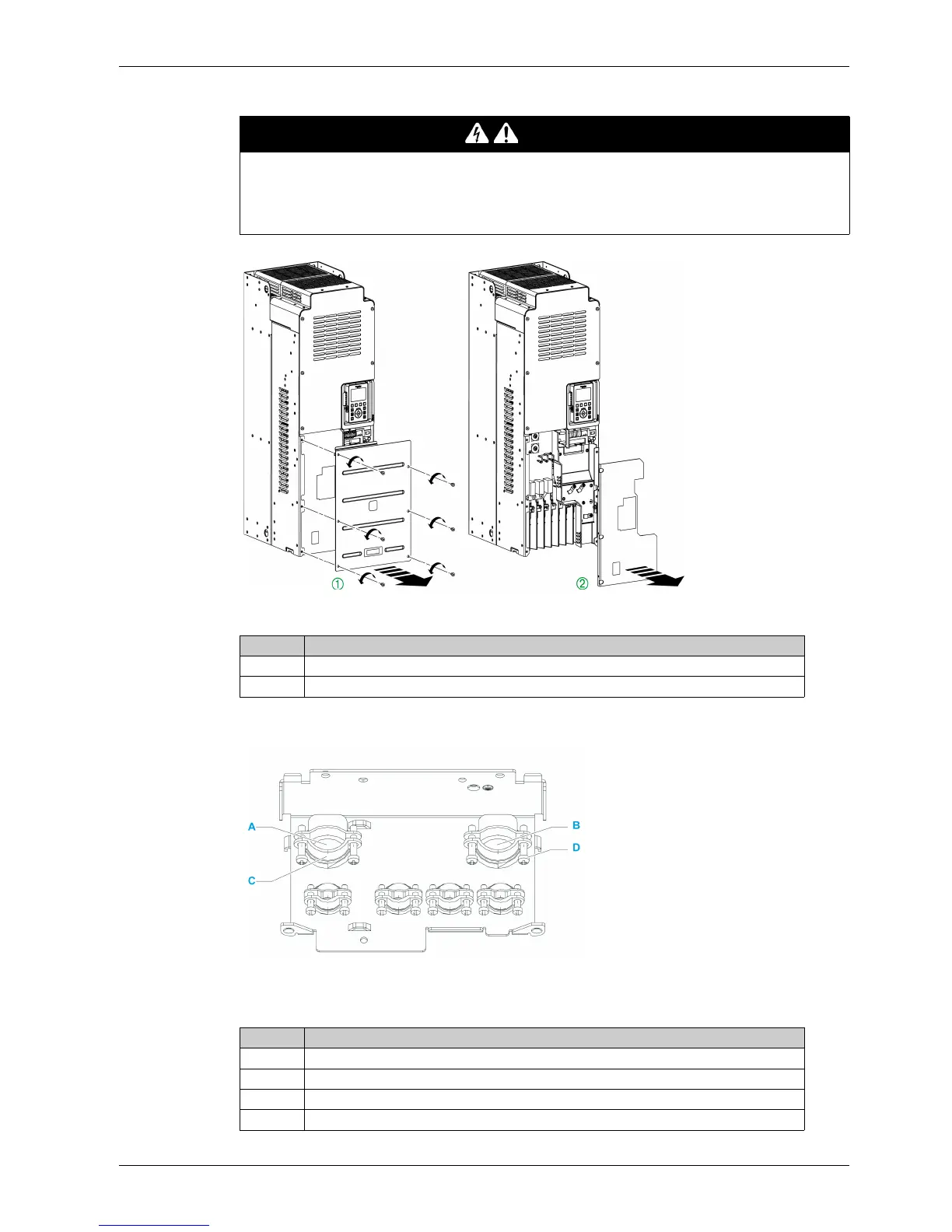
Apply the following instructions to access control terminals on frame sizes 6 drives
Cabling plate preparation
NOTE: Cabling plate shown is for frame size 3. Other cabling plates look slightly differs from this one.
Apply the following instructions before connecting the power cables to the drive
DANGER
HAZARD OF ELECTRIC SHOCK, EXPLOSION OR ARC FLASH
Read and understand the instructions in Safety Information chapter before performing any procedure
in this chapter.
Failure to follow these instructions will result in death or serious injury.
Step Action
1 Unscrew the 6 screws attaching the from bottom front cover and remove it
2 Remove the terminal cover
Step Action
1 Unscrew the cable grommet (C) screws (D) if required
2 Insert power input cables in drilling (A)
3 Insert motor power cables in drilling (B)
4 Screw back the cable grommet screws



 To Next Page