16
3.Preparation(continue)
Be sure to read and understand on the page 3 to 7 “For safety operation” carefully before use
Checking the rotation direction of motor
Import
ant
●All electrical wiring work must be performed by a qualified electrician.
●
1 Turning on the switch and checking the message window
Turn o
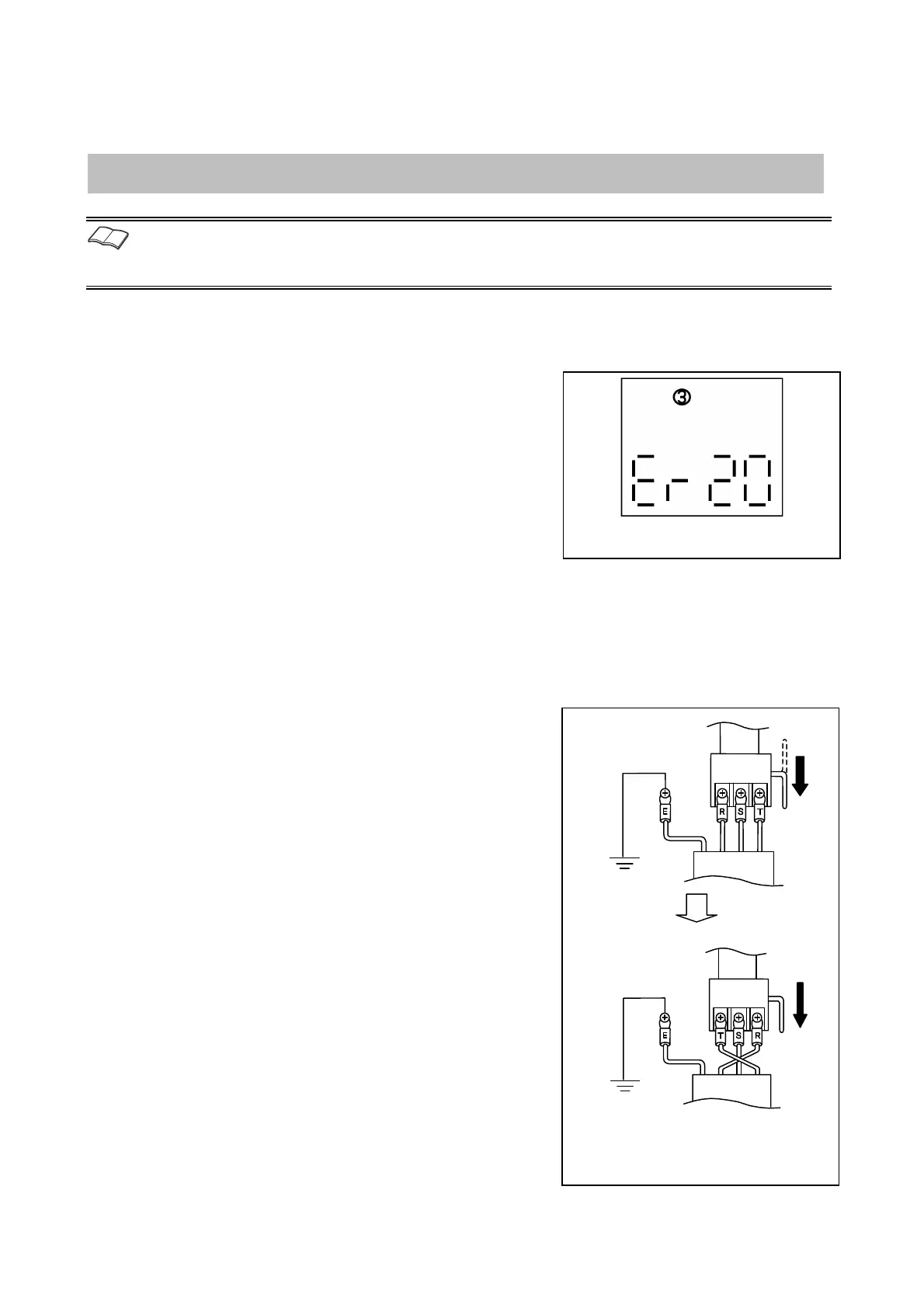
n the switch and check whether the error 20 is displayed.
In case of reverse phase, make sure to perform the following.
●
2 Turning off the switch
Be sure to turn off the circuit breaker on the power distribution
panel(primary power)for preventing electric shock.
●
3
Changing the phase sequence of the power cord
In case of reverse phase, change the phase sequence of R and T.
●
4 Turning on the switch
Turn on the circuit breaker on the power distribution panel.
(primary power)
●
5 Checking the message window
Check the message window to know whether the reverse phase
is occurred or not.
『Er20』is displayed in case o
the reverse phase.
Turn off the circuit breaker of the
distribution panel and replace the phase
sequence of R and T.
Switchboard
Switchboard
Circuit
breaker
Circuit
breaker
Power cord
Power cord


 To Next Page