Page 9
Normal Program Mode
These instructions must be followed in the order given.
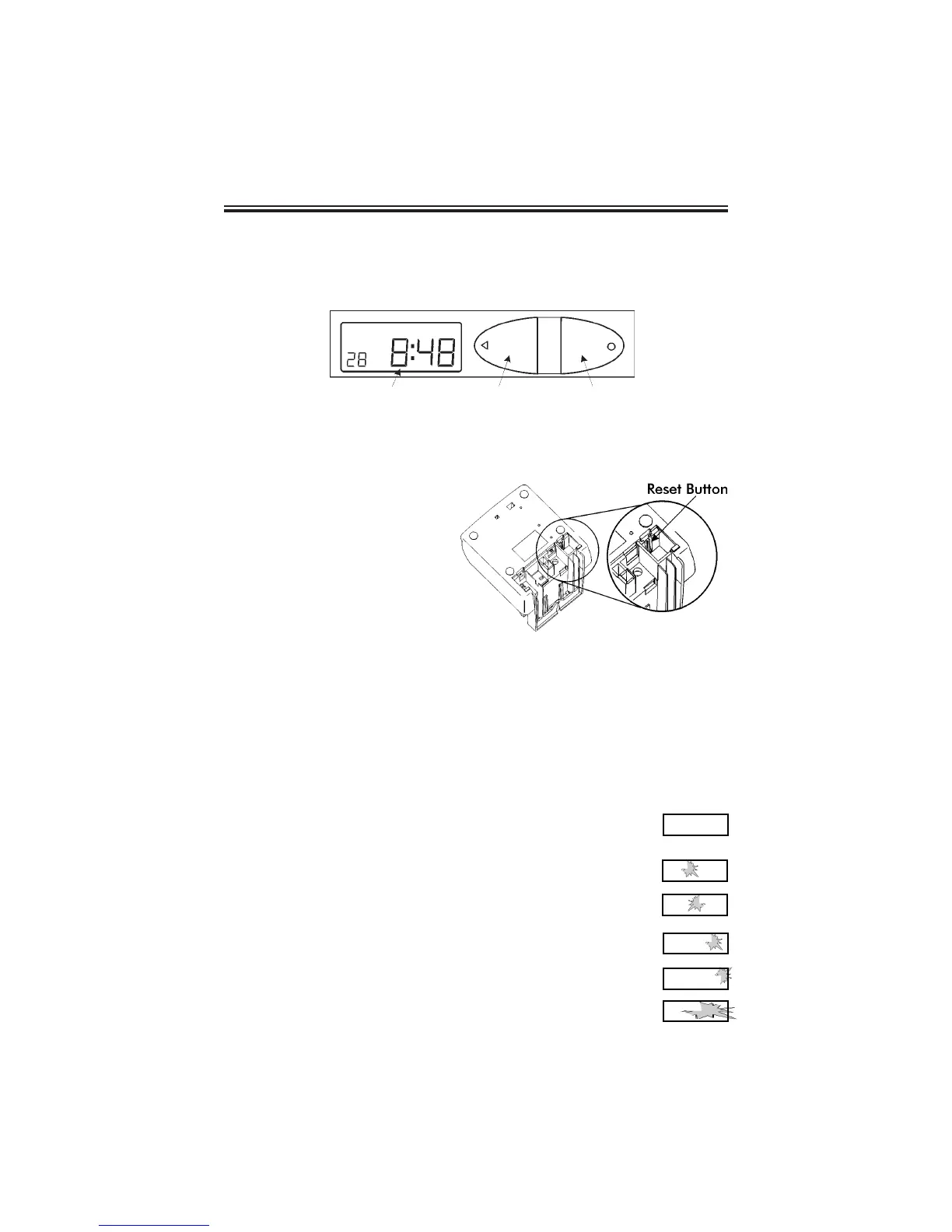
1. Understanding the Front Panel
2. Plug In the Power Cord
3. The Reset Button
Note: To exit the
programming mode and
return to the time display,
press the RESET button at
any time.
The RESET Button is located
in the lower right corner on
the bottom of the clock.
4. Entering the Normal Program Mode
The following steps describe how to get into the Normal Program mode.
Note: The password is printed inside the top of the cover case: “
8088
”.
1. Press and hold down the RESET button.
2. While holding down the RESET button, press and hold down the
ENTER button.
3. While holding down the ENTER button, release the RESET button.
4. When
Pro9
flashes in the display, release the
ENTER button.
5. Press the ENTER button again.
6. Press the CHANGE button until the
8
appears in the first
position, then press the ENTER button.
7. Press the CHANGE button until the
0
appears in the
second position, then press the ENTER button.
8. Press the CHANGE button until the
8
appears in the third
position, then press the ENTER button.
9. Press the CHANGE button until the
8
appears in the fourth
position, then press the ENTER button.
10. When the display flashes
8088
, press the ENTER button.
LCD Display Window
Print/Change Button
Print/Enter Button
P r o 9
8 0
0 0
8 0
0 0
8 0
8 0
8 0
8 8
8 0
8 8



 To Next Page