10
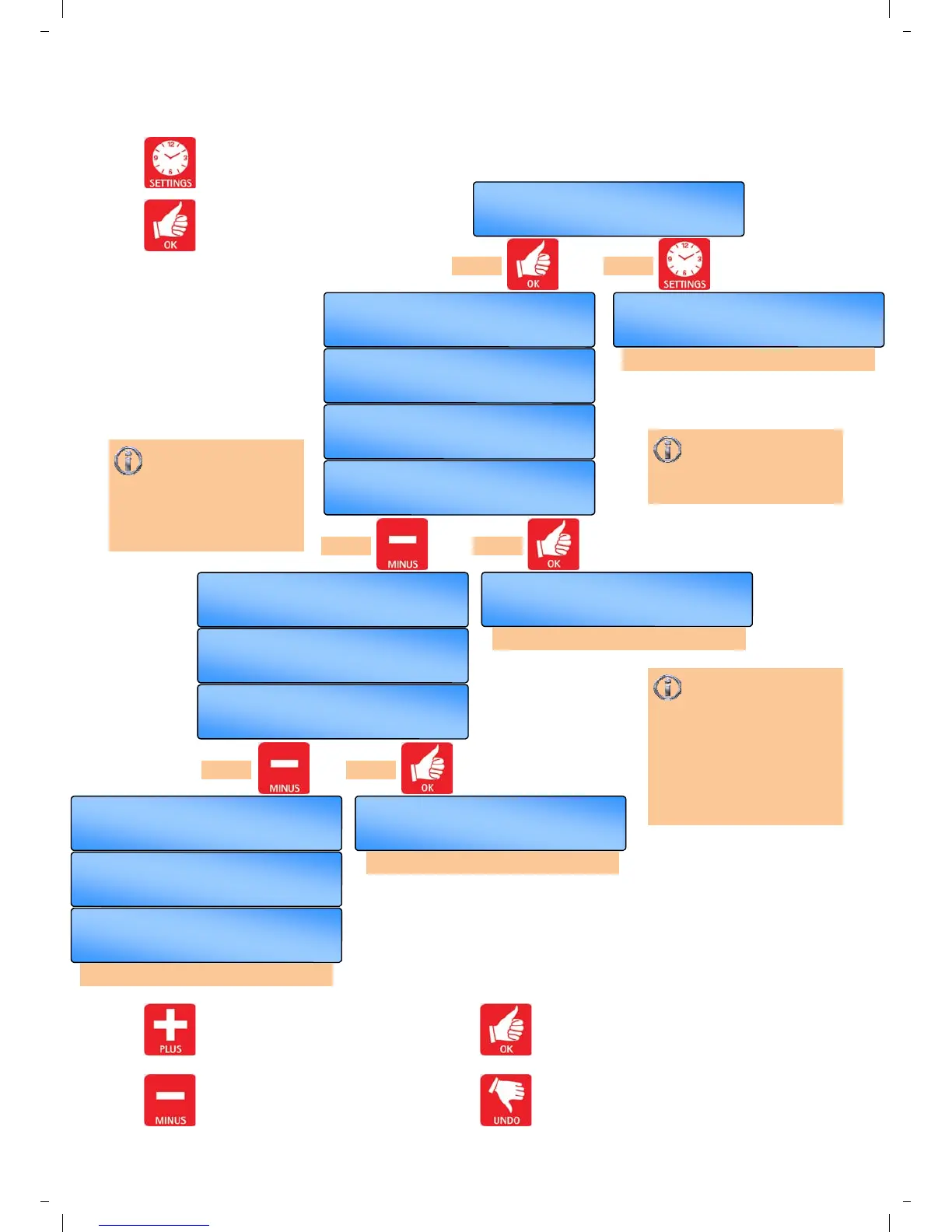
3.5 Setting the Programs
Press the SETTING button till
SET PROGRAM? appears in the
display.
Press the OK button to change this user
mode.
Value to alter/confirm will start flashing.
OK =yes SET =next
SET PROGRAM?
Use the + button to increase the value
in 10 minute steps.
Use the - button to decrease the value.
the value in 10 minute steps.
Press the OK button to accept the value
and advance to the next display.
Press the UNDO button to cancel setting
but save any previous changes.
+ or - then OK
Mo ON 2 17 : 30
+ or - then OK
Mo OFF 2 20 : 00
+ or - then OK
Mo ON 3 - - : - -
+ or - then OK
Mo ON 3 20 : 30
+ or - then OK
Mo OFF 3 22 : 00
OK =yes SET =next
Copy to Tu
OK =yes SET =next
Copy to Tu
follow copy function menu
follow copy function menu
+ or - then OK
SET Day Mo
+ or - then OK
Mo ON 1 08 : 00
+ or - then OK
Mo OFF 1 16 : 30
OK =yes SET =next
SET MODE?
+ or - then OK
Mo ON 2 - - : - -
OK =yes SET =next
Copy to Tu
follow copy function menu
follow ‘Setting the MODE’ menu
If the - button is
pressed at an unused
time slot “--:--”, the screen
advances to a further ON
time. The new ON time will
start flashing.
3 timeslots per day
(each timeslot includes
an on and off time) are
allowed.
Pressing the OK
button at an unused
time slot “--:--”, will display
the automatic copy function.
(see next page).
Press OK to copy day
settings.
Press SET to alter times for
that day.
press or
press or
press or


 To Next Page