12
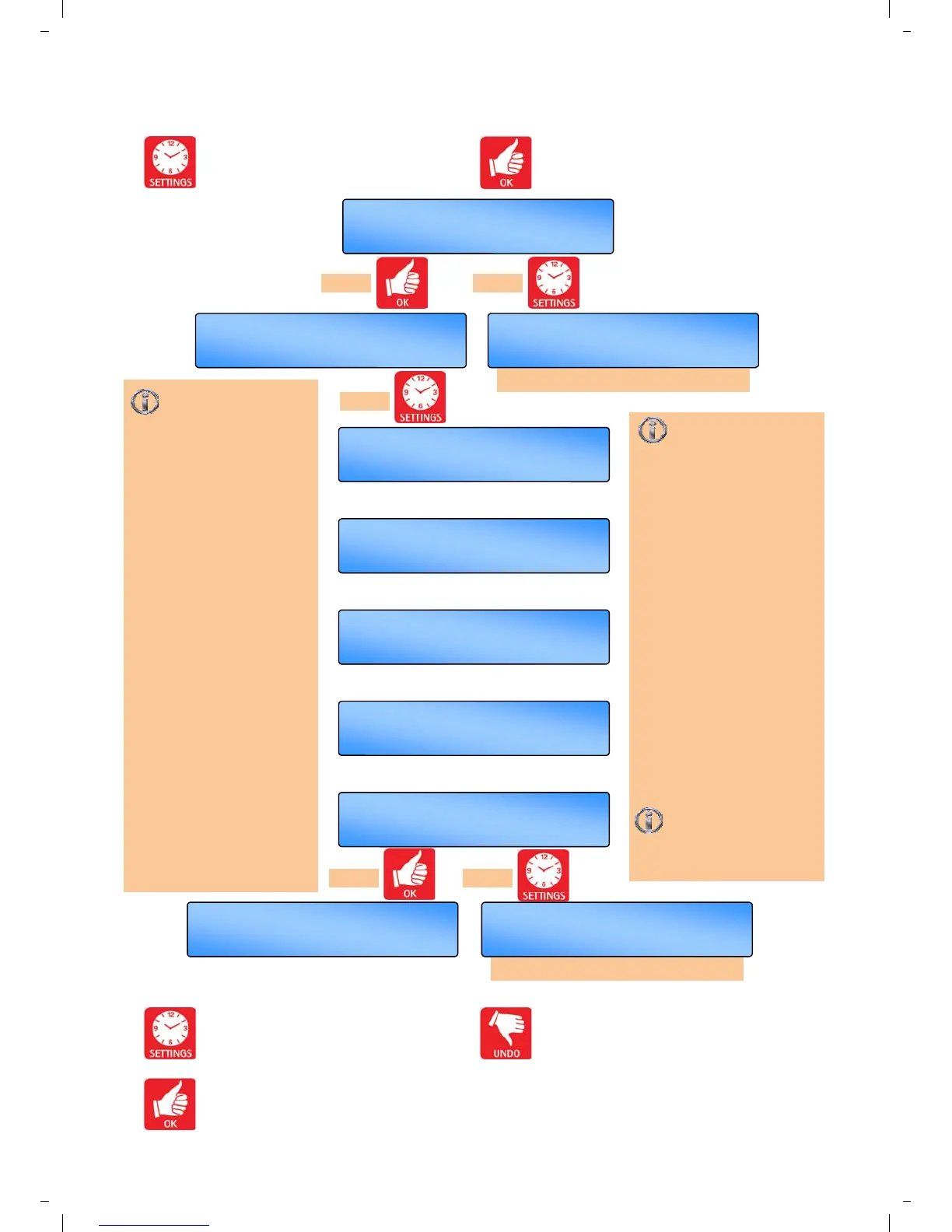
3.6 Setting the Mode
Press the SETTING button till
SET MODE? appears in the display.
Press the OK button to change this user
mode.
Use the SET button to advance to the
next display.
Press the OK button to accept the value
and advance to the next display.
Press the UNDO button to cancel setting
but save any previous changes.
OK =yes SET =next
SET EXAM MODE?
OK =yes SET =next
SET FROST ONLY?
OK =yes SET =next
SET HEAT ONLY?
OK =yes SET =next
SET FAN ONLY?
OK =yes SET =redo
Menu End
Th 09 : 30
HEAT ON
OK =yes SET =next
SET AUTO MODE?
repeat procedure above
Exam Heating mode:
If the control is used
on a system installed in a
sports hall, a temporary
increase in temperature can
be set to improve comfort for
people sitting in the building.
Heating will be controlled to
“temperature 2”. Exam
Heating mode can only be
set during an ON period and
will last only until the next
OFF period unless cancelled
by the UNDO button.
Heat Only mode: Heating
operates automatically
depending on the room
temperature, time/set
temperature program and
the control method selected.
Ventilation is disabled.
Pressing SET at ‘Menu
End’ will scroll round
back to the first mode
setting.
OK =yes SET =next
SET AUTO MODE?
OK =yes SET =next
SET TEMPS?
follow ‘Setting the MODE’ menu
OK =yes SET =next
SET MODE?
Press SET to advance
to the next mode to
choose. Press OK to accept
new mode.
Auto mode: Heating and
ventilation operate
automatically depending on
the room temperature, time/
set temperature program
and the control method
selected. Ventilation is
disabled during off periods
of the time program.
Frost Only mode: Heating
operates automatically
depending on the room
temperature and control
method selected. The set
temperature is fixed at 41°F.
Ventilation is disabled.
Fan Only mode: Ventilation
operates automatically
depending on the room
temperature, time/set
temperature program and
the control method selected.
Heating is disabled.
Ventilation is disabled during
off periods of the time
program.
press or
press or
press


 To Next Page