19
3.15 Network Controllers
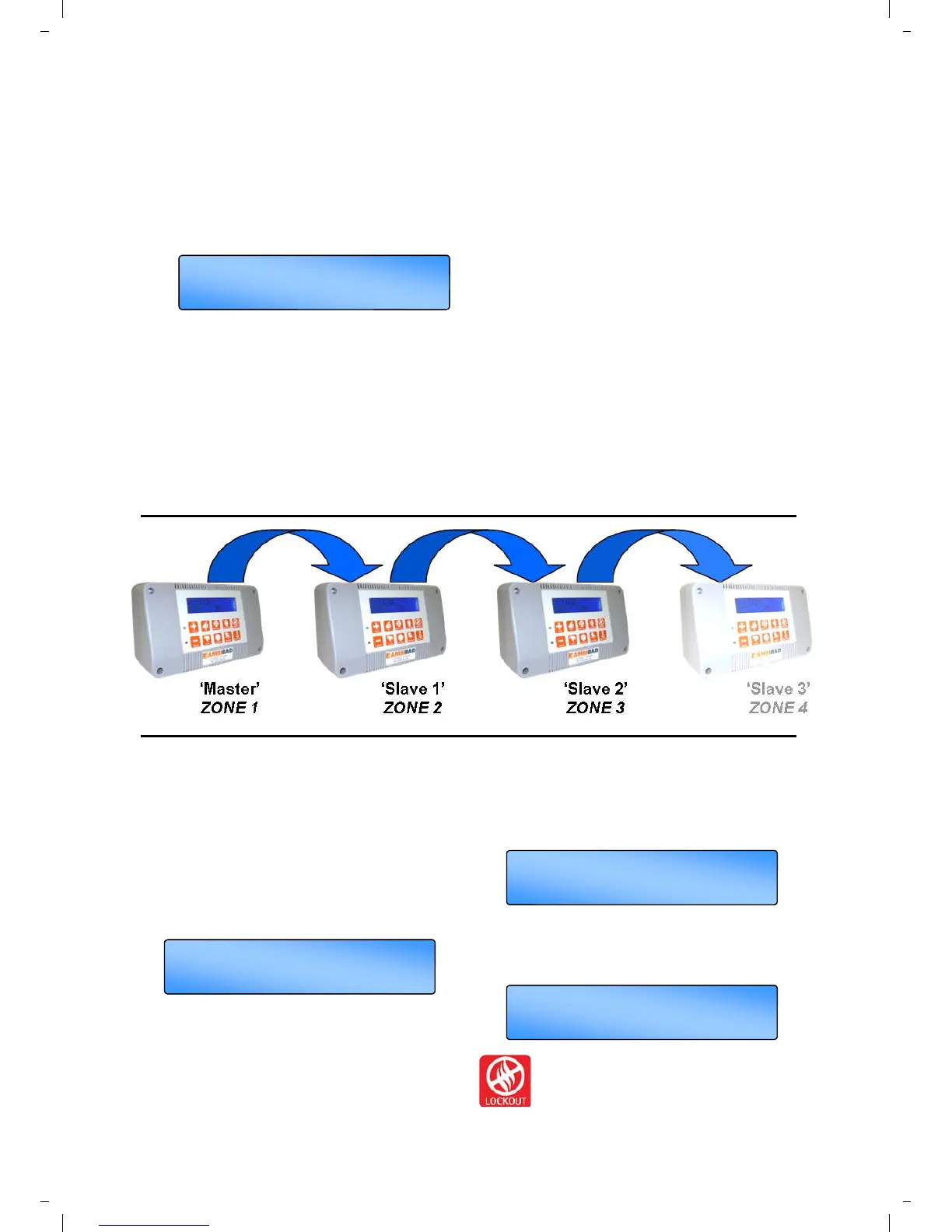
With the SmartCom³ MultiZone version up to 16
controllers can be linked together to form a
multi-zone heating system. This allows one
SmartCom³ (the Master) to communicate with
the other controllers (the slaves). The display
will state the appropriate zone number.
The Master control has the following
capabilities:
• Updating the clock on the Master controller
will globally update the slave controllers.
• The set program and set temperature
functions on the slave controllers can be
accessed from the Master controller.
• The room and set temperatures of the slave
controllers can be viewed from the Master
controller.
• VENT ONLY, HOLIDAY, or OVERTIME
buttons on the Master controller are applied to
the entire network.
• External inputs to the Master will apply to the
entire network.
• Lockouts' on slave controllers will be
displayed on the Master controller and can
then be cleared on each individual controller
or from the Master controller.
The following functions cannot be programmed
over the network and must be carried out locally
on each slave controller:
• Modes, i.e. HEAT ONLY, AUTO, etc.
• Engineer functions.
Refer to the Engineers Settings of this
manual to activate this option.
3.15.1 Operating the Master
When operating the Master controller on a
multi-zone system to modify a program or the
set program/check temperature, the display will
show ‘SET Zone’ along with the flashing zone
number.
Press the + or – button to display the
appropriate zone you want to use.
Press OK to accept. The program and
temperatures can now be set for that zone.
If a fault occurs in the network or the set up is
incorrect, an error message will appear and
flash in the Master controller showing the
(first) appropriate zone fault.
Once the comms error has been rectified, the
display will change to show either a further
comms error or back the main screen.
If a lockout occurs within a zone, the Master will
display ‘Lockout’ and the appropriate zone that
has the fault.
To reset the lockout, press the
LOCKOUT button either on the Master or
the Slave controller to that particular
zone.
+ or - then OK
SET Zone 1
ARN I NG Zone 2
M
!
LOCKOUT
Th 09 : 30 Zone 2
AUTO ON
Th 09 : 30 Zone 1
COMMS ERR Zone 6


 To Next Page