- 43 -
C141501700.fm
User's manual
GB
4-Disconnect the plug of the
power supply unit (A).
5-Cover the recharging station
(C) to prevent any material en-
tering it (leaves, paper etc.)
and to protect the contact
plates.
Service restart
Before restarting the robot after a
long inactivity, proceed as shown.
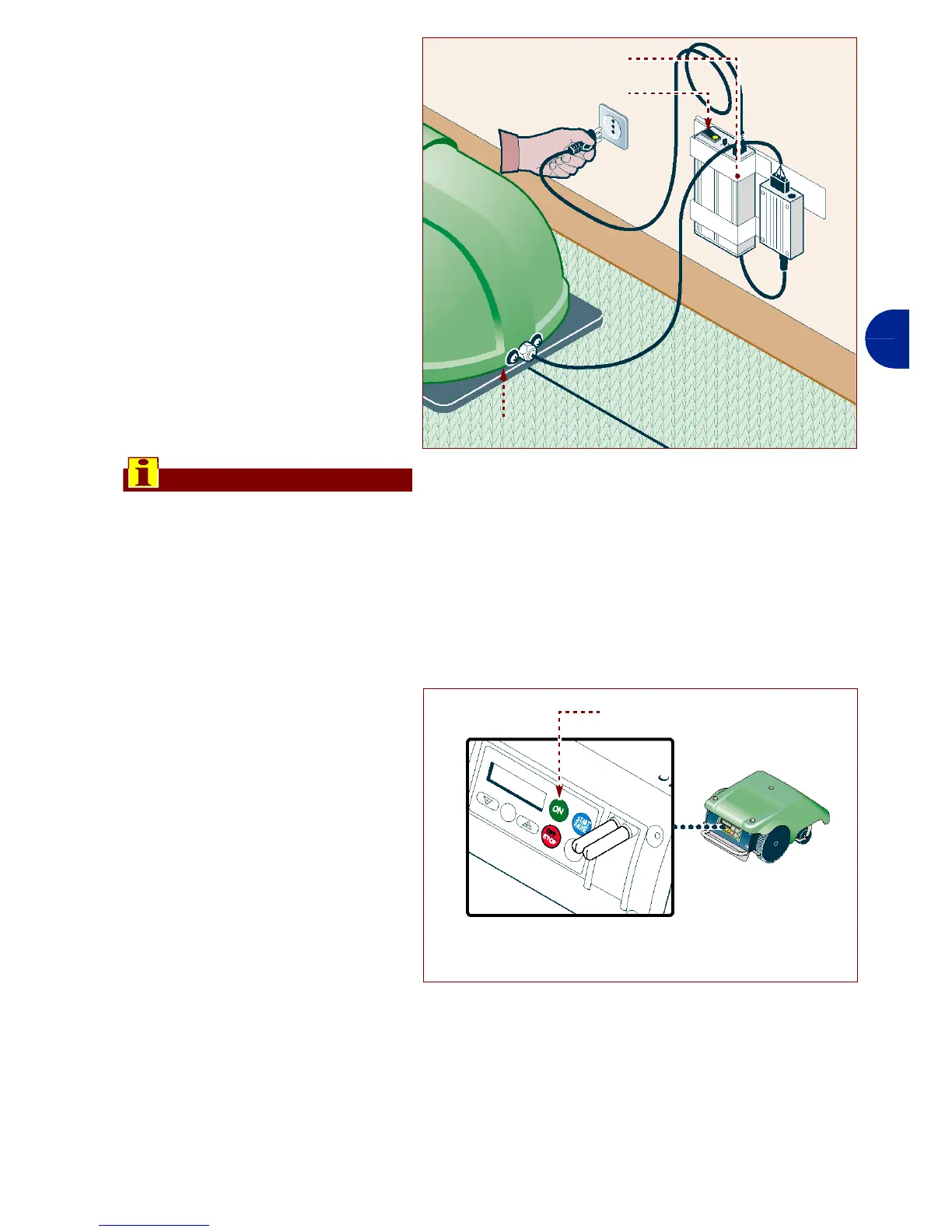
1-Connect the plug of the power
supply unit (A) to the power
socket.
2-Restart the main electric sup-
ply.
3-Press the button (B) of the
power supply unit on ON.
Important
If the antitheft alarm is enabled,
disenable it before lifting the robot
(see "Programming mode").
4-Position the robot inside the recharg-
ing station.
5-Press key ON (A).
6-Insert the password (if re-
quested) (see "Enter pass-
word").
7-After a few seconds the mes-
sage "LOADING" appears on
the display.
8-At this point, the robot is ready
to use (see "Programming
mode").
IDM - 41501710500.tif
Reload station
(C)
power supply unit (A)
pushbutton (B)
IDM - 41501710200.tif
Key “ON” (A)


 To Next Page