- 44 -
C141501700.fm
User's manual
GB
Carry out battery recharge at
least once a month for lead bat-
teries and every 5 months for lith-
ium batteries.
1-Power the recharging base
and make sure that the plates
are clean.
Important
If the antitheft alarm is enabled,
disenable it before lifting the ro-
bot (see "Programming mode").
2-Position the robot inside the
recharging station.
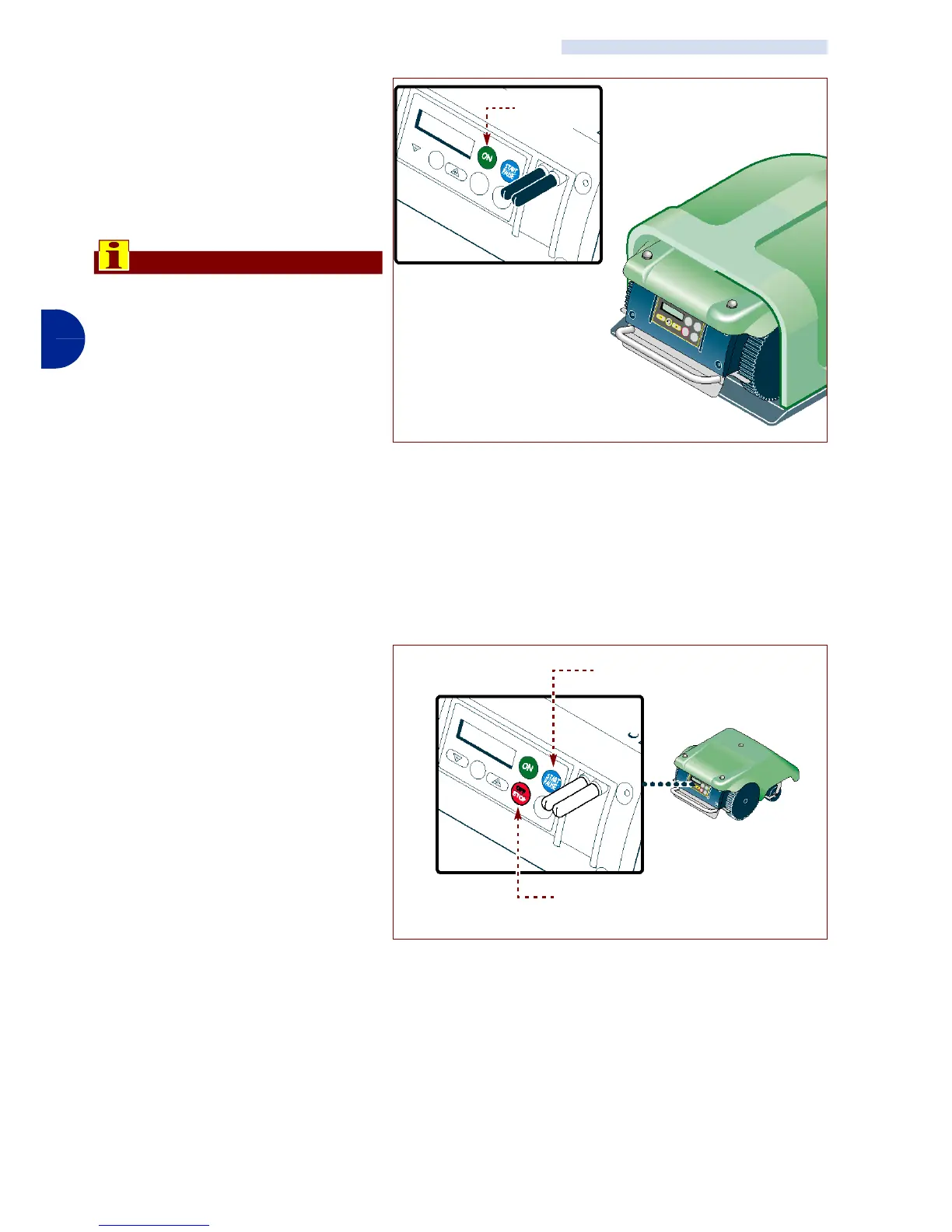
3-Press key "ON" (A).
4-Insert the password (if re-
quested) (see "Enter pass-
word").
5-After a few seconds the mes-
sage "LOADING" appears on
the display.
6-Press key "Start/Pausa" (B).
The batteries start the re-
charging cycle.
7-On completion of recharging
(approx. 6 hours) press key
"Off/Stop" (C).
8-Place the robot in a safe and
dry place, at a suitable room
temperature 10-30 °C and
not easily reachable by unfa-
miliar people (children, ani-
mals, etc.).
RECHARGE BATTERIES FOR EXTENDED INACTIVITY
IDM - 41501703000.tif
Key
“ON” (A)
IDM - 41501710200.tif
Key “Off/Stop” (C)
Key “Start/Pause” (B)


 To Next Page