
EasyManua.ls Logo

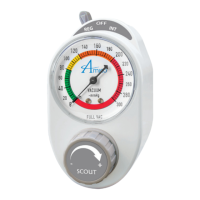
Amico Scout Series - User Manual

Amico Scout Series
24 pages
Print Icon
To Next Page IconTo Next Page
Loading...
www.amico.com
Operating and Maintenance Manual
Scout and Sentinel
Vacuum Regulators

Questions and Answers

  • R
    Robert JonesSep 23, 2025
    Why are both BATT and CHECK LEDs on and remain solid on my Amico Scout (Sentinel only)?
    • H
      hcastilloSep 23, 2025
      If both BATT and CHECK LEDs are on and remain solid on your Amico Controller (Sentinel only), it indicates a wrong calibration method. Recalibrate using the 'Calibration/ Reset Guide - Sentinel'.
  • C
    Christina CookAug 23, 2025
    Why is the red CHECK LED flashing on my Amico Sentinel Controller?
    • C
      corey39Aug 25, 2025
      If the red CHECK LED is flashing on your Amico Sentinel Controller, it could be due to contamination or debris on the sensor window. You can try replacing the disposable body kit, including the sensor window, and then reset and calibrate the system. Alternatively, clean or replace the sensor window itself before resetting and calibrating the system.
  • S
    Steven CruzAug 25, 2025
    How to fix amber BATT LED flashing on Amico Sentinel Controller?
    • A
      Andrew AlexanderAug 25, 2025
      If the amber BATT LED is flashing on your Amico Sentinel Controller, it could be due to incorrect battery orientation or a low battery. Ensure the batteries are correctly installed according to the battery orientation symbols. If they are correctly oriented, replace the batteries.
  • T
    Tyler TrevinoAug 27, 2025
    Why FULL mode is not showing full vacuum on Amico Scout Controller?
    • B
      burchandreaAug 27, 2025
      If the Amico Controller's FULL mode isn't showing full vacuum, check if the bottom port is open or if the vacuum supply is low. Try occluding the bottom port. If the full vacuum remains low, verify the hospital's vacuum level.
  • F
    Frank MelendezAug 27, 2025
    What to do if Amico Scout unit is leaking?
    • R
      Robin RamseyAug 27, 2025
      If the Amico Controller unit is leaking, the duckbill valve or the green plug may be loose or have come off. Try reinstalling the duckbill valve or reinstalling the green plug.
  • M
    Matthew DonovanSep 17, 2025
    What to do if I cannot calibrate the Sensor Module on my Amico Controller (Sentinel only)?
    • R
      Richard McguireSep 18, 2025
      If you cannot calibrate the Sensor Module on your Amico Controller (Sentinel only), it's likely due to low batteries. Replace the batteries.
  • L
    lisadavisSep 14, 2025
    What to do if no LEDs turn on when I press the TEST button on my Amico Controller (Sentinel only)?
    • C
      Corey GonzalezSep 14, 2025
      If no LEDs turn on when you press the TEST button on your Amico Controller (Sentinel only), the batteries are likely low. Replace the batteries.
  • D
    Duane ArroyoSep 15, 2025
    Why FULL/REG mode is not showing vacuum on my Amico Scout Controller?
    • D
      Danielle SmithSep 16, 2025
      If the FULL/REG mode is not showing vacuum on your Amico Controller, it may be because the bottom port is open or the vacuum supply is low. Occlude the bottom port. If the FULL vacuum is still low, check the hospital's vacuum level.
  • B
    Bryan DominguezSep 6, 2025
    What to do if Selector Switch will not change position on Amico Controller?
    • C
      Carolyn HartmanSep 6, 2025
      If the Selector Switch on your Amico Controller will not change position, there may be debris blocking it. Remove any debris that you find.
  • K
    Kathryn SmithSep 3, 2025
    Why no LEDs turn on when TEST button is pressed on Amico Scout Controller?
    • A
      Alex RomeroSep 3, 2025
      If no LEDs turn on when you press the TEST button on your Amico Controller, the batteries are likely dead. Replace the batteries.

Summary

Models

Scout Series Model Numbers

Defines the structure and options for Scout model numbers, including color coding.

Sentinel Series Model Numbers

Defines the structure and options for Sentinel model numbers, including color coding.

User Responsibility

Safety Information and Warnings

Explains hazard symbols (Warning, Caution) and their meanings for safe operation.

Receiving Inspection and Specifications

Intended Use and Warnings

Details the proper application and cautions against misuse of the vacuum regulator.

Vacuum Regulator Specifications

Lists technical details like gauge accuracy, ports, modes, and environmental limits.

Operating Instructions

Regulated (REG) Mode Operation

Step-by-step guide for setting and using continuous vacuum levels.

Intermittent (INT) Mode Operation

Instructions for operating the regulator in intermittent cycling mode.

Full (FULL) Mode Operation

How to achieve and use maximum vacuum settings.

Procedures Prior to Use

Regulator Testing

Essential tests to perform before patient use to ensure functionality and safety.

Regulator Setting

Process for setting vacuum levels and verifying consistency.

Specific Procedures and Timing Adjustment

Pediatric;Neonatal Regulator Checks

Specific pre-use checks for pediatric and neonatal models, including safety valve function.

Sentinel Regulator Battery Test

Procedure to test Sentinel unit's battery power and contamination status.

Setting Intermittent Timing Cycles

Detailed guide on adjusting the ON/OFF timing for intermittent mode.

Cleaning Instructions - Scout

Scout Option 1: Reverse Flush Cleaning

Method for cleaning Scout regulators using Cidex solution via reverse flush.

Cleaning Instructions - Scout

Scout Option 2: Replace Disposable Body

Procedure for replacing the disposable body of the Scout regulator.

Cleaning Instructions - Scout

Scout Body Replacement Steps

Detailed step-by-step guide for replacing the Scout disposable body.

Cleaning Instructions - Sentinel

Sentinel Option 1: Reverse Flush Cleaning

Method for cleaning Sentinel regulators using Cidex solution via reverse flush.

Cleaning Instructions - Sentinel

Sentinel Option 2: Replace Disposable Body

Procedure for replacing the disposable body of the Sentinel regulator.

Cleaning Instructions - Sentinel

Sentinel Body Replacement Steps

Detailed step-by-step guide for replacing the Sentinel disposable body.

Recommended Maintenance After Use

Routine maintenance tasks to perform after each patient use.

Battery Replacement - Sentinel

Sentinel Battery Replacement Procedure

Steps for safely removing and installing new batteries in the Sentinel unit.

Sensor Calibration Post-Replacement

Instruction to calibrate the sensor after battery replacement.

Test & Calibration;Reset Guide - Sentinel

Sentinel Unit Testing Procedure

Method to test the Sentinel unit's battery and contamination status.

Test & Calibration;Reset Guide - Sentinel

Sentinel Calibration and Reset

Detailed steps for calibrating or resetting the Sentinel unit.

Troubleshooting Guide

Sentinel Indicator Light Issues

Troubleshooting Amber BATT and Red CHECK LED status on Sentinel models.

Vacuum & Mode Operation Problems

Addresses issues like no vacuum, incorrect cycling, or knob stiffness.

Unit Assembly & Selector Switch Issues

Covers casing alignment, selector switch problems, and leaks.

No Test Button Response

Troubleshooting when the TEST button yields no LED indication.

Vacuum Regulator Assembly Drawing - Scout

Scout Assembly Parts Identification

Diagram and list of parts for the Scout vacuum regulator assembly.

Vacuum Regulator Assembly Drawing - Sentinel

Sentinel Assembly Parts Identification

Diagram and list of parts for the Sentinel vacuum regulator assembly.

Warranty Policy - Vacuum Regulators

Warranty Coverage and Limitations

Details the warranty period, exclusions, and limitations of liability.

Warranty Claim Process

Outlines the steps and requirements for submitting a warranty claim.

Amico Scout Series Specifications

General IconGeneral
BrandAmico
ModelScout Series
CategoryController
LanguageEnglish