2 - 21
USER’S GUIDE Triton Wireless Hand-held Terminal
Complete Triton Option Parameters - cont’d.
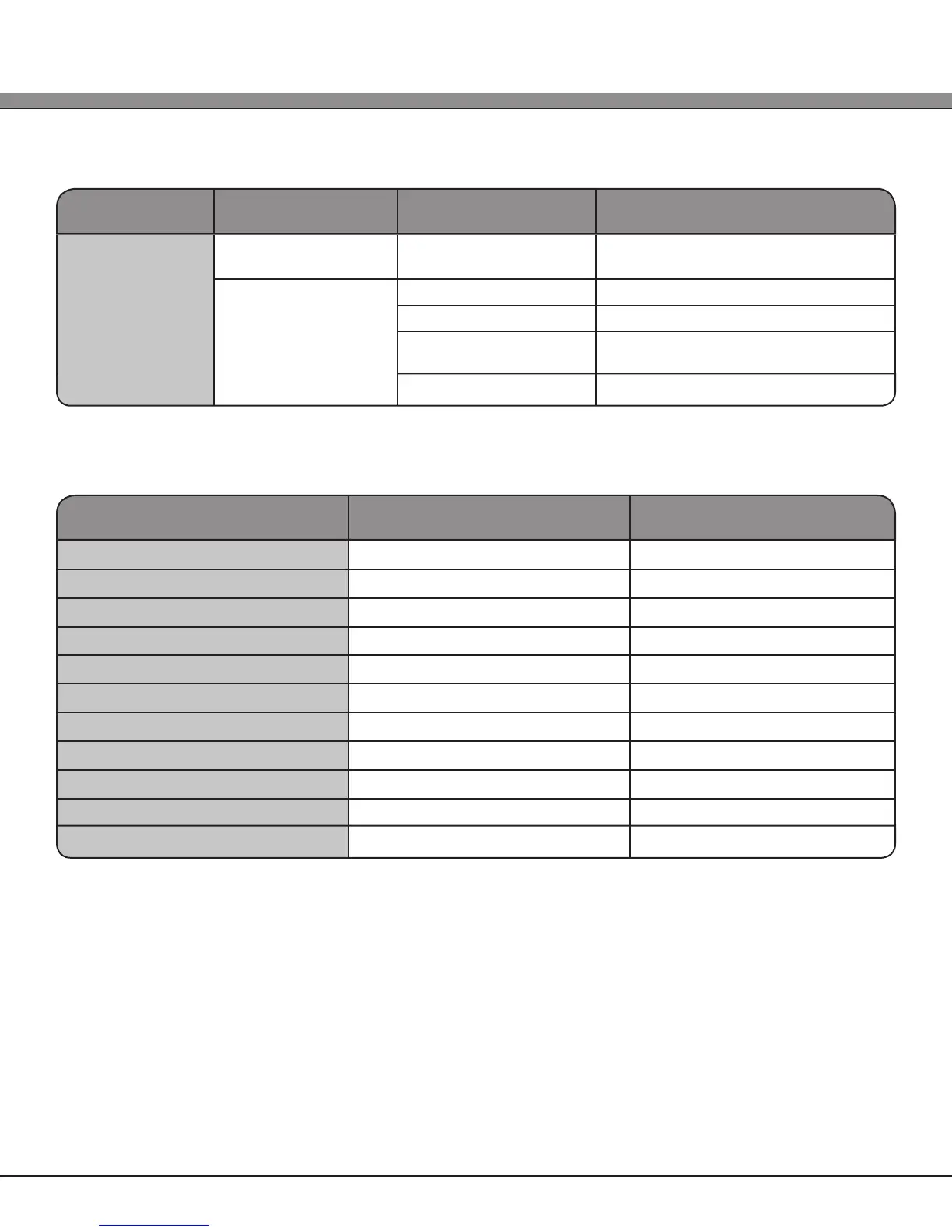
Section Setting Parameter Available Options Option Description
Scanner Setup
Multi-Decode
(2-D Imager Only)
Enabled/Disabled Enable/Disable multiple symbol
decoding in single exposure
Orientation
(2-D Imager Only)
1.) Upright Normal
2.) 90 CW 90 Degrees Clockwise
3.) Upside Down Inverted (the natural position when
holding the Triton normally)
4.) 90 CCW 90 Degrees Counter Clockwise
Bar Code Type ID’s
Symbology AML Type ID AML Type ID
EAN/UPC
B, C, D ]E
Code 39
A ]A
Codabar
G ]F
Code 128
H ]C
Code 93
I ]G
Interleaved 2 of 5
F ]I
Discrete 2 of 5
P ]S
Code 11
K ]H
MSI/Plessy
J ]M
GS1 (RSS)
M, N, O ]e
*All AML Type IDs are followed with a space
*All AIM Type IDs are following with an AIM Modier digit



 To Next Page