EasyManua.ls Logo

AmScope 340 Series - User Manual

AmScope 340 Series
16 pages
Print Icon
To Next Page IconTo Next Page
Loading...
340
Series
1
User’s Manual

Questions and Answers

  • K
    keith11Aug 11, 2025
    Why is my AmScope 340 image unclear?
    • H
      Heather FoleyAug 11, 2025
      An unclear image on your AmScope Microscope can stem from several factors. It could be due to the absence of a cover slip or using a non-standard sized one; ensure you're using a 0.17mm cover slip. If you're using the 100x objective, make sure to use immersion oil (standard Type A or Type B cedarwood oil) and check for and pop any air bubbles. Ensure that immersion oil hasn't accumulated on a dry objective and clean it with lens cleaner if it has. Adjust the aperture so the light is just larger than the condenser, and adjust the condenser height using the knob on the microscope's left side. Finally, check the lens in the head's inlet for stains or dust and clean with lens cleaner and compressed air.
  • A
    ashleyrobinsonAug 16, 2025
    How to brighten the field of view on my AmScope 340 Microscope?
    • D
      Donna GambleAug 16, 2025
      If the field of view on your AmScope Microscope isn't bright enough, it could be due to a too-small iris diaphragm. Adjust it so the light is just larger than the condenser. Also, check for any stains, dust, or dirt on the condenser, objective, eyepieces, or base lens and clean them thoroughly with lens cleaner and a lint-free, non-abrasive cloth.
  • I
    Isaac ColeAug 23, 2025
    What to do if one side of the field of view is dark or the image moves while focusing on my AmScope 340 Microscope?
    • M
      malonedavidAug 23, 2025
      If you're experiencing a dark side in the field of view or image movement while focusing your AmScope Microscope, the specimen slide may not be fixed properly; secure it to the stage with clips. Also, the condenser might not be in the correct position; adjust its height using the knob on the left side of the microscope. Finally, ensure the nosepiece is correctly positioned by turning it until it clicks into place.
  • L
    Linda JohnsonAug 28, 2025
    Why is one side of the field of view darker on my AmScope 340?
    • J
      John BellAug 28, 2025
      A darker side in the field of view on your AmScope Microscope can be due to a misaligned nosepiece; turn it until it clicks into place. Alternatively, stains or dust may have accumulated on the condenser, objective, eyepieces, or base lens; clean all lenses with lens cleaner or a lint-free, non-abrasive cloth.
  • E
    Edward BrownSep 3, 2025
    What to do if I see obstructions in the field of view of my AmScope Microscope?
    • R
      Robert HuntSep 3, 2025
      If you're seeing obstructions in the field of view of your AmScope Microscope, it could be due to stains, dust, or dirt on the specimen. Clean the slide, or use a new specimen if the sample is destroyed. Alternatively, the lens itself may be dirty, in which case you should clean the lens.

Summary

Before Use

Introduction

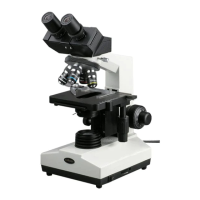
Congratulations on the purchase of your new AmScope microscope! This manual is designed for the 340 series microscopes (B340 & T340).

Safety Precautions

Provides guidelines on handling the microscope carefully, avoiding direct sunlight, and ensuring correct voltage for operation.

Parts

Definition of Parts

Explains the function of various microscope components like the base lens, focusing knobs, condenser, and nosepiece.

Getting Started

Assembly

Step-by-step instructions for unpacking, identifying parts, and assembling the microscope body, head, and eyepieces.

Operation

Setting Up

Guides on adjusting the microscope head, interpupillary distance, specimen placement, and illumination settings.

Focusing

Instructions on selecting objectives, using immersion oil, and employing coarse and fine focusing knobs for clear images.

Adjusting the Condenser & Diaphragm

Details on controlling light concentration and background brightness using condenser adjustment and iris diaphragm.

Using the Trinocular Port

Information on connecting cameras to the trinocular port for simultaneous viewing with eyepieces.

Setting the Stages Stop-Limit

Procedure for setting the upward movement limit of the mechanical stage to prevent damage to slides or objectives.

Changing the Bulb (halogen models only)

Instructions for safely replacing the bulb in halogen model microscopes, including cooling and precautions.

Maintenance;Precautions

Guidelines for cleaning optical surfaces, handling electrical components, and storing the microscope to prevent damage.

Specifications

340 Series Specifications

Detailed specifications for various models including eyepieces, objectives, stage, condenser, and illumination types.

Technical Parameters

Technical Terms & Concepts

Definitions of key terms such as Total Magnification, Field of View, Numerical Aperture (N.A.), and Mechanical Tube Length.

Troubleshooting

Common Issues

Lists common optical and mechanical issues, their causes, and remedies like cleaning lenses or adjusting components.

Common Issues (Continued)

Addresses further optical, mechanical, and electrical issues, including image color, focusing problems, and bulb/fuse failures.

AmScope 340 Series Specifications

General IconGeneral
FocusCoaxial Coarse and Fine Focus Knobs
Objective Lenses4X, 10X, 40X, 100X
EyepieceWF10X and WF25X
IlluminationLED
CondenserAbbe condenser with iris diaphragm
Power Supply100V-240V

Related product manuals