SafeWizard Operating Instructions American Security Products Company
Last Revision 10/17/2008 Page 65 of 73 Document 4305199
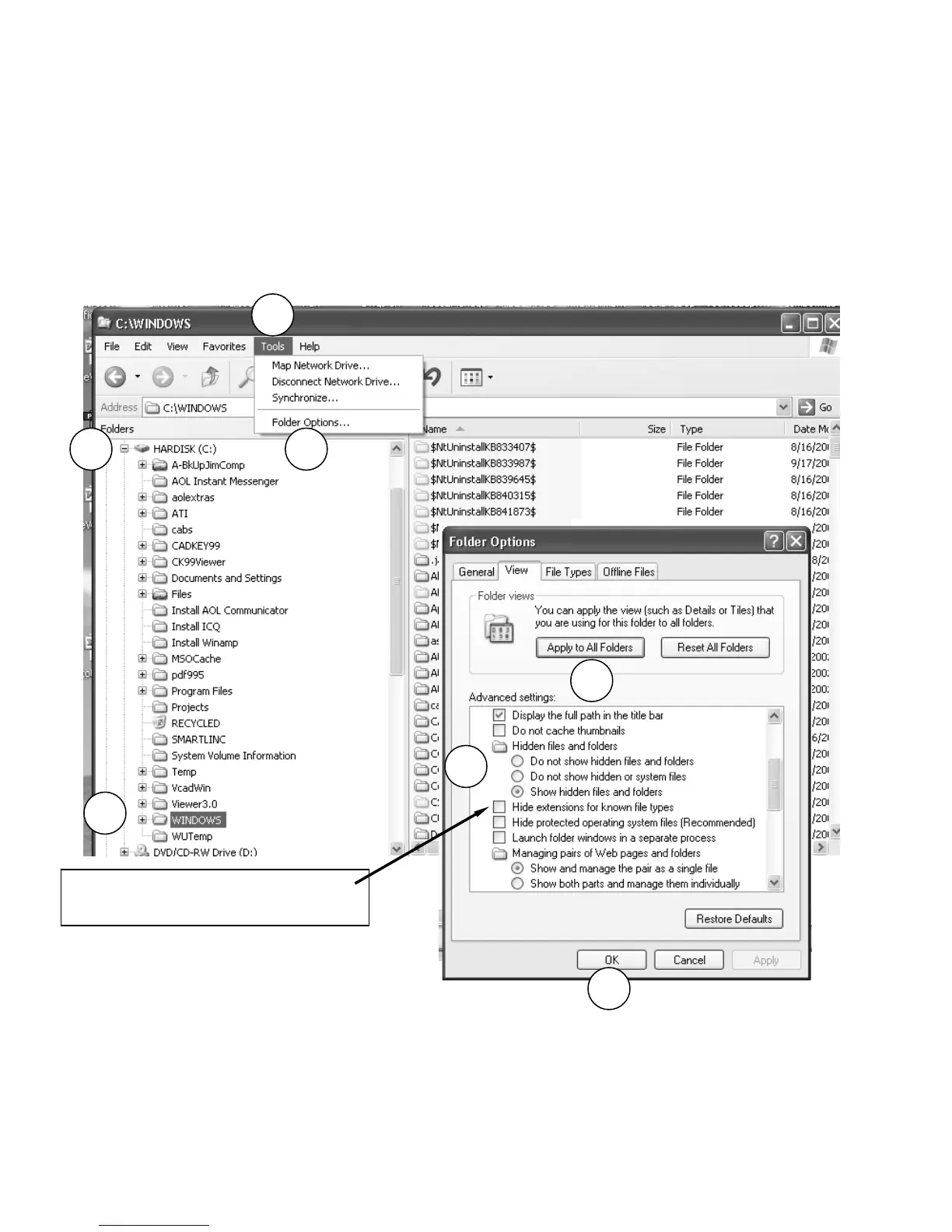
In order to delete the added file extension on the SafeWizard Audit file added by the PDA during the Audit
download, follow the instructions below to be sure that Windows is set to display the full file name.
1. Right click on “My Computer” and select “Explore”.
2. Expand the “C” drive menu tree.
3. Select “Windows”
4. At the top menu bar, select “TOOLS” to drop down the menu.
5. Select “Folder Options”.
6. Select the “View” tab. Under “Hidden files and folders, if there is a check in the box, move the
mouse pointer to the box and ….click to un-check.
7. Next, click on the left box “Apply To All Folders”, then click on “OK”.
8. On the PC, locate the folder titled PC_MY DOC and open.
You should see the file with the second extension at the end,.txt.
Move the mouse pointer to that file, right click, hold and drag to the desk top.
At the drop menu box, select “move”.
Unselect “Hide extensions for known file
types”
2
3
4
5
6
7
7



 To Next Page