4200T CNC Programming and Operations Manual
P/N 70000412F - Edit Help
7-38 All rights reserved. Subject to change without notice.
31-July-05
Programming LINE Moves in Edit Help
NOTE: Refer to Table 7-6, Help Template Menus
. This table gives a list
of all Help Graphic Templates, and the Table location for the
corresponding Input Labels and Entry Fields.
LINE moves can be vectored moves (motion in two axes, X and Z) or
straight-line moves (motion in one axis, X or Z). LINE moves are
programmed by entering values for angles, endpoints, and/or radii that
define a LINE move. These features are found in the Edit Help Menu.
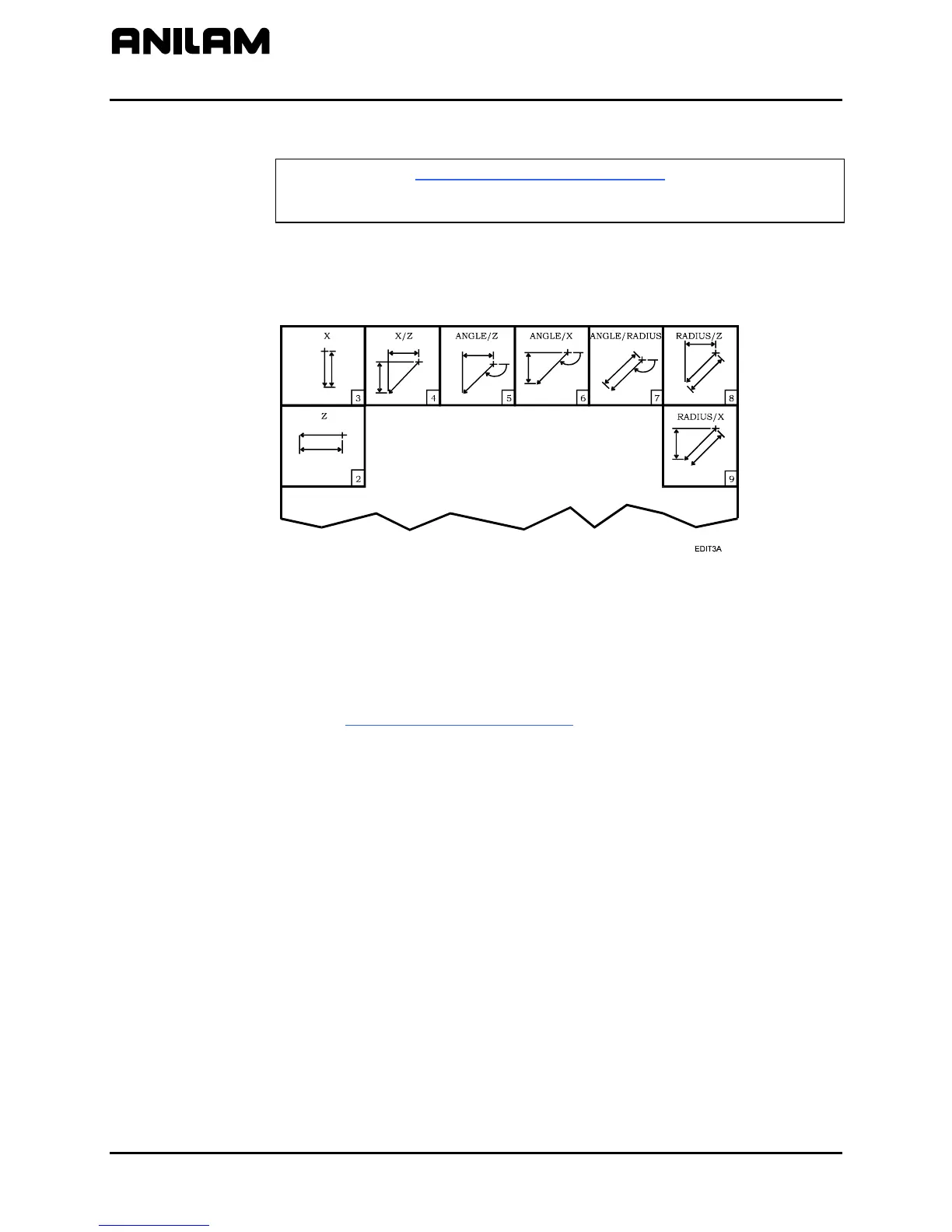
Figure 7-6, LINE Help Template Menu
Refer to Figure 7-6. The drawing shows the LINE Help Template Menu,
which contains the various types of LINE moves that can be programmed
in the Edit Help Menu. Activating a LINE Help Graphic screen allows the
programmer to insert a program block into the Listing for the appropriate
LINE move.
Refer to Table 7-16, LINE Move Types
. The table lists the types of LINE
moves available in the LINE Help Template Menu. It describes the entry
fields (information) that must be supplied by the programmer in order to
program a LINE move.
Menu item numbers reference the LINE Help Template used to program
the line move defined.



 To Next Page