USER GUIDE | 23
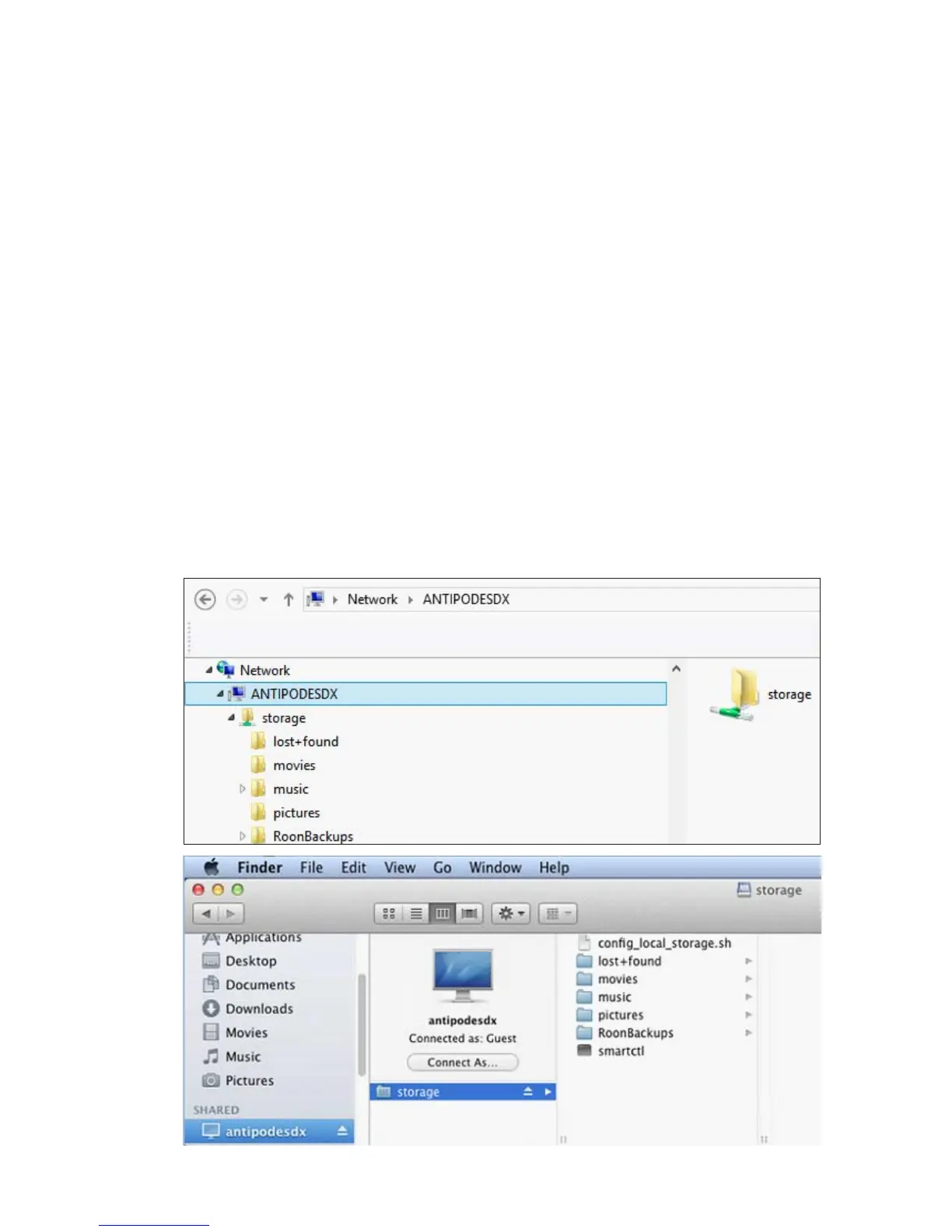
To copy les to or from your Antipodes, or delete les
on your Antipodes, open File Explorer (Windows) or
Finder (Mac).
Antipodes will usually show in the left pane under
‘Network’ (Windows) or ‘Shared’ (Mac). You can now
copy and delete les in the same way as if they were
located on your computer.
If ‘antipodes’ does not show in File Explorer then
there may be a network problem. Enter the address
of your Antipodes in the address bar of File Explorer -
eg. \\antipodes\storage, or
\\192.168.1.214\storage
(use the IP address found by browsing to
myantipodes.com).
Similarly if Antipodes does not show under ‘Shared’
in Mac Finder, click Finder menu item Go, and then
sub-menu item Connect To Server. In the dialogue
box that appears, enter address smb://antipodes/, or
smb://192.168.1.214 (but use your actual IP address,
this is just an example) and click Connect. If you are
asked for a username, click on the Guest option. This
will open Antipodes in Finder.
6.2
Copy Music To The Server



 To Next Page