42 | Antipodes Audio Music Server
This part of the guide refers to a third-party application that is not included with your Antipodes server, but we
include it as a way to get started quickly with this application. For detailed and up to date information, you
should visit:
Website: http://www.signalyst.com/
The HQPlayer Desktop User Guide can be found at: i-cat.biz/pdf/HQPlayer-manual.pdf
There is a very active HQPlayer community forum at:
http://www.computeraudiophile.com/f11-software/hq-player-20293/.
Run HQPlayer on Windows or Mac
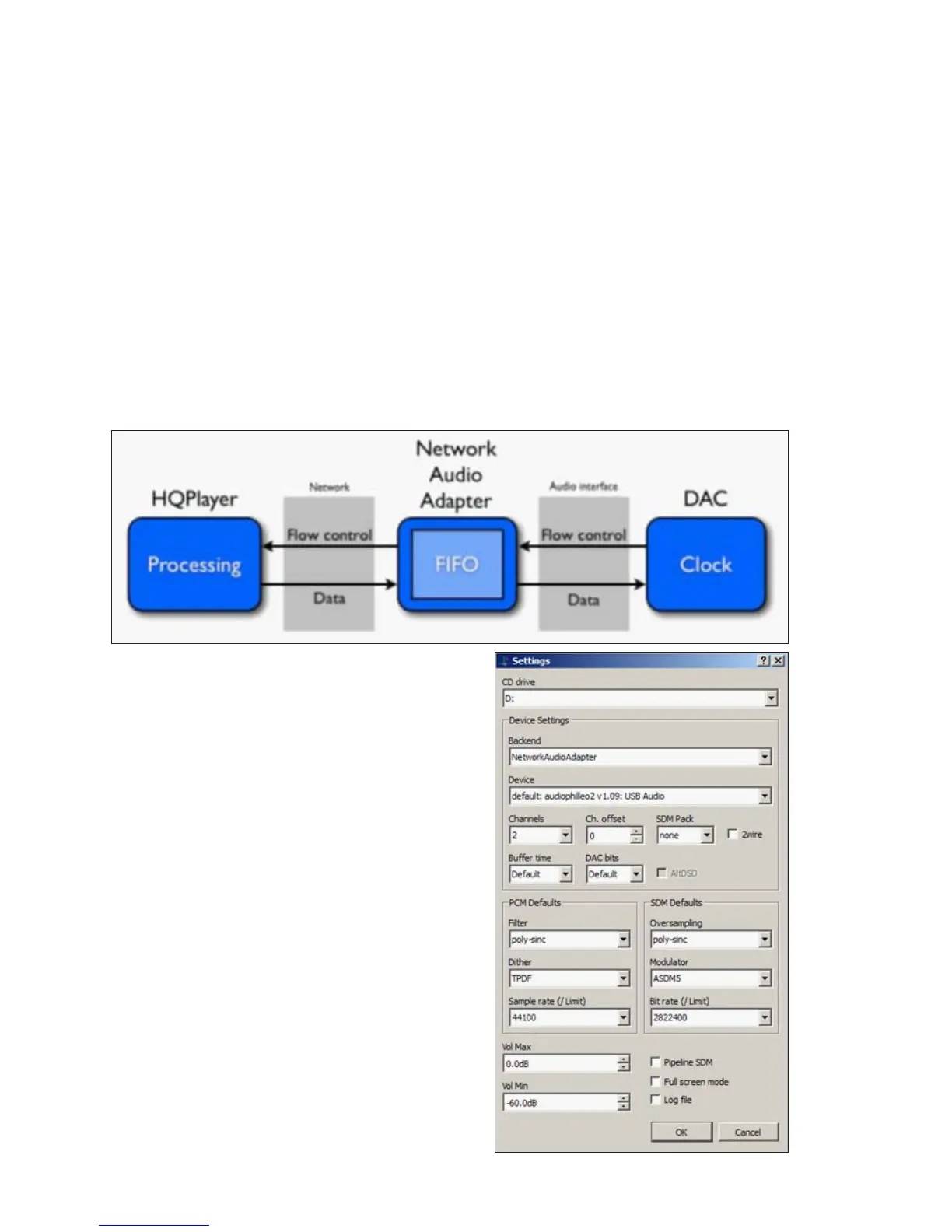
The audio processing is performed at the HQPlayer Desktop application side, and then streamed
asynchronously over the network for reproduction on your Antipodes. In the diagram below the Antipodes is
the Network Audio Adaptor.
How To Set Up HQPlayer on Windows or Mac
Start HQPlayer NAA on your Antipodes server and
then start the HQPlayer Desktop application on your
PC or Mac. Click ‘File/Settings’.
Under ‘Backend’ select ‘NetworkAudioAdapter’.
Under ‘Device’ select the entry that matches the
name of you DAC or USB adapter (‘audiophilleo2’ in
the above example). Then click ‘OK’.



 To Next Page